Explore Bangkok BTS & MRT map
อัปเดตเมื่อ
เวอร์ชันปัจจุบัน
12.3.1
ให้บริการโดย

เมื่อใช้ Explore Bangkok BTS & MRT map บนโทรศัพท์ของคุณไม่ต้องกังวลกับการชาร์จไฟมากเกินไปปลดปล่อยตัวคุณเองจากหน้าจอขนาดเล็กและสนุกกับการใช้แอพนี้บนหน้าจอขนาดใหญ่ จากนี้ไปรับประสบการณ์เต็มหน้าจอของแอปพลิเคชันของคุณด้วยคีย์บอร์ดและเมาส์ MEmu มีคุณสมบัติที่น่าแปลกใจที่คุณคาดหวัง: การติดตั้งที่รวดเร็วและการตั้งค่าที่ง่ายควบคุมได้ง่ายไม่ จำกัด แบตเตอรี่ข้อมูลมือถือและการโทรที่รบกวน MEmu 9 ใหม่ล่าสุดเป็นตัวเลือกที่ดีที่สุดสำหรับการใช้ Meitu – โปรแกรมแก้ไขภาพแนวธรรมชาติ บนคอมพิวเตอร์ของคุณ ด้วยรหัสการดูดซึมของเราผู้จัดการหลายอินสแตนซ์ทำให้สามารถเปิดบัญชี 2 บัญชีขึ้นไปในเวลาเดียวกันได้ และที่สำคัญที่สุดเอ็นจิ้นจำลองพิเศษของเราสามารถปลดปล่อยศักยภาพของPCของคุณและทำให้ทุกอย่างราบรื่นและสนุกสนาน
แสดงเพิ่มเติม
ดาวน์โหลด Explore Bangkok BTS & MRT map บน PC ด้วย MEmu Android Emulator สนุกกับการเล่นบนหน้าจอขนาดใหญ่ Recommended by CNN and Lonely Planet, this is Bangkok's best subway map!
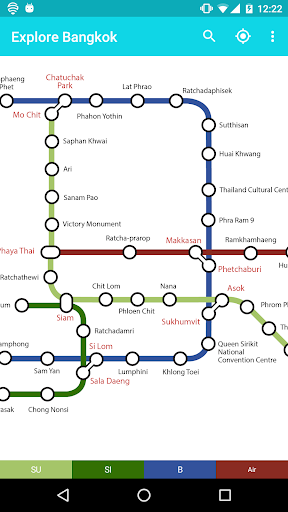


Recommended by CNN and Lonely Planet, this is Bangkok's best subway map! Up-to-date with all the metro lines; Works offline; Routeplanner, GPS, Street maps; English and Thai included.
Download the app completely free! The free app is ad-supported. Download ExploreMetro VIP to remove ads in all of our apps and support future development!
WHY EXPLOREMETRO?
1. Fully up-to-date
Accurate metro map, includes every station on every line. Free updates for future station openings and timetable changes.
2. Designed for Android
Supports all devices running Android 5.0 or higher. Designed to use the latest Android technologies.
3. Street maps for every station
Need to get your bearings at a station? Integrated Street maps show you metro exits and nearby streets for every station.
4. Route-planner
A really easy route-planner. Get route and time information for any journey with just three taps.
5. "Find my nearest station"
Using your GPS, see a list of the closest metro stations to your current location.
6. Works offline
Everything works without an Internet connection. Search stations and plan routes on the go.
UPGRADE TO VIP
I've been developing this app for 15 years. Upgrading to VIP helps support future development of the app. VIP users get NO ADS in all of our Android apps.
REVIEWS
CNN Travel: "These maps are very easy on the eye and simple to navigate. They work offline and also include free updates of stations that have yet to be completed, operating hours and schedules."
Lonely Planet: "Easy to use, up to date and work offline. Very handy, especially when they've run out of paper maps at the stations."
SUGGESTIONS
We'd love to hear your comments and suggestions on ways to improve the app. Please contact us via support@exploremetro.com, as we can't respond to comments left in the reviews.
แสดงเพิ่มเติม

1. ดาวน์โหลดตัวติดตั้ง MEmu และสิ้นสุดการติดตั้ง

2. เริ่ม MEmu จากนั้นเปิด Google Play บนหน้าแรก

3. ค้นหา Explore Bangkok BTS & MRT map ใน Google Play
Install
4. ดาวน์โหลดและติดตั้ง Explore Bangkok BTS & MRT map
5. เมื่อติดตั้งเสร็จให้คลิกที่ไอคอนเพื่อเริ่มใช้งาน

6. ใช้ MEmu เพื่อสัมผัสประสบการณ์ Explore Bangkok BTS & MRT map บนคอมพิวเตอร์ของคุณ
MEmu Play คือโปรแกรมจำลอง Android ที่ดีที่สุด มีผู้ใช้มากกว่า 50 ล้านคน มอบประสบการณ์การใช้งานแอป Android ขั้นสุดยอดให้กับคุณ เทคโนโลยีจำลองเสมือนของ MEmu ช่วยให้คุณรันแอป Android หลายพันแอปบนคอมพิวเตอร์ได้อย่างราบรื่น แม้แอปที่กินทรัพยากรเครื่องสูงที่สุด
จอใหญ่และกราฟฟิกสวยกว่า; เล่นได้นาน, ไม่ต้องใช้แบตเตอรี่โทรศัพท์หรือเน็ตโทรศัพท์.
ระบบปรับแต่งปุ่มคีย์บอร์ดและเม้าส์ตามที่คุณเลือก
เล่นมากกว่าหนึ่งเกมบน PC ในเวลาเดียวกันด้วยระบบหลายจอหรือ Multi-Instance manager.
Use Explore Bangkok BTS & MRT map on PC by following steps: