Fermata Media Player
อัปเดตเมื่อ
เวอร์ชันปัจจุบัน
1.9.9
ให้บริการโดย

เมื่อใช้ Fermata Media Player บนโทรศัพท์ของคุณไม่ต้องกังวลกับการชาร์จไฟมากเกินไปปลดปล่อยตัวคุณเองจากหน้าจอขนาดเล็กและสนุกกับการใช้แอพนี้บนหน้าจอขนาดใหญ่ จากนี้ไปรับประสบการณ์เต็มหน้าจอของแอปพลิเคชันของคุณด้วยคีย์บอร์ดและเมาส์ MEmu มีคุณสมบัติที่น่าแปลกใจที่คุณคาดหวัง: การติดตั้งที่รวดเร็วและการตั้งค่าที่ง่ายควบคุมได้ง่ายไม่ จำกัด แบตเตอรี่ข้อมูลมือถือและการโทรที่รบกวน MEmu 9 ใหม่ล่าสุดเป็นตัวเลือกที่ดีที่สุดสำหรับการใช้ Meitu – โปรแกรมแก้ไขภาพแนวธรรมชาติ บนคอมพิวเตอร์ของคุณ ด้วยรหัสการดูดซึมของเราผู้จัดการหลายอินสแตนซ์ทำให้สามารถเปิดบัญชี 2 บัญชีขึ้นไปในเวลาเดียวกันได้ และที่สำคัญที่สุดเอ็นจิ้นจำลองพิเศษของเราสามารถปลดปล่อยศักยภาพของPCของคุณและทำให้ทุกอย่างราบรื่นและสนุกสนาน
แสดงเพิ่มเติม
ดาวน์โหลด Fermata Media Player บน PC ด้วย MEmu Android Emulator สนุกกับการเล่นบนหน้าจอขนาดใหญ่ !
!!! PLEASE, STOP REPORTING ISSUES WITH VIDEO PLAYBACK IN ANDROID AUTO !!!
A media application for Android Auto is just a media browser service, that can play audio. It does not have any user interface. What you see on the car screen is a standard, built into Android Auto, Audio Player and it does not support video! You may install any media app from Google Play and you will see almost identical interface and no video!
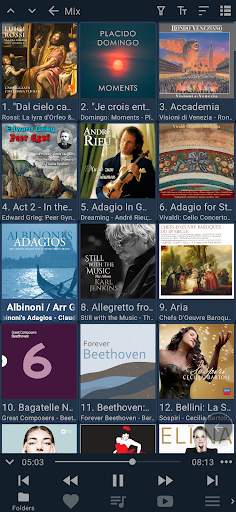
Fermata Media Player is a free, open source audio, video and TV player with a simple and intuitive interface. It is focused on playing media files organized in folders and playlists.
Despite of its small size (about 3Mb), it supports a lot of features:
• Play media files organized in folders
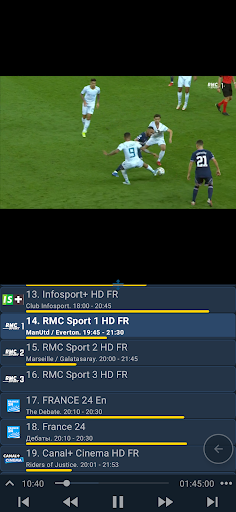
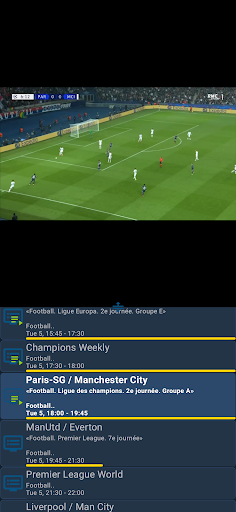
• IPTV addon with support for EPG and archives
• Show subtitles in two languages at the same time
• Show subtitles for audio files (supported formats: srt, vtt)
• Youtube and web browser addons
• Support for network folders: SFTP, SMB (CIFS), Google drive
• Remembers the last played track and position for each folder
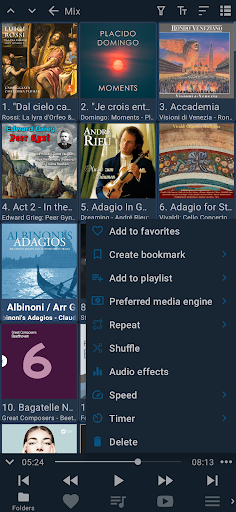
• Support for favorites and playlists
• Support for CUE and M3U playlists
• Support for M3U playlist URLs
• Support for bookmarks
• Shuffle and repeat functions
• Playback timer
• Audio effects: Equalizer, Bass Boost and Virtualizer
• Configure audio effects for individual tracks and folders
• Configure playback speed for individual tracks and folders
• Sort tracks by name, file name, date or randomly
• Customizable titles and subtitles
• Pluggable media engines: MediaPlayer, ExoPlayer and VLC
• Support for Android Auto
แสดงเพิ่มเติม

1. ดาวน์โหลดตัวติดตั้ง MEmu และสิ้นสุดการติดตั้ง

2. เริ่ม MEmu จากนั้นเปิด Google Play บนหน้าแรก

3. ค้นหา Fermata Media Player ใน Google Play
Install
4. ดาวน์โหลดและติดตั้ง Fermata Media Player
5. เมื่อติดตั้งเสร็จให้คลิกที่ไอคอนเพื่อเริ่มใช้งาน

6. ใช้ MEmu เพื่อสัมผัสประสบการณ์ Fermata Media Player บนคอมพิวเตอร์ของคุณ
MEmu Play คือโปรแกรมจำลอง Android ที่ดีที่สุด มีผู้ใช้มากกว่า 50 ล้านคน มอบประสบการณ์การใช้งานแอป Android ขั้นสุดยอดให้กับคุณ เทคโนโลยีจำลองเสมือนของ MEmu ช่วยให้คุณรันแอป Android หลายพันแอปบนคอมพิวเตอร์ได้อย่างราบรื่น แม้แอปที่กินทรัพยากรเครื่องสูงที่สุด
จอใหญ่และกราฟฟิกสวยกว่า; เล่นได้นาน, ไม่ต้องใช้แบตเตอรี่โทรศัพท์หรือเน็ตโทรศัพท์.
ระบบปรับแต่งปุ่มคีย์บอร์ดและเม้าส์ตามที่คุณเลือก
เล่นมากกว่าหนึ่งเกมบน PC ในเวลาเดียวกันด้วยระบบหลายจอหรือ Multi-Instance manager.
Use Fermata Media Player on PC by following steps: