FlyNote - Notes, Notepad
อัปเดตเมื่อ
เวอร์ชันปัจจุบัน
1.10.32
ให้บริการโดย

เมื่อใช้ FlyNote - Notes, Notepad บนโทรศัพท์ของคุณไม่ต้องกังวลกับการชาร์จไฟมากเกินไปปลดปล่อยตัวคุณเองจากหน้าจอขนาดเล็กและสนุกกับการใช้แอพนี้บนหน้าจอขนาดใหญ่ จากนี้ไปรับประสบการณ์เต็มหน้าจอของแอปพลิเคชันของคุณด้วยคีย์บอร์ดและเมาส์ MEmu มีคุณสมบัติที่น่าแปลกใจที่คุณคาดหวัง: การติดตั้งที่รวดเร็วและการตั้งค่าที่ง่ายควบคุมได้ง่ายไม่ จำกัด แบตเตอรี่ข้อมูลมือถือและการโทรที่รบกวน MEmu 9 ใหม่ล่าสุดเป็นตัวเลือกที่ดีที่สุดสำหรับการใช้ Meitu – โปรแกรมแก้ไขภาพแนวธรรมชาติ บนคอมพิวเตอร์ของคุณ ด้วยรหัสการดูดซึมของเราผู้จัดการหลายอินสแตนซ์ทำให้สามารถเปิดบัญชี 2 บัญชีขึ้นไปในเวลาเดียวกันได้ และที่สำคัญที่สุดเอ็นจิ้นจำลองพิเศษของเราสามารถปลดปล่อยศักยภาพของPCของคุณและทำให้ทุกอย่างราบรื่นและสนุกสนาน
แสดงเพิ่มเติม
ดาวน์โหลด FlyNote - Notes, Notepad บน PC ด้วย MEmu Android Emulator สนุกกับการเล่นบนหน้าจอขนาดใหญ่ Notes - Notepad, Notebook is a powerful and versatile note-taking app that helps you stay organized and productive.
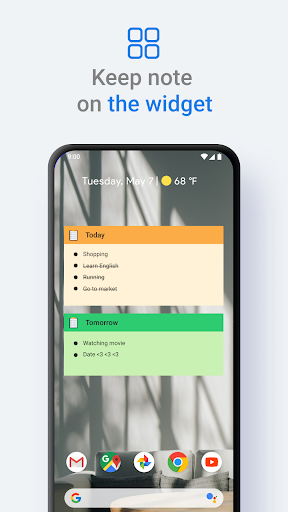
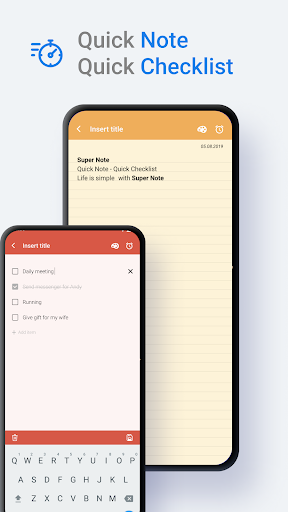
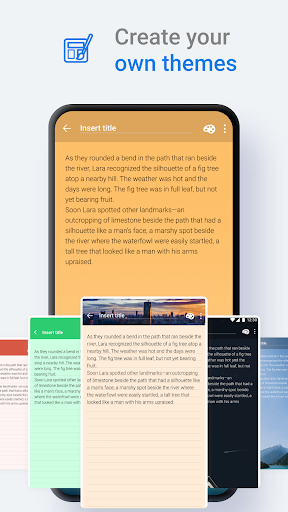
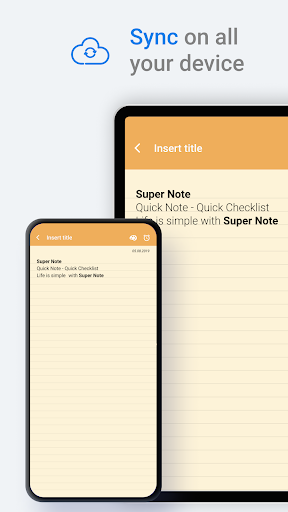
Notes - Notepad, Notebook is a powerful and versatile note-taking app that helps you stay organized and productive. With a wide range of features and customization options, FlyNote is the perfect tool for students, professionals, and anyone else who needs to keep track of their thoughts and ideas.
Try creating a new note, check list with FlyNote.
You can create a new note/check list by tapping + in the bottom right corner of the main screen.
Protect your notes and check list.
1. Click on the Note or check list you want to protect, then click on the lock icon in the upper right corner of the screen or click on more option and select the lock icon.
Then create your password and answer the security question.
2. Lock the notes and check lists you want to protect by touching the lock icon.
Key features:
- Create notes and checklists anywhere.
- Sticky Notes widget, View your note from Home screen
- Sync your notes: FlyNote supports sync with Google Drive, so you can access your notes on any device.
- Keep your notes safe: Notes lets you protect your notes with a password.
- Customize your notes with different themes and backgrounds
- Set reminders: FlyNote lets you set reminders for your notes and to-do lists, so you never miss a deadline.
- Back up your notes: Notes lets you back up your notes to Google Drive so you never have to worry about losing them.
- Recover deleted notes: Notes lets you recover deleted notes from the trash bin.
- Create shortcuts: Notes lets you create shortcuts to your notes on your home screen.
- Share your notes: FlyNote make it easy to share your notes with others.
Benefits:
- Stay organized: FlyNote helps you keep track of your thoughts and ideas in one place. With smart search features, you can easily find the information you need when you need it.
- Be productive: Notes can help you be more productive by making it easy to capture and organize your ideas. With its variety of features, you can customize Notes to fit your specific needs.
- Be creative: Notes lets you express your creativity in any way you want.
FlyNote is the perfect note-taking app for anyone who wants a powerful and versatile tool that can help them stay organized, productive, and creative. With its wide range of features and customization options, Notes is the perfect choice for students, professionals, and anyone else who needs to keep track of their thoughts and ideas.
แสดงเพิ่มเติม

1. ดาวน์โหลดตัวติดตั้ง MEmu และสิ้นสุดการติดตั้ง

2. เริ่ม MEmu จากนั้นเปิด Google Play บนหน้าแรก

3. ค้นหา FlyNote - Notes, Notepad ใน Google Play
Install
4. ดาวน์โหลดและติดตั้ง FlyNote - Notes, Notepad
5. เมื่อติดตั้งเสร็จให้คลิกที่ไอคอนเพื่อเริ่มใช้งาน

6. ใช้ MEmu เพื่อสัมผัสประสบการณ์ FlyNote - Notes, Notepad บนคอมพิวเตอร์ของคุณ
MEmu Play คือโปรแกรมจำลอง Android ที่ดีที่สุด มีผู้ใช้มากกว่า 50 ล้านคน มอบประสบการณ์การใช้งานแอป Android ขั้นสุดยอดให้กับคุณ เทคโนโลยีจำลองเสมือนของ MEmu ช่วยให้คุณรันแอป Android หลายพันแอปบนคอมพิวเตอร์ได้อย่างราบรื่น แม้แอปที่กินทรัพยากรเครื่องสูงที่สุด
จอใหญ่และกราฟฟิกสวยกว่า; เล่นได้นาน, ไม่ต้องใช้แบตเตอรี่โทรศัพท์หรือเน็ตโทรศัพท์.
ระบบปรับแต่งปุ่มคีย์บอร์ดและเม้าส์ตามที่คุณเลือก
เล่นมากกว่าหนึ่งเกมบน PC ในเวลาเดียวกันด้วยระบบหลายจอหรือ Multi-Instance manager.
Use FlyNote - Notes, Notepad on PC by following steps: