GO TO-U: EV Charging App
อัปเดตเมื่อ
เวอร์ชันปัจจุบัน
6.6.6
ให้บริการโดย

เมื่อใช้ GO TO-U: EV Charging App บนโทรศัพท์ของคุณไม่ต้องกังวลกับการชาร์จไฟมากเกินไปปลดปล่อยตัวคุณเองจากหน้าจอขนาดเล็กและสนุกกับการใช้แอพนี้บนหน้าจอขนาดใหญ่ จากนี้ไปรับประสบการณ์เต็มหน้าจอของแอปพลิเคชันของคุณด้วยคีย์บอร์ดและเมาส์ MEmu มีคุณสมบัติที่น่าแปลกใจที่คุณคาดหวัง: การติดตั้งที่รวดเร็วและการตั้งค่าที่ง่ายควบคุมได้ง่ายไม่ จำกัด แบตเตอรี่ข้อมูลมือถือและการโทรที่รบกวน MEmu 9 ใหม่ล่าสุดเป็นตัวเลือกที่ดีที่สุดสำหรับการใช้ Meitu – โปรแกรมแก้ไขภาพแนวธรรมชาติ บนคอมพิวเตอร์ของคุณ ด้วยรหัสการดูดซึมของเราผู้จัดการหลายอินสแตนซ์ทำให้สามารถเปิดบัญชี 2 บัญชีขึ้นไปในเวลาเดียวกันได้ และที่สำคัญที่สุดเอ็นจิ้นจำลองพิเศษของเราสามารถปลดปล่อยศักยภาพของPCของคุณและทำให้ทุกอย่างราบรื่นและสนุกสนาน
แสดงเพิ่มเติม
ดาวน์โหลด GO TO-U: EV Charging App บน PC ด้วย MEmu Android Emulator สนุกกับการเล่นบนหน้าจอขนาดใหญ่ If you have already switched from an ICE car to the electric one, if you love comfort, confidence and simplicity, innovation and progress – then hurry up to download the best EV charging station app for Tesla and other EV drivers!
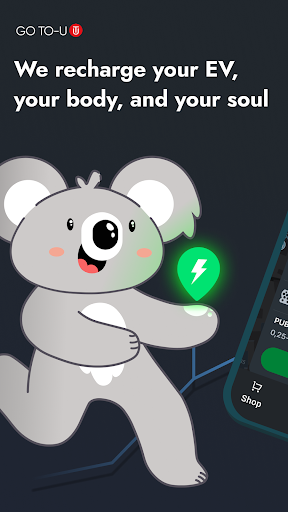
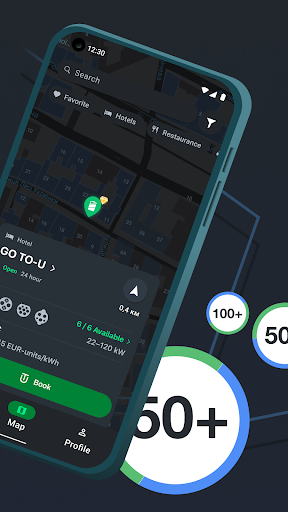
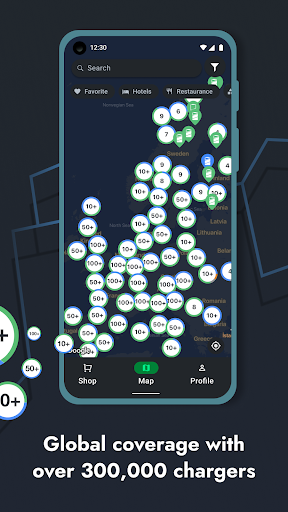
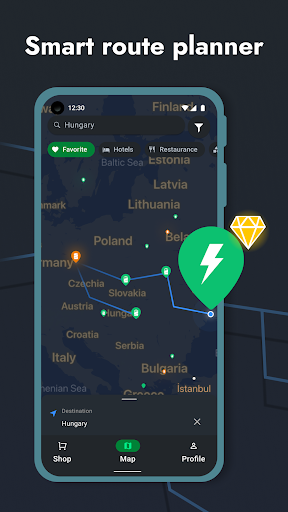
If you have already switched from an ICE car to the electric one, if you love comfort, confidence and simplicity, innovation and progress – then hurry up to download the best EV charging station app for Tesla and other EV drivers!
Our application offers you safe and certified charging stations in the best locations. With our premium filters of charging station map, not only will you be able to reserve a charging station at your convenience, but you will also be guaranteed that it will be switched on just for you. What is more, you can book a service at the EV charging location: hotel room, table at a restaurant, or maybe SPA. We will let you know as soon as the charging is completed, so you will be able to arrange your time even more efficiently.
Using EV charging app GO TO-U will help you find EV charging stations, plan your route, and our algorithm will tell you which location is most convenient for you to stop for charging: no worries - we have everything under control!
We offer more than 300,000 EV charging station locations from GO TO-U partners and top network operators in Europe, North America, Asia:
- Innogy
- GreenWay
- Greenlots
- Tesla Superchargers and Destination chargers
- Ionity
- Blink
- EVBox
- EV Connect
- ChargePoint
- Webasto
- Has·to·be
- Allego
- MOVE
- eCarUp
- Wien Energie
- Clever
- GreenFlux
- Neogy
- EVgo
- Volta
- ChargeNet
- Endesa
We have super convenient charging station filters! For example, with just one click, you can not only find a public charging stations, but leave hotel chargers on the map only, which is very convenient when traveling by electric car. Or filter all the offers according to charging time: AC, DC Fast Charger, Super Fast Charger, Tesla Supercharger including, CCS Combo type 1 or type 2, CHAdeMO, 11, 22, 50 + kWhph. You can also select the operator and type of charging station you need.
GO TO-U is the perfect solution for those who own a Tesla Model S, Tesla Model X, Tesla Model 3, Tesla Cybertruck, Hyundai Ioniq, Hyundai Kona, Jaguar I-PACE, Porsche Panamera, Porsche Taycan, Nissan LEAF, Chevrolet Volt, Chevrolet Bolt EV, BMW i3, Fiat 500e, Ford Fusion Energi, Volkswagen e-Golf, Prius Plug-in, Kia Soul EV, Rivian, VolvoC40Recharge, VolvoX40Recharge, Volkswagen ID.4, Skoda Enyaq iV, Hyundai Ioniq5, and other electric cars on the market!
Among other things, we offer bonuses, a loyalty program and gifts, as well as a store with the best merchandise for the EV owners.
GO TO-U is an absolutely free app for electric vehicle drivers that allows you to:
- get acquainted with an up-to-date information about the public charger, services at its location and the feedback from other users;
- find a free or paid but the most profitable public charging station;
- book your charging at a convenient time;
- book the service at a location with the charging station;
- get directions and plan the route;
- navigate using Google Maps, Waze, Apple Maps;
- filter charging locations by different categories and criteria;
- get bonuses and gifts;
- pay for charging at paid stations directly via the application (at partner stations);
- receive notifications about charging sessions, the number of kW received, and other necessary information.
We charge Your EV, Your body and Your soul! Let's Power the Future Together!
GO Green! GO TO-U!
แสดงเพิ่มเติม

1. ดาวน์โหลดตัวติดตั้ง MEmu และสิ้นสุดการติดตั้ง

2. เริ่ม MEmu จากนั้นเปิด Google Play บนหน้าแรก

3. ค้นหา GO TO-U: EV Charging App ใน Google Play
Install
4. ดาวน์โหลดและติดตั้ง GO TO-U: EV Charging App
5. เมื่อติดตั้งเสร็จให้คลิกที่ไอคอนเพื่อเริ่มใช้งาน

6. ใช้ MEmu เพื่อสัมผัสประสบการณ์ GO TO-U: EV Charging App บนคอมพิวเตอร์ของคุณ
MEmu Play คือโปรแกรมจำลอง Android ที่ดีที่สุด มีผู้ใช้มากกว่า 50 ล้านคน มอบประสบการณ์การใช้งานแอป Android ขั้นสุดยอดให้กับคุณ เทคโนโลยีจำลองเสมือนของ MEmu ช่วยให้คุณรันแอป Android หลายพันแอปบนคอมพิวเตอร์ได้อย่างราบรื่น แม้แอปที่กินทรัพยากรเครื่องสูงที่สุด
จอใหญ่และกราฟฟิกสวยกว่า; เล่นได้นาน, ไม่ต้องใช้แบตเตอรี่โทรศัพท์หรือเน็ตโทรศัพท์.
ระบบปรับแต่งปุ่มคีย์บอร์ดและเม้าส์ตามที่คุณเลือก
เล่นมากกว่าหนึ่งเกมบน PC ในเวลาเดียวกันด้วยระบบหลายจอหรือ Multi-Instance manager.
Use GO TO-U: EV Charging App on PC by following steps: