GPS Location Tracker Ultra
อัปเดตเมื่อ
เวอร์ชันปัจจุบัน
1.3.1.0
ให้บริการโดย

เมื่อใช้ GPS Location Tracker Ultra บนโทรศัพท์ของคุณไม่ต้องกังวลกับการชาร์จไฟมากเกินไปปลดปล่อยตัวคุณเองจากหน้าจอขนาดเล็กและสนุกกับการใช้แอพนี้บนหน้าจอขนาดใหญ่ จากนี้ไปรับประสบการณ์เต็มหน้าจอของแอปพลิเคชันของคุณด้วยคีย์บอร์ดและเมาส์ MEmu มีคุณสมบัติที่น่าแปลกใจที่คุณคาดหวัง: การติดตั้งที่รวดเร็วและการตั้งค่าที่ง่ายควบคุมได้ง่ายไม่ จำกัด แบตเตอรี่ข้อมูลมือถือและการโทรที่รบกวน MEmu 9 ใหม่ล่าสุดเป็นตัวเลือกที่ดีที่สุดสำหรับการใช้ Meitu – โปรแกรมแก้ไขภาพแนวธรรมชาติ บนคอมพิวเตอร์ของคุณ ด้วยรหัสการดูดซึมของเราผู้จัดการหลายอินสแตนซ์ทำให้สามารถเปิดบัญชี 2 บัญชีขึ้นไปในเวลาเดียวกันได้ และที่สำคัญที่สุดเอ็นจิ้นจำลองพิเศษของเราสามารถปลดปล่อยศักยภาพของPCของคุณและทำให้ทุกอย่างราบรื่นและสนุกสนาน
แสดงเพิ่มเติม
สัมผัสประสบการณ์สุดยอดการใช้งาน GPS Location Tracker Ultra บนพีซีด้วย MEmu Play นี่คือโปรแกรมจำลอง Android ฟรีที่ทรงพลัง ให้คุณใช้งานแอป Android นับพันบนเดสก์ท็อป สนุกกับการเชื่อมต่อกับเพื่อนๆ และขัดเกลาผลงานของคุณอย่างมีประสิทธิภาพยิ่งขึ้น! Whether you want to keep track of your family’s routes, share your real‑time location with family, or explore what’s around you, GPS Location Tracker Ultra has you covered.
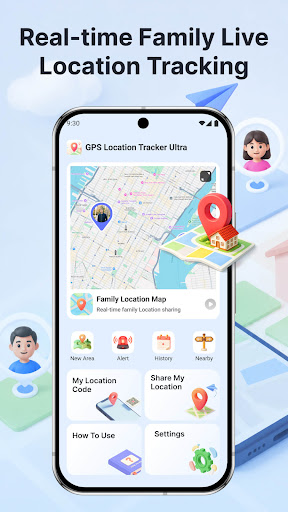
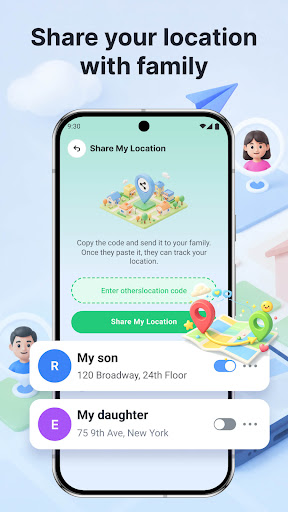
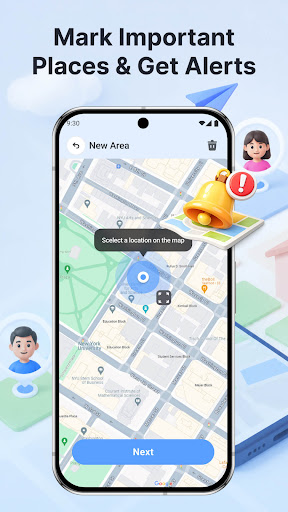
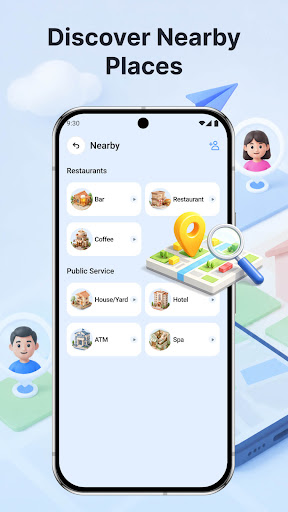
Whether you want to keep track of your family’s routes, share your real‑time location with family, or explore what’s around you, GPS Location Tracker Ultra has you covered.
Key Features
Real-Time Location: Get accurate GPS positioning of your current location with clear map display.
View Family Real-Time Location: Add your family and see their real-time location on the map.
Share Your Location with family: Easily share your live location with family.
Mark Important Places & Get Reminders: Save your home, work, school, or any custom place. Get reminders when arriving at or leaving a marked location.
Location History Tracking: Review past routes and visited places.
Find Nearby Places: Quickly search and discover nearby restaurants, hotels and other services.
Contact Us
Should you run into technical issues or have inquiries regarding the GPS location tracking feature of this app, our support team stands by to assist you at any time.
Reach us via email: worka7567@gmail.com
Disclaimer
Privacy Policy
All operations of this app require explicit authorization from users. The location tracking feature will only activate after you grant clear, explicit permission.
Data Compliance
All location data is encrypted during processing. We will never sell or disclose your personal location information to third parties for commercial or other self-serving purposes. You retain complete authority to adjust location sharing and related management settings.
Authorized Usage
Unauthorized tracking activities are strictly forbidden. Before using any location-sharing functions, you must obtain full informed consent from all relevant individuals being tracked.
แสดงเพิ่มเติม

1. ดาวน์โหลดตัวติดตั้ง MEmu และสิ้นสุดการติดตั้ง

2. เริ่ม MEmu จากนั้นเปิด Google Play บนหน้าแรก

3. ค้นหา GPS Location Tracker Ultra ใน Google Play
Install
4. ดาวน์โหลดและติดตั้ง GPS Location Tracker Ultra
5. เมื่อติดตั้งเสร็จให้คลิกที่ไอคอนเพื่อเริ่มใช้งาน

6. ใช้ MEmu เพื่อสัมผัสประสบการณ์ GPS Location Tracker Ultra บนคอมพิวเตอร์ของคุณ
MEmu Play คือโปรแกรมจำลอง Android ที่ดีที่สุด มีผู้ใช้มากกว่า 50 ล้านคน มอบประสบการณ์การใช้งานแอป Android ขั้นสุดยอดให้กับคุณ เทคโนโลยีจำลองเสมือนของ MEmu ช่วยให้คุณรันแอป Android หลายพันแอปบนคอมพิวเตอร์ได้อย่างราบรื่น แม้แอปที่กินทรัพยากรเครื่องสูงที่สุด
จอใหญ่และกราฟฟิกสวยกว่า; เล่นได้นาน, ไม่ต้องใช้แบตเตอรี่โทรศัพท์หรือเน็ตโทรศัพท์.
ระบบปรับแต่งปุ่มคีย์บอร์ดและเม้าส์ตามที่คุณเลือก
เล่นมากกว่าหนึ่งเกมบน PC ในเวลาเดียวกันด้วยระบบหลายจอหรือ Multi-Instance manager.
Use GPS Location Tracker Ultra on PC by following steps: