
Kindara Fertility & Ovulation
อัปเดตเมื่อ
เวอร์ชันปัจจุบัน
7.4.3
ให้บริการโดย

เมื่อใช้ Kindara Fertility & Ovulation บนโทรศัพท์ของคุณไม่ต้องกังวลกับการชาร์จไฟมากเกินไปปลดปล่อยตัวคุณเองจากหน้าจอขนาดเล็กและสนุกกับการใช้แอพนี้บนหน้าจอขนาดใหญ่ จากนี้ไปรับประสบการณ์เต็มหน้าจอของแอปพลิเคชันของคุณด้วยคีย์บอร์ดและเมาส์ MEmu มีคุณสมบัติที่น่าแปลกใจที่คุณคาดหวัง: การติดตั้งที่รวดเร็วและการตั้งค่าที่ง่ายควบคุมได้ง่ายไม่ จำกัด แบตเตอรี่ข้อมูลมือถือและการโทรที่รบกวน MEmu 9 ใหม่ล่าสุดเป็นตัวเลือกที่ดีที่สุดสำหรับการใช้ Meitu – โปรแกรมแก้ไขภาพแนวธรรมชาติ บนคอมพิวเตอร์ของคุณ ด้วยรหัสการดูดซึมของเราผู้จัดการหลายอินสแตนซ์ทำให้สามารถเปิดบัญชี 2 บัญชีขึ้นไปในเวลาเดียวกันได้ และที่สำคัญที่สุดเอ็นจิ้นจำลองพิเศษของเราสามารถปลดปล่อยศักยภาพของPCของคุณและทำให้ทุกอย่างราบรื่นและสนุกสนาน
แสดงเพิ่มเติม
ดาวน์โหลด Kindara Fertility & Ovulation บน PC ด้วย MEmu Android Emulator สนุกกับการเล่นบนหน้าจอขนาดใหญ่ Goodbye surprise periods, mysterious fertile windows, and confusion about your cycle.
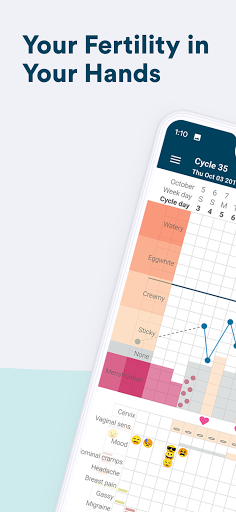

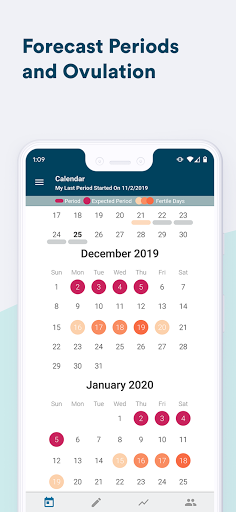
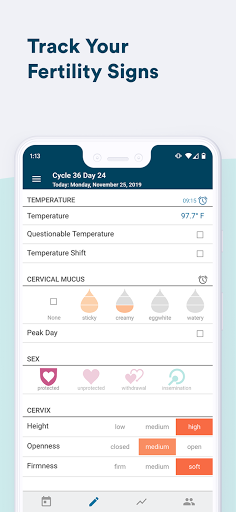
Goodbye surprise periods, mysterious fertile windows, and confusion about your cycle. We provide tools backed by science so you can master of your reproductive health. It’s time for empowerment, a supportive user-based community, and accuracy.
“Kindara has helped me take my health into my own hands. Information is power and tracking my own health data has empowered me by helping me understand my own fertility. It's also fun to use.” —Kristen Z.
Read more stories about how Kindara changes lives: https://www.kindara.com/stories
Understand your body, menstrual cycle, and overall reproductive health with the customizable tracking app, Kindara. Kindara helps you utilize the proven science of fertility awareness-based methods with straightforward, easy-to-use, and comprehensive charts.
Kindara can also be used beyond ovulation tracking and charting for trying to get pregnant. Kindara fertility charting may also make it easier to work with your healthcare provider when evaluating instances such as infertility, anovulation, PCOS, and perimenopause.
CHARTING DONE RIGHT: KEY FEATURES
+ Easily record your fertility signs including period, basal body temperature (BBT), cervical mucus, cervical position, sexual intercourse, test results, PMS symptoms and more
+ Track what is important and unique to you with custom data fields
+ Receive data-driven predictions for fertility and menstruation based on YOUR actual data, not population averages
+ Share your chart with your partner and/or healthcare practitioner to facilitate the best care for you
+ Sync fertility data with Apple Health and add cervical mucus (CM) directly from your Apple watch
+ Vaginal sensation field to take charting to the next level (available with Premium)
+ Connect to others in our supportive community
ENGAGED, HELPFUL & SUPPORTIVE COMMUNITY
Get a second opinion on your charts from fellow charting or fertility awareness-based method enthusiasts, find support from people on the same journey as you, and maybe even forge lasting friendships in our global Kindara community.
“Kindara is more than just an app.” —Anne C.
BASED ON SCIENCE
We really are more than just an app — we do the research so you don’t have to! We regularly post new blogs that are thoroughly researched and backed by scientific references you can trust. https://kindara.com/blog
KEEP IN TOUCH TO KEEP LEARNING
https://www.kindara.com
Facebook: https://www.facebook.com/KindaraFertility/
Twitter: @Kindara_Inc
Instagram: @kindara_fertility
Based in Boulder, Colorado, our mission is to offer women the tools, knowledge, and support to understand how their fertility works, take ownership of their reproductive health, and meet their fertility goals. Questions? Email us at support@kindara.com.
Privacy: https://www.kindara.com/privacy-policy
Terms of use: https://www.kindara.com/terms-of-use
แสดงเพิ่มเติม

1. ดาวน์โหลดตัวติดตั้ง MEmu และสิ้นสุดการติดตั้ง

2. เริ่ม MEmu จากนั้นเปิด Google Play บนหน้าแรก

3. ค้นหา Kindara Fertility & Ovulation ใน Google Play
Install
4. ดาวน์โหลดและติดตั้ง Kindara Fertility & Ovulation
5. เมื่อติดตั้งเสร็จให้คลิกที่ไอคอนเพื่อเริ่มใช้งาน

6. ใช้ MEmu เพื่อสัมผัสประสบการณ์ Kindara Fertility & Ovulation บนคอมพิวเตอร์ของคุณ
MEmu Play คือโปรแกรมจำลอง Android ที่ดีที่สุด มีผู้ใช้มากกว่า 50 ล้านคน มอบประสบการณ์การใช้งานแอป Android ขั้นสุดยอดให้กับคุณ เทคโนโลยีจำลองเสมือนของ MEmu ช่วยให้คุณรันแอป Android หลายพันแอปบนคอมพิวเตอร์ได้อย่างราบรื่น แม้แอปที่กินทรัพยากรเครื่องสูงที่สุด
จอใหญ่และกราฟฟิกสวยกว่า; เล่นได้นาน, ไม่ต้องใช้แบตเตอรี่โทรศัพท์หรือเน็ตโทรศัพท์.
ระบบปรับแต่งปุ่มคีย์บอร์ดและเม้าส์ตามที่คุณเลือก
เล่นมากกว่าหนึ่งเกมบน PC ในเวลาเดียวกันด้วยระบบหลายจอหรือ Multi-Instance manager.
Use Kindara Fertility & Ovulation on PC by following steps: