Micromedex Drug Reference
อัปเดตเมื่อ
เวอร์ชันปัจจุบัน
4.6.5
ให้บริการโดย

เมื่อใช้ Micromedex Drug Reference บนโทรศัพท์ของคุณไม่ต้องกังวลกับการชาร์จไฟมากเกินไปปลดปล่อยตัวคุณเองจากหน้าจอขนาดเล็กและสนุกกับการใช้แอพนี้บนหน้าจอขนาดใหญ่ จากนี้ไปรับประสบการณ์เต็มหน้าจอของแอปพลิเคชันของคุณด้วยคีย์บอร์ดและเมาส์ MEmu มีคุณสมบัติที่น่าแปลกใจที่คุณคาดหวัง: การติดตั้งที่รวดเร็วและการตั้งค่าที่ง่ายควบคุมได้ง่ายไม่ จำกัด แบตเตอรี่ข้อมูลมือถือและการโทรที่รบกวน MEmu 9 ใหม่ล่าสุดเป็นตัวเลือกที่ดีที่สุดสำหรับการใช้ Meitu – โปรแกรมแก้ไขภาพแนวธรรมชาติ บนคอมพิวเตอร์ของคุณ ด้วยรหัสการดูดซึมของเราผู้จัดการหลายอินสแตนซ์ทำให้สามารถเปิดบัญชี 2 บัญชีขึ้นไปในเวลาเดียวกันได้ และที่สำคัญที่สุดเอ็นจิ้นจำลองพิเศษของเราสามารถปลดปล่อยศักยภาพของPCของคุณและทำให้ทุกอย่างราบรื่นและสนุกสนาน
แสดงเพิ่มเติม
ดาวน์โหลด Micromedex Drug Reference บน PC ด้วย MEmu Android Emulator สนุกกับการเล่นบนหน้าจอขนาดใหญ่ The support of this app will be discontinued on Feb 20, 2025.
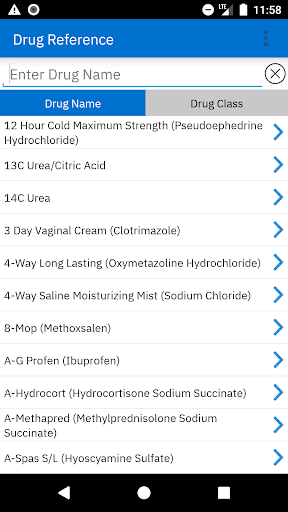
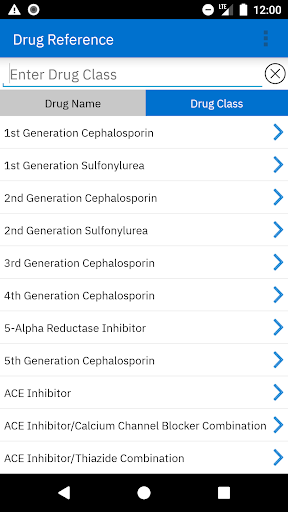
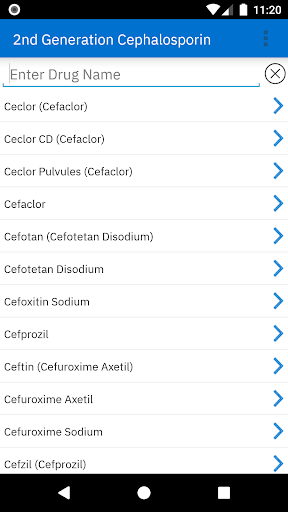
The support of this app will be discontinued on Feb 20, 2025. Visit the Google Play Store to download the new Micromedex mobile app https://play.google.com/store/apps/details?id=com.micromedex.coremobile
Access to Micromedex Drug Reference requires a password. Once you’ve downloaded the app, follow these instructions to obtain the password (which only needs to be entered once per year):
1. Login to Merative Micromedex through your online subscription.
2. Click on the “Mobile Application Access” link near the top of the application.
3. Refer to the detailed downloading instructions, which include your password for activating the mobile app at no charge.
If you cannot locate the “Mobile Application Access” link, or have other questions related to this app, please contact support via https://merative.my.site.com/mysupport/s/micromedex-support-request
Access the evidence-based content you rely on in your Merative Micromedex online solution, anytime, anywhere, via your Android device.
Micromedex Drug Reference provides clinical care professionals with on-the-go access to the industry’s most trusted drug information, when and where it’s needed most. Users will find peace of mind knowing the content is backed by the same thorough, unbiased editorial process as all Merative Micromedex solutions.
Once content is downloaded or updated an internet connection is not required, allowing for access at anytime from anywhere.
The app is part of the Micromedex Medication Management apps bundle, which includes Micromedex Drug Interactions and Micromedex IV Compatability The trio is an excellent solution to your on-the-go medication management needs.
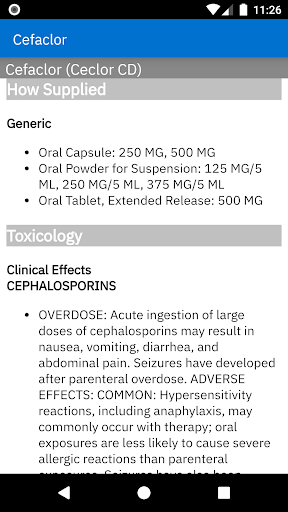
Micromedex Drug Reference app contains concise information on 4500+ search terms, covering common needs such as:
• Adult and pediatric dosage
• Adverse effects (separated into “common” and “serious”)
• Drug interactions
As well as:
• Administration
• Black box warnings
• Breast feeding
• Common trade names
• Contraindications
• Dose adjustments
• Generic names, including selected combination products
• How supplied
• Indications (differentiated as “FDA labeled” and “non-FDA labeled”)
• Mechanism of action
• Monitoring
• Precautions
• Pregnancy category
• Therapeutic class
Features
• Updated monthly
• Ability to use without a WiFi or cellular connection
แสดงเพิ่มเติม

1. ดาวน์โหลดตัวติดตั้ง MEmu และสิ้นสุดการติดตั้ง

2. เริ่ม MEmu จากนั้นเปิด Google Play บนหน้าแรก

3. ค้นหา Micromedex Drug Reference ใน Google Play
Install
4. ดาวน์โหลดและติดตั้ง Micromedex Drug Reference
5. เมื่อติดตั้งเสร็จให้คลิกที่ไอคอนเพื่อเริ่มใช้งาน

6. ใช้ MEmu เพื่อสัมผัสประสบการณ์ Micromedex Drug Reference บนคอมพิวเตอร์ของคุณ
MEmu Play คือโปรแกรมจำลอง Android ที่ดีที่สุด มีผู้ใช้มากกว่า 50 ล้านคน มอบประสบการณ์การใช้งานแอป Android ขั้นสุดยอดให้กับคุณ เทคโนโลยีจำลองเสมือนของ MEmu ช่วยให้คุณรันแอป Android หลายพันแอปบนคอมพิวเตอร์ได้อย่างราบรื่น แม้แอปที่กินทรัพยากรเครื่องสูงที่สุด
จอใหญ่และกราฟฟิกสวยกว่า; เล่นได้นาน, ไม่ต้องใช้แบตเตอรี่โทรศัพท์หรือเน็ตโทรศัพท์.
ระบบปรับแต่งปุ่มคีย์บอร์ดและเม้าส์ตามที่คุณเลือก
เล่นมากกว่าหนึ่งเกมบน PC ในเวลาเดียวกันด้วยระบบหลายจอหรือ Multi-Instance manager.
Use Micromedex Drug Reference on PC by following steps: