mysms - Remote Text Messages
อัปเดตเมื่อ
เวอร์ชันปัจจุบัน
7.1.1
ให้บริการโดย

เมื่อใช้ mysms - Remote Text Messages บนโทรศัพท์ของคุณไม่ต้องกังวลกับการชาร์จไฟมากเกินไปปลดปล่อยตัวคุณเองจากหน้าจอขนาดเล็กและสนุกกับการใช้แอพนี้บนหน้าจอขนาดใหญ่ จากนี้ไปรับประสบการณ์เต็มหน้าจอของแอปพลิเคชันของคุณด้วยคีย์บอร์ดและเมาส์ MEmu มีคุณสมบัติที่น่าแปลกใจที่คุณคาดหวัง: การติดตั้งที่รวดเร็วและการตั้งค่าที่ง่ายควบคุมได้ง่ายไม่ จำกัด แบตเตอรี่ข้อมูลมือถือและการโทรที่รบกวน MEmu 9 ใหม่ล่าสุดเป็นตัวเลือกที่ดีที่สุดสำหรับการใช้ Meitu – โปรแกรมแก้ไขภาพแนวธรรมชาติ บนคอมพิวเตอร์ของคุณ ด้วยรหัสการดูดซึมของเราผู้จัดการหลายอินสแตนซ์ทำให้สามารถเปิดบัญชี 2 บัญชีขึ้นไปในเวลาเดียวกันได้ และที่สำคัญที่สุดเอ็นจิ้นจำลองพิเศษของเราสามารถปลดปล่อยศักยภาพของPCของคุณและทำให้ทุกอย่างราบรื่นและสนุกสนาน
แสดงเพิ่มเติม
ดาวน์โหลด mysms - Remote Text Messages บน PC ด้วย MEmu Android Emulator สนุกกับการเล่นบนหน้าจอขนาดใหญ่ ★★★Featured on Google Play in 130+ countries.
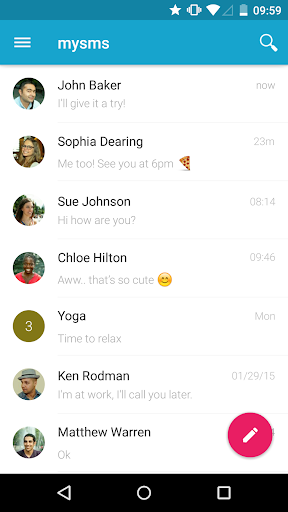
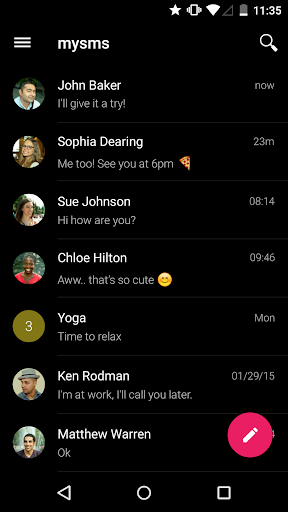
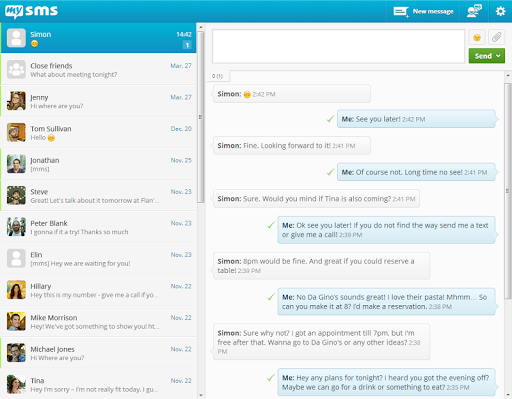
★★★Featured on Google Play in 130+ countries.★★★
As seen on by The Times, PCWorld, TheNextWeb, Gizmodo, All Things Digital, Android Central and many more.
SMS & calls on your PC or tablet in perfect sync with your Android phone.
● Text from computer and tablet (real SMS and MMS) using your Android #
● Call notifications on your computer - when you receive a call on your phone
● The only remote texting app with native apps for Android tablet, Windows 7/XP, Windows 8 desktop & tablet and Chrome
● Complete call log history from your Android on your PC & tablet
● MMS Group Chat (group messaging)
● Multimedia messages (picture messages and files)
● Support for any browser (Chrome, Internet Explorer, Firefox, Safari, Opera …)
● Sync your contacts and messages from your phone to the mysms cloud to text from any device
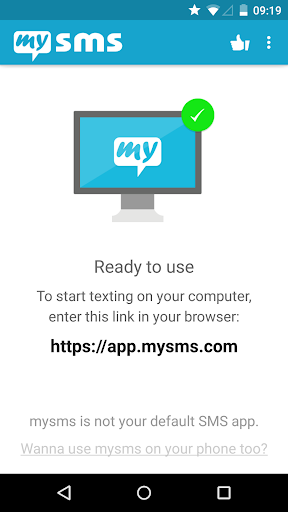
To connect your computer or tablet to your Android phone, download this app on your phone and register for an account. When you then start texting from your computer at https://app.mysms.com or use one of our native apps, you will find all existing SMS messages and contacts synchronized from your Android to your computer/tablet. There is no additional charge from what your carrier charges when you text from your computer.
HOW TO GET STARTED:
1) Install this mysms app on your Android phone
2) Start texting on your computer at https://app.mysms.com or download one of our native desktop and tablet apps at https://www.mysms.com/apps
mysms enables you to manage your Android SMS notifications on your computer and tablet. You also have the choice to use mysms as default SMS app on your Android phone offering you great customization options, expandable notifications and many more features that your preinstalled stock SMS app cannot beat.
When you are in the office, leave your phone in your pocket and send and receive text messages using your full computer keyboard. During meetings you can use mysms as your personal assistant and respond with text to incoming calls from your computer.
If you want even more you can upgrade to Premium for advanced management of your messages. Price: Only USD 9.99 per year. You can also try out mysms Premium free of charge for 14 days.
mysms Premium offer:
● Backup SMS and restore SMS to a new smartphone, or after a reset
● Sync messages and calls between your business phone and private smartphone (-> download mysms mirror)
● Archive SMS & MMS messages in your Evernote, Dropbox or Google Drive or email account
● Full SMS export of your messages to a .CSV file
● No attachment of "via mysms.com" text at the end of the message
We’d love to hear from you! Do you have a suggestion, question or comment? Just contact us at http://support.mysms.com.
แสดงเพิ่มเติม

1. ดาวน์โหลดตัวติดตั้ง MEmu และสิ้นสุดการติดตั้ง

2. เริ่ม MEmu จากนั้นเปิด Google Play บนหน้าแรก

3. ค้นหา mysms - Remote Text Messages ใน Google Play
Install
4. ดาวน์โหลดและติดตั้ง mysms - Remote Text Messages
5. เมื่อติดตั้งเสร็จให้คลิกที่ไอคอนเพื่อเริ่มใช้งาน

6. ใช้ MEmu เพื่อสัมผัสประสบการณ์ mysms - Remote Text Messages บนคอมพิวเตอร์ของคุณ
MEmu Play คือโปรแกรมจำลอง Android ที่ดีที่สุด มีผู้ใช้มากกว่า 50 ล้านคน มอบประสบการณ์การใช้งานแอป Android ขั้นสุดยอดให้กับคุณ เทคโนโลยีจำลองเสมือนของ MEmu ช่วยให้คุณรันแอป Android หลายพันแอปบนคอมพิวเตอร์ได้อย่างราบรื่น แม้แอปที่กินทรัพยากรเครื่องสูงที่สุด
จอใหญ่และกราฟฟิกสวยกว่า; เล่นได้นาน, ไม่ต้องใช้แบตเตอรี่โทรศัพท์หรือเน็ตโทรศัพท์.
ระบบปรับแต่งปุ่มคีย์บอร์ดและเม้าส์ตามที่คุณเลือก
เล่นมากกว่าหนึ่งเกมบน PC ในเวลาเดียวกันด้วยระบบหลายจอหรือ Multi-Instance manager.
Use mysms - Remote Text Messages on PC by following steps: