PulsePoint Respond
อัปเดตเมื่อ
เวอร์ชันปัจจุบัน
4.20.1
ให้บริการโดย

เมื่อใช้ PulsePoint Respond บนโทรศัพท์ของคุณไม่ต้องกังวลกับการชาร์จไฟมากเกินไปปลดปล่อยตัวคุณเองจากหน้าจอขนาดเล็กและสนุกกับการใช้แอพนี้บนหน้าจอขนาดใหญ่ จากนี้ไปรับประสบการณ์เต็มหน้าจอของแอปพลิเคชันของคุณด้วยคีย์บอร์ดและเมาส์ MEmu มีคุณสมบัติที่น่าแปลกใจที่คุณคาดหวัง: การติดตั้งที่รวดเร็วและการตั้งค่าที่ง่ายควบคุมได้ง่ายไม่ จำกัด แบตเตอรี่ข้อมูลมือถือและการโทรที่รบกวน MEmu 9 ใหม่ล่าสุดเป็นตัวเลือกที่ดีที่สุดสำหรับการใช้ Meitu – โปรแกรมแก้ไขภาพแนวธรรมชาติ บนคอมพิวเตอร์ของคุณ ด้วยรหัสการดูดซึมของเราผู้จัดการหลายอินสแตนซ์ทำให้สามารถเปิดบัญชี 2 บัญชีขึ้นไปในเวลาเดียวกันได้ และที่สำคัญที่สุดเอ็นจิ้นจำลองพิเศษของเราสามารถปลดปล่อยศักยภาพของPCของคุณและทำให้ทุกอย่างราบรื่นและสนุกสนาน
แสดงเพิ่มเติม
ดาวน์โหลด PulsePoint Respond บน PC ด้วย MEmu Android Emulator สนุกกับการเล่นบนหน้าจอขนาดใหญ่ PulsePoint Respond is a 911-connected app that can immediately inform you of emergencies occurring in your community and can request your help when CPR is needed nearby.
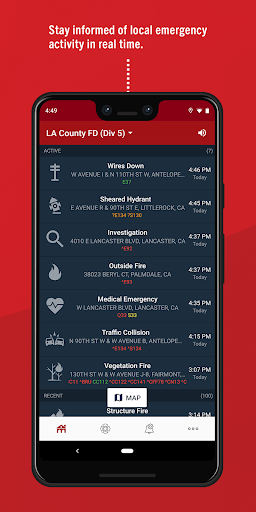
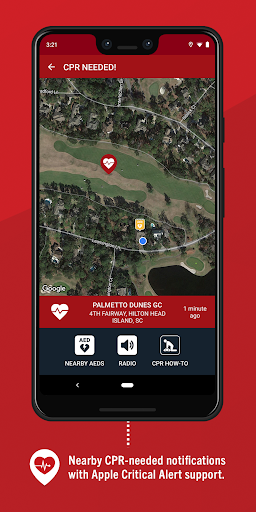
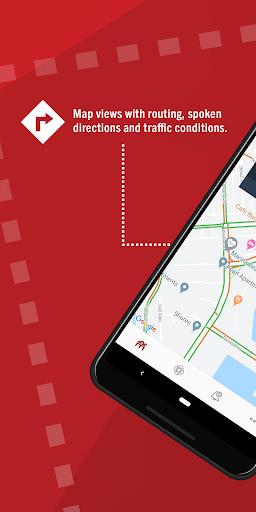
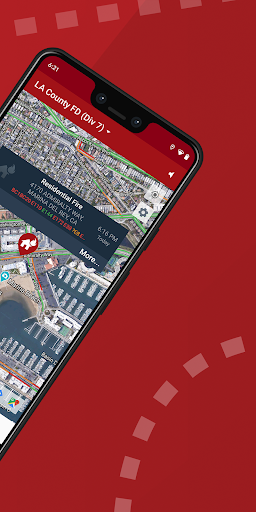
PulsePoint Respond is a 911-connected app that can immediately inform you of emergencies occurring in your community and can request your help when CPR is needed nearby.
PulsePoint helps create an informed and engaged community that drives a “Culture of Action,” a key strategy in strengthening the Chain of Survival for cardiac arrest victims. In addition to nearby “CPR-needed” notifications, you can choose to be notified of significant events that may impact you and your family. These informational notifications provide an early heads-up to local threats such as wildland fires, flooding and utility emergencies. You can even monitor live dispatch radio traffic for most PulsePoint-connected communities with a simple tap on the speaker icon.
PulsePoint currently provides coverage for thousands of cities and communities, with many more on the way. For more information, visit pulsepoint.org, contact us at info@pulsepoint.org, or join the conversation at Facebook and Twitter.
PulsePoint not yet available in your community? Although we are working hard to make public safety agencies aware of PulsePoint, you can help by expressing interest to your local fire chief, EMS official, and elected officials such as your mayor, council member or supervisor. A simple note, phone call or public meeting comment would ensure that they are aware of PulsePoint. We have found that City Hall does listen and is quite willing to bring PulsePoint to the community.
PulsePoint is a 501(c)(3) public non-profit foundation.
แสดงเพิ่มเติม

1. ดาวน์โหลดตัวติดตั้ง MEmu และสิ้นสุดการติดตั้ง

2. เริ่ม MEmu จากนั้นเปิด Google Play บนหน้าแรก

3. ค้นหา PulsePoint Respond ใน Google Play
Install
4. ดาวน์โหลดและติดตั้ง PulsePoint Respond
5. เมื่อติดตั้งเสร็จให้คลิกที่ไอคอนเพื่อเริ่มใช้งาน

6. ใช้ MEmu เพื่อสัมผัสประสบการณ์ PulsePoint Respond บนคอมพิวเตอร์ของคุณ
MEmu Play คือโปรแกรมจำลอง Android ที่ดีที่สุด มีผู้ใช้มากกว่า 50 ล้านคน มอบประสบการณ์การใช้งานแอป Android ขั้นสุดยอดให้กับคุณ เทคโนโลยีจำลองเสมือนของ MEmu ช่วยให้คุณรันแอป Android หลายพันแอปบนคอมพิวเตอร์ได้อย่างราบรื่น แม้แอปที่กินทรัพยากรเครื่องสูงที่สุด
จอใหญ่และกราฟฟิกสวยกว่า; เล่นได้นาน, ไม่ต้องใช้แบตเตอรี่โทรศัพท์หรือเน็ตโทรศัพท์.
ระบบปรับแต่งปุ่มคีย์บอร์ดและเม้าส์ตามที่คุณเลือก
เล่นมากกว่าหนึ่งเกมบน PC ในเวลาเดียวกันด้วยระบบหลายจอหรือ Multi-Instance manager.
Use PulsePoint Respond on PC by following steps: