RealDash
อัปเดตเมื่อ
เวอร์ชันปัจจุบัน
v2.4.4-2
ให้บริการโดย

เมื่อใช้ RealDash บนโทรศัพท์ของคุณไม่ต้องกังวลกับการชาร์จไฟมากเกินไปปลดปล่อยตัวคุณเองจากหน้าจอขนาดเล็กและสนุกกับการใช้แอพนี้บนหน้าจอขนาดใหญ่ จากนี้ไปรับประสบการณ์เต็มหน้าจอของแอปพลิเคชันของคุณด้วยคีย์บอร์ดและเมาส์ MEmu มีคุณสมบัติที่น่าแปลกใจที่คุณคาดหวัง: การติดตั้งที่รวดเร็วและการตั้งค่าที่ง่ายควบคุมได้ง่ายไม่ จำกัด แบตเตอรี่ข้อมูลมือถือและการโทรที่รบกวน MEmu 9 ใหม่ล่าสุดเป็นตัวเลือกที่ดีที่สุดสำหรับการใช้ Meitu – โปรแกรมแก้ไขภาพแนวธรรมชาติ บนคอมพิวเตอร์ของคุณ ด้วยรหัสการดูดซึมของเราผู้จัดการหลายอินสแตนซ์ทำให้สามารถเปิดบัญชี 2 บัญชีขึ้นไปในเวลาเดียวกันได้ และที่สำคัญที่สุดเอ็นจิ้นจำลองพิเศษของเราสามารถปลดปล่อยศักยภาพของPCของคุณและทำให้ทุกอย่างราบรื่นและสนุกสนาน
แสดงเพิ่มเติม
ดาวน์โหลด RealDash บน PC ด้วย MEmu Android Emulator สนุกกับการเล่นบนหน้าจอขนาดใหญ่ The best vehicle companion app for road trips, street and race track.
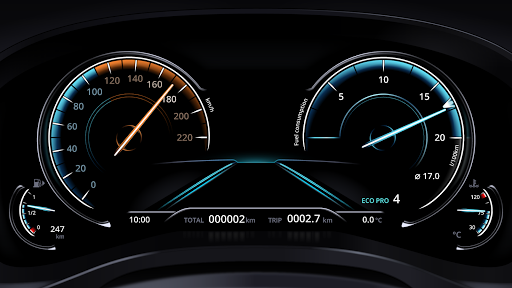
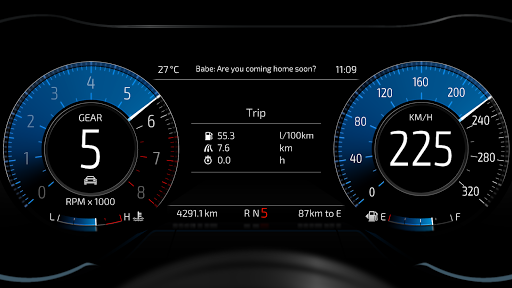
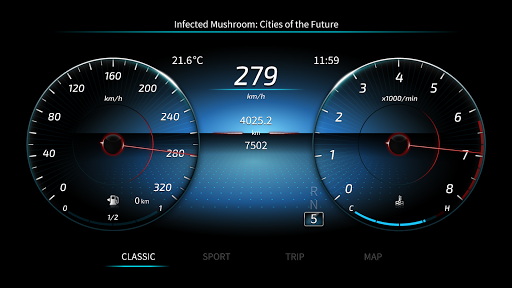
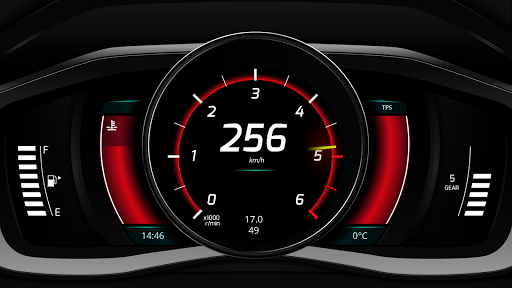
The best vehicle companion app for road trips, street and race track. Or just having fun with your favourite racing simulator.
RealDash is free to try. Consider subscribing My RealDash service if you find this app useful.
★ Pixel Perfect™ customization of dashboards. Limited only by imagination.
★ Super high quality visuals and animated gauges.
★ Gallery with downloadable free and premium Dashboards and Gizmos.
★ Read and clear vehicle error codes.
★ Map and Speed limit display.
★ Voice commands allow hands free operation.
★ Instant and average fuel consumption.
★ Performance meter 0-60, 0-100, 0-200, 60 feet, 1/8 mile, 1/4 mile, and mile.
★ Measure horsepower and torque.
★ A powerful Trigger->Action system.
★ Create alarms and visual effects based on configurable triggers.
★ A lap timer with dozens of automatically detected race tracks.
Supported ECUs:
- Autronic SM4, SM2 and SMC
- CAN-Analyzer USB (7.x)
- DTAFast S-Series
- EasyEcu 3+
- Ecumaster EMU
- Hondata K-Pro, FlashPro, and S300
- Hybrid EMS
- KMS MP25 and MD35
- Link ECU (except G4X)
- MaxxECU
- Megasquirt 1,2,3 / Microsquirt
- Motorsport-Electronics ME221
- Nissan Consult I
- OBD2 via ELM327 adapter
- Speeduino
- Spitronics ECU & TCU
- SPLeinonen PDSX-1 & DashBox
- Tatech 32 & 38
- UltraSky EMS
- Unichip
- VEMS v3
+ Custom hardware and DIY solutions via our open protocol.
Supported Racing games:
- Assetto Corsa
- BeamNG Drive
- Codemasters F1 2015-2020
- Dirt Rally
- Euro Truck Simulator 2
- Forza Horizon 4
- Forza Motorsport 7
- Gran Turismo Sport
- Gran Turismo 7
- Grid 2
- Live for Speed
- Project Cars
RealDash can be used without connection to ECU. Then a GPS and device internal sensors are available for:
- Vehicle speed.
- Your current location on map.
- Current speed limit.
- Lap timer.
- Acceleration info.
- Performance measurements (with limited accuracy).
We hope you enjoy using RealDash. Have Fun!
แสดงเพิ่มเติม

1. ดาวน์โหลดตัวติดตั้ง MEmu และสิ้นสุดการติดตั้ง

2. เริ่ม MEmu จากนั้นเปิด Google Play บนหน้าแรก

3. ค้นหา RealDash ใน Google Play
Install
4. ดาวน์โหลดและติดตั้ง RealDash
5. เมื่อติดตั้งเสร็จให้คลิกที่ไอคอนเพื่อเริ่มใช้งาน

6. ใช้ MEmu เพื่อสัมผัสประสบการณ์ RealDash บนคอมพิวเตอร์ของคุณ
MEmu Play คือโปรแกรมจำลอง Android ที่ดีที่สุด มีผู้ใช้มากกว่า 50 ล้านคน มอบประสบการณ์การใช้งานแอป Android ขั้นสุดยอดให้กับคุณ เทคโนโลยีจำลองเสมือนของ MEmu ช่วยให้คุณรันแอป Android หลายพันแอปบนคอมพิวเตอร์ได้อย่างราบรื่น แม้แอปที่กินทรัพยากรเครื่องสูงที่สุด
จอใหญ่และกราฟฟิกสวยกว่า; เล่นได้นาน, ไม่ต้องใช้แบตเตอรี่โทรศัพท์หรือเน็ตโทรศัพท์.
ระบบปรับแต่งปุ่มคีย์บอร์ดและเม้าส์ตามที่คุณเลือก
เล่นมากกว่าหนึ่งเกมบน PC ในเวลาเดียวกันด้วยระบบหลายจอหรือ Multi-Instance manager.
Use RealDash on PC by following steps: