Speech Assistant AAC
อัปเดตเมื่อ
เวอร์ชันปัจจุบัน
6.4.7
ให้บริการโดย

เมื่อใช้ Speech Assistant AAC บนโทรศัพท์ของคุณไม่ต้องกังวลกับการชาร์จไฟมากเกินไปปลดปล่อยตัวคุณเองจากหน้าจอขนาดเล็กและสนุกกับการใช้แอพนี้บนหน้าจอขนาดใหญ่ จากนี้ไปรับประสบการณ์เต็มหน้าจอของแอปพลิเคชันของคุณด้วยคีย์บอร์ดและเมาส์ MEmu มีคุณสมบัติที่น่าแปลกใจที่คุณคาดหวัง: การติดตั้งที่รวดเร็วและการตั้งค่าที่ง่ายควบคุมได้ง่ายไม่ จำกัด แบตเตอรี่ข้อมูลมือถือและการโทรที่รบกวน MEmu 9 ใหม่ล่าสุดเป็นตัวเลือกที่ดีที่สุดสำหรับการใช้ Meitu – โปรแกรมแก้ไขภาพแนวธรรมชาติ บนคอมพิวเตอร์ของคุณ ด้วยรหัสการดูดซึมของเราผู้จัดการหลายอินสแตนซ์ทำให้สามารถเปิดบัญชี 2 บัญชีขึ้นไปในเวลาเดียวกันได้ และที่สำคัญที่สุดเอ็นจิ้นจำลองพิเศษของเราสามารถปลดปล่อยศักยภาพของPCของคุณและทำให้ทุกอย่างราบรื่นและสนุกสนาน
แสดงเพิ่มเติม
ดาวน์โหลด Speech Assistant AAC บน PC ด้วย MEmu Android Emulator สนุกกับการเล่นบนหน้าจอขนาดใหญ่ Speech Assistant AAC is a text-to-speech (TTS) app designed for people who are speech impaired, for example due to Aphasia, MND/ALS, Autism, Stroke, Cerebral Palsy or other speech problems.
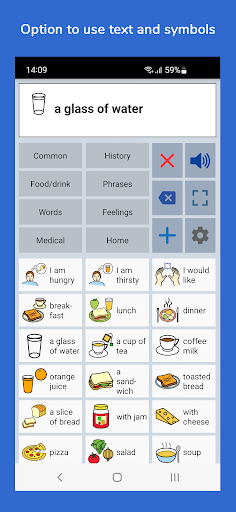
Speech Assistant AAC is a text-to-speech (TTS) app designed for people who are speech impaired, for example due to Aphasia, MND/ALS, Autism, Stroke, Cerebral Palsy or other speech problems.
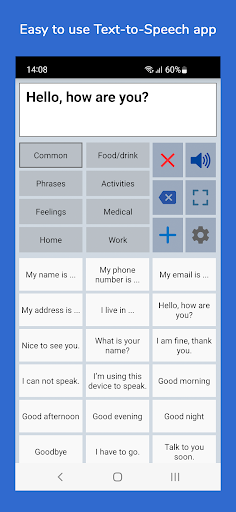
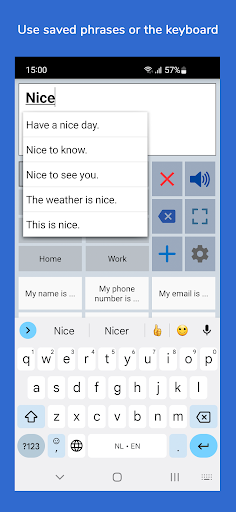
With the app you can create categories and phrases, which are placed on buttons. With these buttons you can create messages that can be shown or spoken (text-to-speech). It is also possible to type any text using the keyboard.
Key features
• Easy to use and completely customizable to your needs and preferences.
• Categories to organize your phrases.
• History for quick access to previously typed phrases.
• Option to select photos from your Photo Library or Symbols on the buttons.
• Option to record speech or use a text-to-speech voice.
• Full screen button to show your message with a large font.
• Auto complete feature to quickly find your phrases.
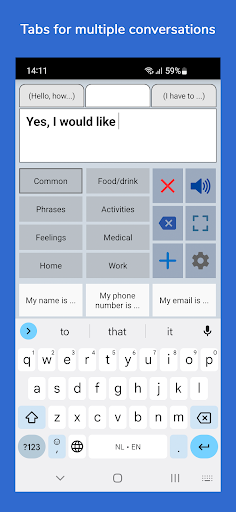
• Tabs for multiple conversations (optional setting).
• Designed for smartphones and tablets with portrait and landscape layout.
• Backup to Mail or Google Drive.
Categories and phrases
• Add, change or delete your own categories and phrases.
• You can create categories to organize your phrases for quick access.
• Long press (optional setting) to easily edit the phrase and category buttons.
• Option to Backup and Restore your categories and phrases.
Fully Customizable
• The size of the buttons, the textbox and the text can be adjusted.
• The app has various color schemes and you can also create a personal color scheme.
• Give the individual buttons with phrases different colors.
Full screen
• Show your message full screen with a very large font.
• Useful for communicating in a noisy environment.
• Button to rotate the text to show your message to the person opposite of you.
Other features
• Button to share your message to mail, text and social media.
• Connect a bluetooth keyboard and create shortcuts for the functions Speak, Clear, Show and Attention Sound.
• Option for preventing double tapping by disabling the button (for a short time) after touching.
• Undo option in case of unintentionally tapping the clear button.
• Attention sound button on Main and Full screen.
Voices
The voice is not part of the app, but the app uses the voice installed on your device.
For example, you can use one of the voices from 'Speech Services by Google'. It has female and male voices in many languages. If it is not available on your device, you can download it from the Google Play Store.
You can change the selected voice in the voice settings of the app.
Full version
The basic version of the app is free. In the settings of the app you can upgrade to the full version. This is a one-time payment for these extra features, there is no subscription.
• An unlimited number of categories.
• Backup and Restore option.
• Option to select symbols from the set of 3400 Mulberry Symbols (mulberrysymbols.org).
• Option to change the color of the individual buttons.
• History for quick access to previously spoken phrases.
• Create user profiles for different languages, situations or persons.
• Tabs for easy switching between multiple conversations.
• Option to record speech on to a button and to import voice recordings into the app.
About the app
• The app does not require an internet connection.
• For feedback or questions, please contact: android@asoft.nl.
• On www.asoft.nl you can find a user manual.
แสดงเพิ่มเติม

1. ดาวน์โหลดตัวติดตั้ง MEmu และสิ้นสุดการติดตั้ง

2. เริ่ม MEmu จากนั้นเปิด Google Play บนหน้าแรก

3. ค้นหา Speech Assistant AAC ใน Google Play
Install
4. ดาวน์โหลดและติดตั้ง Speech Assistant AAC
5. เมื่อติดตั้งเสร็จให้คลิกที่ไอคอนเพื่อเริ่มใช้งาน

6. ใช้ MEmu เพื่อสัมผัสประสบการณ์ Speech Assistant AAC บนคอมพิวเตอร์ของคุณ
MEmu Play คือโปรแกรมจำลอง Android ที่ดีที่สุด มีผู้ใช้มากกว่า 50 ล้านคน มอบประสบการณ์การใช้งานแอป Android ขั้นสุดยอดให้กับคุณ เทคโนโลยีจำลองเสมือนของ MEmu ช่วยให้คุณรันแอป Android หลายพันแอปบนคอมพิวเตอร์ได้อย่างราบรื่น แม้แอปที่กินทรัพยากรเครื่องสูงที่สุด
จอใหญ่และกราฟฟิกสวยกว่า; เล่นได้นาน, ไม่ต้องใช้แบตเตอรี่โทรศัพท์หรือเน็ตโทรศัพท์.
ระบบปรับแต่งปุ่มคีย์บอร์ดและเม้าส์ตามที่คุณเลือก
เล่นมากกว่าหนึ่งเกมบน PC ในเวลาเดียวกันด้วยระบบหลายจอหรือ Multi-Instance manager.
Use Speech Assistant AAC on PC by following steps: