The MICHELIN Guide
อัปเดตเมื่อ
เวอร์ชันปัจจุบัน
9.0.1
ให้บริการโดย

เมื่อใช้ The MICHELIN Guide บนโทรศัพท์ของคุณไม่ต้องกังวลกับการชาร์จไฟมากเกินไปปลดปล่อยตัวคุณเองจากหน้าจอขนาดเล็กและสนุกกับการใช้แอพนี้บนหน้าจอขนาดใหญ่ จากนี้ไปรับประสบการณ์เต็มหน้าจอของแอปพลิเคชันของคุณด้วยคีย์บอร์ดและเมาส์ MEmu มีคุณสมบัติที่น่าแปลกใจที่คุณคาดหวัง: การติดตั้งที่รวดเร็วและการตั้งค่าที่ง่ายควบคุมได้ง่ายไม่ จำกัด แบตเตอรี่ข้อมูลมือถือและการโทรที่รบกวน MEmu 9 ใหม่ล่าสุดเป็นตัวเลือกที่ดีที่สุดสำหรับการใช้ Meitu – โปรแกรมแก้ไขภาพแนวธรรมชาติ บนคอมพิวเตอร์ของคุณ ด้วยรหัสการดูดซึมของเราผู้จัดการหลายอินสแตนซ์ทำให้สามารถเปิดบัญชี 2 บัญชีขึ้นไปในเวลาเดียวกันได้ และที่สำคัญที่สุดเอ็นจิ้นจำลองพิเศษของเราสามารถปลดปล่อยศักยภาพของPCของคุณและทำให้ทุกอย่างราบรื่นและสนุกสนาน
แสดงเพิ่มเติม
ดาวน์โหลด The MICHELIN Guide บน PC ด้วย MEmu Android Emulator สนุกกับการเล่นบนหน้าจอขนาดใหญ่ The MICHELIN Guide app puts the world’s best restaurants and hotels right in your pocket — and lets you book them.
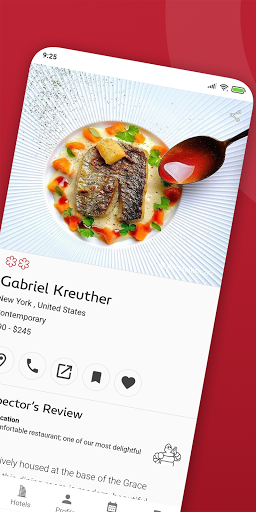
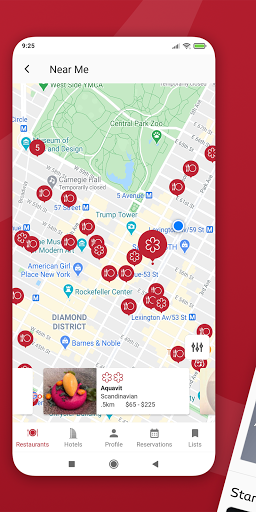
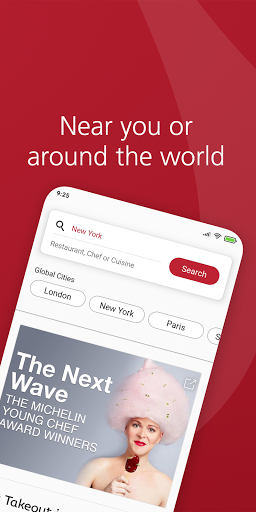
The MICHELIN Guide app puts the world’s best restaurants and hotels right in your pocket — and lets you book them.
The MICHELIN Guide app is a milestone. It marks the first time in history that the entire global guide — every restaurant in every location — is all together, all in one place. The app also includes the new and improved MICHELIN Guide hotel selection. Now you can instantly book the world’s most unique and exciting hotels, each one chosen for their extraordinary style, service, and personality.
The MICHELIN Guide app makes it easier than ever to plan your next adventure or enhance your current one. Use it to quickly find and reserve restaurants and hotels near you or in a future destination; create and share lists of all your favorite places; or trial our “Plus” membership and receive free VIP upgrades and amenities at participating hotels.
Need concierge-level care? Our expert travel specialists are waiting just a click away, available to assist with any aspect of your trip. They’re real people, ready to help you go places.
So get going. Find great restaurants in each MICHELIN Guide city. Book amazing hotels wherever you find yourself. Download the app today.
Here’s everything you can do on the MICHELIN Guide app:
• Search all MICHELIN Guide restaurants near you or by location
• Create and share lists of your favorite hotels and restaurants
• Filter by restaurants that offer takeaway or online reservations
• Get a table via Resy, Open Table, TheFork, and others (where available)
• Instantly book thousands of incredible hotels in over 130 countries
• Sign up for Plus and get VIP privileges at over a thousand hotels
• Filter hotels by amenity, style, sustainability, Plus privileges, and more
• Quickly discover restaurants and hotels near you or in a future destination
• Get dedicated expert assistance before, during, and after your trip
Stay in amazing places. Eat unforgettable meals. Take the MICHELIN Guide app wherever you go.
แสดงเพิ่มเติม

1. ดาวน์โหลดตัวติดตั้ง MEmu และสิ้นสุดการติดตั้ง

2. เริ่ม MEmu จากนั้นเปิด Google Play บนหน้าแรก

3. ค้นหา The MICHELIN Guide ใน Google Play
Install
4. ดาวน์โหลดและติดตั้ง The MICHELIN Guide
5. เมื่อติดตั้งเสร็จให้คลิกที่ไอคอนเพื่อเริ่มใช้งาน

6. ใช้ MEmu เพื่อสัมผัสประสบการณ์ The MICHELIN Guide บนคอมพิวเตอร์ของคุณ
MEmu Play คือโปรแกรมจำลอง Android ที่ดีที่สุด มีผู้ใช้มากกว่า 50 ล้านคน มอบประสบการณ์การใช้งานแอป Android ขั้นสุดยอดให้กับคุณ เทคโนโลยีจำลองเสมือนของ MEmu ช่วยให้คุณรันแอป Android หลายพันแอปบนคอมพิวเตอร์ได้อย่างราบรื่น แม้แอปที่กินทรัพยากรเครื่องสูงที่สุด
จอใหญ่และกราฟฟิกสวยกว่า; เล่นได้นาน, ไม่ต้องใช้แบตเตอรี่โทรศัพท์หรือเน็ตโทรศัพท์.
ระบบปรับแต่งปุ่มคีย์บอร์ดและเม้าส์ตามที่คุณเลือก
เล่นมากกว่าหนึ่งเกมบน PC ในเวลาเดียวกันด้วยระบบหลายจอหรือ Multi-Instance manager.
Use The MICHELIN Guide on PC by following steps: