True CyberSafe PRO
อัปเดตเมื่อ
เวอร์ชันปัจจุบัน
1.3.0
ให้บริการโดย

เมื่อใช้ True CyberSafe PRO บนโทรศัพท์ของคุณไม่ต้องกังวลกับการชาร์จไฟมากเกินไปปลดปล่อยตัวคุณเองจากหน้าจอขนาดเล็กและสนุกกับการใช้แอพนี้บนหน้าจอขนาดใหญ่ จากนี้ไปรับประสบการณ์เต็มหน้าจอของแอปพลิเคชันของคุณด้วยคีย์บอร์ดและเมาส์ MEmu มีคุณสมบัติที่น่าแปลกใจที่คุณคาดหวัง: การติดตั้งที่รวดเร็วและการตั้งค่าที่ง่ายควบคุมได้ง่ายไม่ จำกัด แบตเตอรี่ข้อมูลมือถือและการโทรที่รบกวน MEmu 9 ใหม่ล่าสุดเป็นตัวเลือกที่ดีที่สุดสำหรับการใช้ Meitu – โปรแกรมแก้ไขภาพแนวธรรมชาติ บนคอมพิวเตอร์ของคุณ ด้วยรหัสการดูดซึมของเราผู้จัดการหลายอินสแตนซ์ทำให้สามารถเปิดบัญชี 2 บัญชีขึ้นไปในเวลาเดียวกันได้ และที่สำคัญที่สุดเอ็นจิ้นจำลองพิเศษของเราสามารถปลดปล่อยศักยภาพของPCของคุณและทำให้ทุกอย่างราบรื่นและสนุกสนาน
แสดงเพิ่มเติม
สัมผัสประสบการณ์สุดยอดการใช้งาน True CyberSafe PRO บนพีซีด้วย MEmu Play นี่คือโปรแกรมจำลอง Android ฟรีที่ทรงพลัง ให้คุณใช้งานแอป Android นับพันบนเดสก์ท็อป สนุกกับการเชื่อมต่อกับเพื่อนๆ และขัดเกลาผลงานของคุณอย่างมีประสิทธิภาพยิ่งขึ้น! Protect your digital life with True CyberSafe PRO, the comprehensive mobile security solution designed to keep you safe and protected while using the internet.
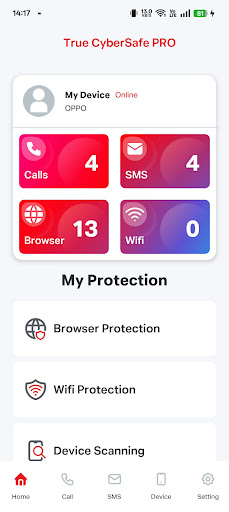
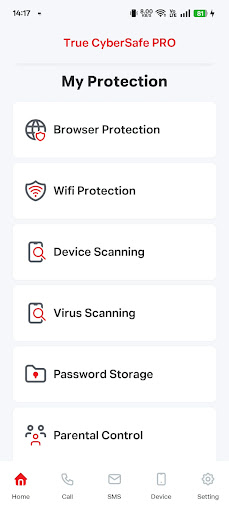
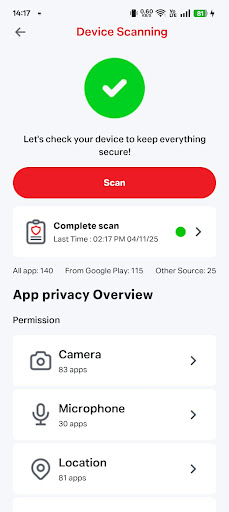
Protect your digital life with True CyberSafe PRO, the comprehensive mobile security solution designed to keep you safe and protected while using the internet. Our app helps you stay ahead of cyber threats, enhances your phone's security, and safeguards you from bad actors online—wherever you go.
Comprehensive Protection at Your Fingertips:
- Advanced Web Protection Browse with confidence. We proactively detect and block unsecured domains, malicious URLs, and unwanted websites to protect you from malware, phishing, and other online dangers.
- Wi-Fi Security Scanner Connect safely to any network. Our scanner checks your Wi-Fi connections for vulnerabilities and threats, ensuring your data remains private on public and private networks.
- Real-time Scam Alerts Stay one step ahead of scammers. Receive instant warnings about suspicious scam calls and fraudulent SMS messages, helping you identify and avoid costly-phishing attempts.
- Proactive Threat Blocking Our powerful security engine actively blocks threats before they can compromise your device, neutralizing malware and other malicious activities.
- Robust Parental Controls Create a safer digital environment for your family. Easily lock and manage apps, restrict access to inappropriate content, and ensure your children are protected online.
Important Disclosure: Use of Accessibility Service
To provide you with critical, real-time protection, True CyberSafe PRO utilizes the Accessibility Service.
Why We Use This Service: This service is essential for enabling our core security features. It allows us to:
Detect and alert you to scam calls.
Identify malicious links within other applications.
Warn you about fraudulent SMS messages.
Your Privacy is Our Priority: True CyberSafe PRO does not collect or share any of your personal data through the Accessibility Service. Its sole purpose is to power these security features and ensure you stay safe online.
แสดงเพิ่มเติม

1. ดาวน์โหลดตัวติดตั้ง MEmu และสิ้นสุดการติดตั้ง

2. เริ่ม MEmu จากนั้นเปิด Google Play บนหน้าแรก

3. ค้นหา True CyberSafe PRO ใน Google Play
Install
4. ดาวน์โหลดและติดตั้ง True CyberSafe PRO
5. เมื่อติดตั้งเสร็จให้คลิกที่ไอคอนเพื่อเริ่มใช้งาน

6. ใช้ MEmu เพื่อสัมผัสประสบการณ์ True CyberSafe PRO บนคอมพิวเตอร์ของคุณ
MEmu Play คือโปรแกรมจำลอง Android ที่ดีที่สุด มีผู้ใช้มากกว่า 50 ล้านคน มอบประสบการณ์การใช้งานแอป Android ขั้นสุดยอดให้กับคุณ เทคโนโลยีจำลองเสมือนของ MEmu ช่วยให้คุณรันแอป Android หลายพันแอปบนคอมพิวเตอร์ได้อย่างราบรื่น แม้แอปที่กินทรัพยากรเครื่องสูงที่สุด
จอใหญ่และกราฟฟิกสวยกว่า; เล่นได้นาน, ไม่ต้องใช้แบตเตอรี่โทรศัพท์หรือเน็ตโทรศัพท์.
ระบบปรับแต่งปุ่มคีย์บอร์ดและเม้าส์ตามที่คุณเลือก
เล่นมากกว่าหนึ่งเกมบน PC ในเวลาเดียวกันด้วยระบบหลายจอหรือ Multi-Instance manager.
Use True CyberSafe PRO on PC by following steps: