Vapor AI
อัปเดตเมื่อ
เวอร์ชันปัจจุบัน
1.0.1
ให้บริการโดย

เมื่อใช้ Vapor AI บนโทรศัพท์ของคุณไม่ต้องกังวลกับการชาร์จไฟมากเกินไปปลดปล่อยตัวคุณเองจากหน้าจอขนาดเล็กและสนุกกับการใช้แอพนี้บนหน้าจอขนาดใหญ่ จากนี้ไปรับประสบการณ์เต็มหน้าจอของแอปพลิเคชันของคุณด้วยคีย์บอร์ดและเมาส์ MEmu มีคุณสมบัติที่น่าแปลกใจที่คุณคาดหวัง: การติดตั้งที่รวดเร็วและการตั้งค่าที่ง่ายควบคุมได้ง่ายไม่ จำกัด แบตเตอรี่ข้อมูลมือถือและการโทรที่รบกวน MEmu 9 ใหม่ล่าสุดเป็นตัวเลือกที่ดีที่สุดสำหรับการใช้ Meitu – โปรแกรมแก้ไขภาพแนวธรรมชาติ บนคอมพิวเตอร์ของคุณ ด้วยรหัสการดูดซึมของเราผู้จัดการหลายอินสแตนซ์ทำให้สามารถเปิดบัญชี 2 บัญชีขึ้นไปในเวลาเดียวกันได้ และที่สำคัญที่สุดเอ็นจิ้นจำลองพิเศษของเราสามารถปลดปล่อยศักยภาพของPCของคุณและทำให้ทุกอย่างราบรื่นและสนุกสนาน
แสดงเพิ่มเติม
สัมผัสประสบการณ์สุดยอดการใช้งาน Vapor AI บนพีซีด้วย MEmu Play นี่คือโปรแกรมจำลอง Android ฟรีที่ทรงพลัง ให้คุณใช้งานแอป Android นับพันบนเดสก์ท็อป สนุกกับการเชื่อมต่อกับเพื่อนๆ และขัดเกลาผลงานของคุณอย่างมีประสิทธิภาพยิ่งขึ้น! Explore Creative Image and Video Tools with Vapor AI!
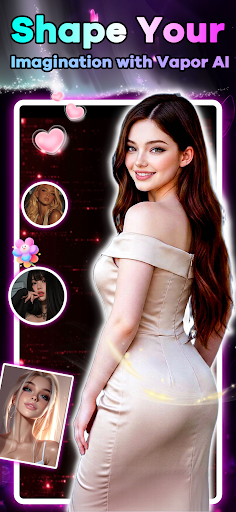
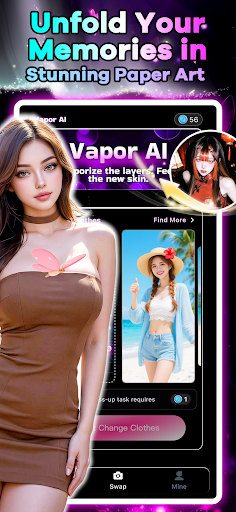
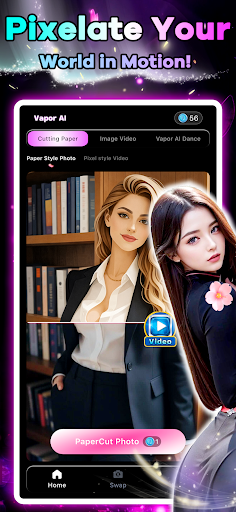
Explore Creative Image and Video Tools with Vapor AI!
Whether you want to preview summer outfits or transform your media into unique art styles, Vapor AI is your versatile AI-powered creative assistant. From instant beachwear swaps to artistic video transformations and animations, Vapor AI helps you bring your creative ideas to life.
Key Features:
Virtual Beach Wardrobe
Upload any clear photo and swap your everyday clothes for summer beachwear. Our AI technology adjusts the garments to fit your body shape, pose, and lighting naturally for realistic results.
Curated Summer Collection
Explore a diverse wardrobe of styles, including bikinis, classic one-piece swimsuits, tropical shirts, swim trunks, and beach dresses to find the look that suits you.
Image-to-Papercut Art (New)
Transform your photos into layered papercut or paper-sculpture art. This feature adds distinct depth, clean edges, and realistic paper textures to give your photos a handcrafted design aesthetic.
Video-to-Pixel Style (New)
Convert ordinary video clips into retro 8-bit or 16-bit pixel art. This filter brings a nostalgic, classic-gaming aesthetic to your modern video content.
AI Image-to-Video (New)
Animate your static photos. By analyzing a single image, our AI generates smooth and coherent motion sequences, turning still shots into short, dynamic video stories.
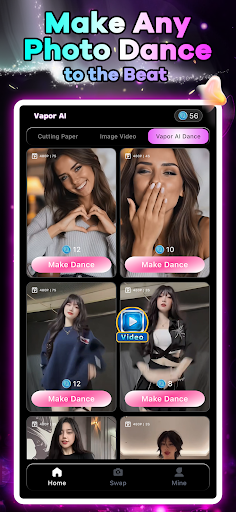
AI Dance Animation (New)
Upload a portrait or full-body photo, and watch the AI animate the subject to perform energetic dance routines. It is a simple and fun way to create engaging short-form video content.
Who is Vapor AI for?
Fashion & Swimwear Enthusiasts: Preview and experiment with different beachwear styles before making a purchase.
Content Creators: Leverage papercut filters, pixelated videos, and dance animations to diversify your social media feed.
Creative Explorers: Have fun discovering the possibilities of AI-driven image and video editing.
Download Vapor AI today and start exploring your creative options!
แสดงเพิ่มเติม

1. ดาวน์โหลดตัวติดตั้ง MEmu และสิ้นสุดการติดตั้ง

2. เริ่ม MEmu จากนั้นเปิด Google Play บนหน้าแรก

3. ค้นหา Vapor AI ใน Google Play
Install
4. ดาวน์โหลดและติดตั้ง Vapor AI
5. เมื่อติดตั้งเสร็จให้คลิกที่ไอคอนเพื่อเริ่มใช้งาน

6. ใช้ MEmu เพื่อสัมผัสประสบการณ์ Vapor AI บนคอมพิวเตอร์ของคุณ
MEmu Play คือโปรแกรมจำลอง Android ที่ดีที่สุด มีผู้ใช้มากกว่า 50 ล้านคน มอบประสบการณ์การใช้งานแอป Android ขั้นสุดยอดให้กับคุณ เทคโนโลยีจำลองเสมือนของ MEmu ช่วยให้คุณรันแอป Android หลายพันแอปบนคอมพิวเตอร์ได้อย่างราบรื่น แม้แอปที่กินทรัพยากรเครื่องสูงที่สุด
จอใหญ่และกราฟฟิกสวยกว่า; เล่นได้นาน, ไม่ต้องใช้แบตเตอรี่โทรศัพท์หรือเน็ตโทรศัพท์.
ระบบปรับแต่งปุ่มคีย์บอร์ดและเม้าส์ตามที่คุณเลือก
เล่นมากกว่าหนึ่งเกมบน PC ในเวลาเดียวกันด้วยระบบหลายจอหรือ Multi-Instance manager.
Use Vapor AI on PC by following steps: