Mimic Party پی سی

پی سی پر Mimic Party ڈاؤن لوڈ کریں

Mimic Party پی سی
  • تازہ کاری

  • موجودہ ورژن

  • پیشکش بذریعہ

    Mimic Party پی سی

پی سی پر Mimic Party کی خصوصیات

Mimic Party کھیلنے کے اپنے پورے جنون کے دوران آپ کے ہاتھ آپ کے فون کی ایک چھوٹی سی اسکرین تک محدود نہیں ہونے چاہئیں۔ پرو کی طرح کھیلیں اور کی بورڈ اور ماؤس کے سہارے اپنے گیم پر مکمل کنٹرول حاصل کریں۔ MEmu آپ کو وہ تمام چیزیں پیش کرتا ہے جس کی آپ امید کرتے ہیں۔ پی سی پر Mimic Party ڈاؤن لوڈ کریں اور کھیلیں۔ جتنی دیر تک آپ چاہیں کھیلیں، بیٹری، موبائل ڈیٹا کی کوئی حد نہیں ہے اور پریشان کن کالز نہیں ہیں۔ نئے برانڈ کا MEmu 9 پی سی پر Mimic Party کھیلنے کا بہترین اختیار ہے۔ ہماری مہارت کی مدد سے تیار کردہ، شاندار پری سیٹ کی میپنگ سسٹم Mimic Party کو ایک ریئل پی سی گیم بناتا ہے۔ MEmu کثیر نظیری منیجرایک ہی ڈیوائس پر 2 یا زیادہ اکاؤنٹس پلے کرنا ممکن بناتا ہے۔ اور سب سے اہم بات یہ ہے کہ، ہمارا خصوصی ایمولیشن انجن آپ کے پی سی کی مکمل طاقت ریلیز کرتے ہوئے ہر چیز ہموار بنا سکتا ہے۔

مزید دکھائیں

اسکرین شاٹس اور Mimic Party پی سی کی ویڈیو

MEmu Play کے ساتھ PC پر Mimic Party ڈاؤن لوڈ کریں۔ بڑی اسکرین پر کھیلنے کا لطف اٹھائیں۔ An online 1-5 player voice party game.

گیم کی معلومات

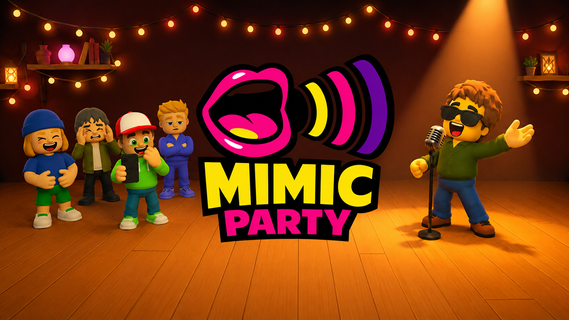
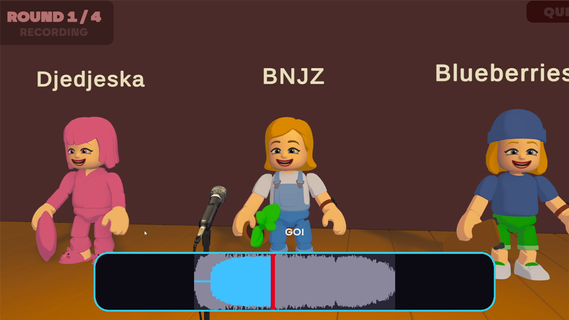
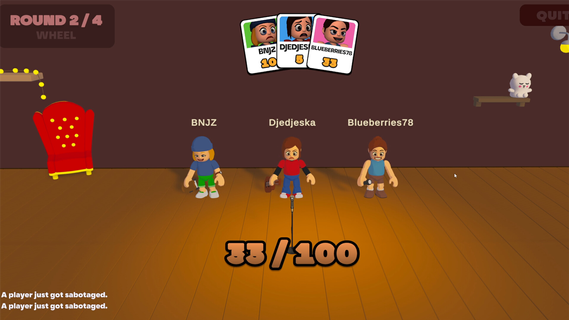
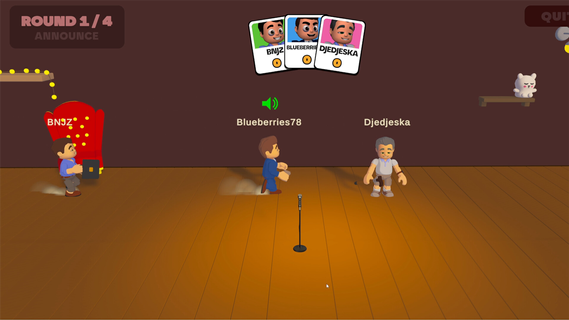
An online 1-5 player voice party game. You hear a sound. You get one shot to reproduce it with your own voice. A local AI grades how close you got melody, rhythm, attacks and then the wheel decides who walks away with a bonus and whose next take comes back saturated, echoing, or replaced by a fart.FEATURES:🎤 1-5 player online voice party game🎧 One-shot takes - no retries, no undo, no mercy🤖 Local AI scoring: melody, rhythm and attacks, not your voice🎡A wheel between rounds: bonuses, multipliers, and sabotages to hand out😈 Sabotages: saturation, echo, pitch shift, chopped audio or your take swapped for a fart🗣️ In-game voice chat that goes quiet exactly when someone performs🔊 Themed sound packs - animals, machines, voices, and more🛠️ Steam Workshop: build and share your own sound packs⏱️ 10 minutes per gameONE SOUND. ONE SHOT.Every round reveals a reference sound to the whole table at once. Everybody records on the same countdown, then the takes are played back one by one while the room reacts. There is no second attempt and no rehearsal - whatever came out of your mouth is what everyone hears.WE DON'T CARE ABOUT YOUR VOICEScoring is built around what a human throat can actually reproduce: the shape of the melody, the rhythm, the attacks, whether you barked once or three times. Not your timbre. A deep voice and a high voice doing the same curve score the same, so nobody wins just because they got lucky with their vocal cords.THE WHEEL DECIDESBetween rounds the wheel spins for everyone at once. It hands out points, multipliers and sabotages. Draw one and you choose your victim: their next take comes out saturated, echoing, chopped to pieces, or replaced outright by a garbage sound the whole table hears instead of their voice. It costs them points on top. And you find out who aimed at you only when your take plays.THE ROOM GOES QUIETVoice chat is always on except when it shouldn't be. The moment a take starts playing, the whole table is muted so everyone hears the same thing. The second it ends, the mics open again, right in time for the reaction. That half-second is the game.BRING YOUR OWN NOISESSound packs are just content. Make one, publish it to the Steam Workshop in a couple of clicks, and subscribe to whatever the community comes up with. Everyone at the table needs the pack before a game can start - the lobby tells you exactly who is still downloading.

مزید دکھائیں

پی سی پر Mimic Party کو کیسے ڈاؤن لوڈ کریں

  • Mimic Party پی سی

    1. MEmu انسٹالر ڈاؤن لوڈ کریں اور سیٹ اپ مکمل کریں

  • Mimic Party پی سی

    2. MEmu شروع کریں اسکے بعد ڈیسکٹاپ پر Google Play کھولیں

  • Mimic Party پی سی

    3. Google Play میں Mimic Party تلاش کریں

  • Mimic Party پی سی Install

    4. Mimic Party ڈاؤن لوڈ کریں اور انسٹال کریں

  • Mimic Party پی سی

    5. انسٹال مکمل ہونے کے بعد سٹارٹ کرنے کے لیے آئیکن پر کلک کریں

  • Mimic Party پی سی
    Mimic Party پی سی Mimic Party پی سی

    6. MEmu کے ساتھ پی سی پر Mimic Party کھیلنے کا لطف لیں

Mimic Party کے لیے Memu کا استعمال کیوں کریں

MEmu پلے بہترین اینڈرائڈ ایمولیٹر ہے اور 100 ملین لوگ اس کے زبردست اینڈرائڈ گیمنگ تجربہ سے لطف اندوز ہو رہے ہیں۔ MEmu کی ورچولائزیشن ٹیکنالوجی آپ کو اپنے PC پر ہزاروں اینڈرائڈ گیمز یہاں تک کہ انتہائی گرافک والے گیمز باسہولت کھیلنے کی طاقت دیتی ہے۔

  • بہتر گرافکس کے ساتھ بڑی اسکرین؛ طویل دورانیہ، بیٹری یا لامحدود موبائل ڈیٹا کے بغیر۔

  • کی بورڈ اور ماؤس یا گیم پیڈ کے عین مطابق کنٹرول کے لیے کی میپنگ کا پورا سپورٹ۔

  • کثیر مثالی منیجر کے ساتھ بیک وقت ایک پی سی پر متعدد گیم اکاؤنٹس یا ٹاسکس۔

کھیلنے کے لئے تیار؟

مقبول موضوعات

Mimic Party - اکثر پوچھے جانے والے سوالات

  • پی سی پر Mimic Party کیسے پلے کریں؟

    پی سی پر درج ذیل مراحل پر عمل کرتے ہوئے Mimic Party کھیلیں:

    • MEmu ڈاؤن لوڈ کریں، پھر انسٹال کریں اور اس کو لاؤنچ کریں
    • گوگل پلے اسٹور میں لاگ ان کریں، گیم انسٹال کریں
    • MEmu کے ساتھ پی سی پر گیم کھیلنے کا لطف اٹھائیں
  • پی سی پر Mimic Party چلانے کے لیے کم از کم سسٹم کے کیا تقاضے ہیں؟
    • انٹیل یا اے ایم ڈی پروسیسر
    • مائکروسافٹ 7 یا اس سے اوپر
    • 2GB کی میموری
    • 5GB کا مفت اسپیس
    • ہارڈ ویئر ورچولائزیشن ٹیکنالوجی