Dawnfolk
Aktualisiert
Aktuelle Version
Angeboten von

Bei all Ihrer Leidenschaft für das Spielen von Dawnfolk sollten Ihre Hände nicht auf einen winzigen Bildschirm Ihres Telefons beschränkt sein. Spielen Sie wie ein Profi und übernehmen Sie die volle Kontrolle über Ihr Spiel mit Tastatur und Maus. MEmu bietet Ihnen all die Dinge, die Sie erwarten. Laden Sie Dawnfolk herunter und spielen Sie es auf dem PC. Spielen Sie so lange, wie Sie wollen, ohne Grenzwerte für Akku, mobile Daten und störende Anrufe. Das brandneue MEmu 9 ist die beste Wahl, um Dawnfolk auf dem PC zu spielen. Das exquisite voreingestellte Tastaturbelegungssystem, das mit unserem Fachwissen vorbereitet wurde, macht Dawnfolk zu einem echten PC-Spiel. Der MEmu Multi-Instanz-Manager ermöglicht das Spielen von 2 oder mehr Konten auf demselben Gerät. Und das Wichtigste: Unsere exklusive Emulations-Engine kann das volle Potenzial Ihres PCs freisetzen und für reibungslose Abläufe sorgen.
Mehr anzeigen
Laden Sie Play Dawnfolk auf dem PC mit MEmu Android Emulator. Viel Spaß beim Spielen auf großmundieren. In einer Welt voller Dunkelheit bist du der Herrscher eines Königreichs, das von den Schatten verschlungen wurde.
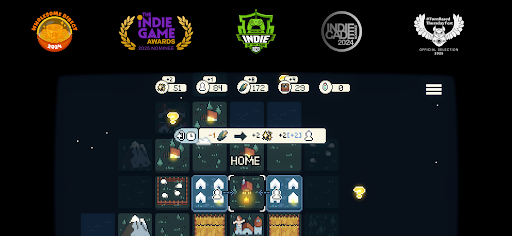
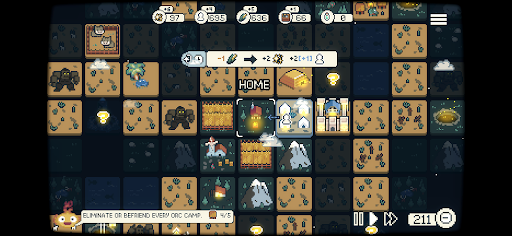
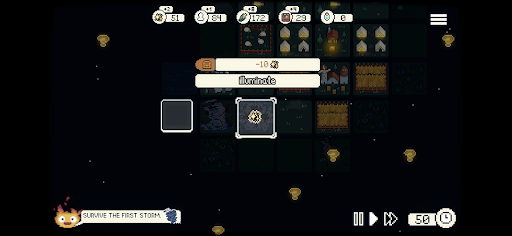
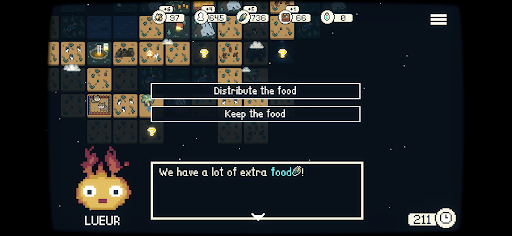
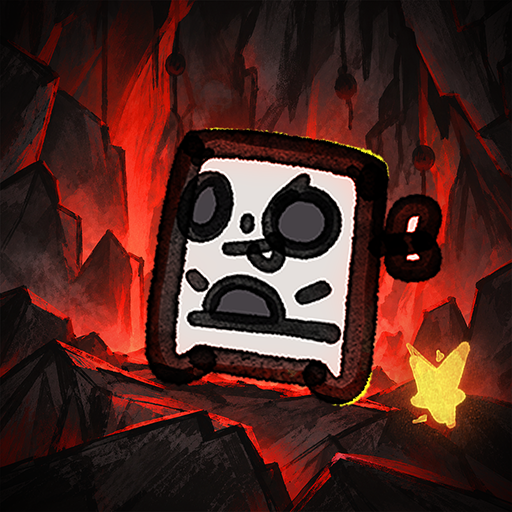
In einer Welt voller Dunkelheit bist du der Herrscher eines Königreichs, das von den Schatten verschlungen wurde. Auf der Suche nach einem Weg, dein Volk zu retten, entdeckst du Lueur – eine mythische, feurige Begleiterin, die deinen Weg erhellen wird.
Vor Jahrzehnten fielen Obsidian-Monolithen vom Himmel und brachten eine schleichende Dunkelheit mit sich, die das Land verschlang. Nun kannst du mit der Kraft von Lueur die Schatten zurückdrängen und dein Reich zurückerobern.
Doch was für ein Herrscher wirst du sein?
Dawnfolk wurde vom Solo-Entwickler Darenn Keller erschaffen und verbindet minimalistische Strategie, Erkundung und Städtebau zu einem entspannenden und zugleich äußerst lohnenden Spielerlebnis.
Erkunde eine unbekannte mittelalterliche Fantasywelt, verwalte Ressourcen, errichte Städte und überlebe zahlreiche Gefahren.
Minispiele sorgen für zusätzliche Herausforderungen bei der Unterstützung deines Volkes. Je besser du abschneidest, desto mehr Ressourcen erhältst du – und hilfst deiner Gemeinschaft dabei, der Dunkelheit zu trotzen.
Jede Entscheidung zählt, während du verschiedene Strategien und Spielstile ausprobierst. Entwickle deine Siedlung von ein paar Zelten zu einer florierenden Stadt – und das in weniger als einer Stunde, ganz ohne lange Tutorials oder komplizierte Systeme.
Das Spiel wurde so gestaltet, dass es sich vertraut und zugleich frisch anfühlt. Der Fokus liegt auf Erkundung und Experimentierfreude – denn Entdeckungen sind ein zentraler Teil der Reise.
Deine Entscheidungen bestimmen das Schicksal deines Volkes.
Wirst du es schaffen, das Licht in die Welt zurückzubringen?
Features
Ein gemütliches Spielerlebnis: Ein Strategiespiel, das für entspanntes Spielen entwickelt wurde – egal, wo du bist.
Einfach zu erlernen: Keine langen Tutorials oder komplexen Menüs – starte direkt und beginne mit dem Aufbau.
Kurze Spielsitzungen: Entwickle dich von den ersten Anfängen zu einer blühenden Stadt in weniger als einer Stunde.
Makro trifft Mikro: Kombiniere Städtebau mit Minispielen, die von Farming-Simulationen und RPGs inspiriert sind. Verdiene Bonusressourcen durch geschicklichkeitsbasierte Herausforderungen, die das Stadtmanagement auflockern.
Verschiedene Spielmodi: Mehrere Spielweisen, darunter Echtzeit, rundenbasierte Modi und anpassbare Schwierigkeitsgrade.
Entdecken wird belohnt: Erforsche, experimentiere und entdecke die Spielsysteme in deinem eigenen Tempo – das Spiel verrät dir nicht alles.
Minimalistisches Design: Konzentrierte Spielmechaniken, die Tiefe bieten, ohne unnötig komplex zu sein.
Interaktive Geschichte: Deine Gebäude formen sich entwickelnde Geschichten. Deine Entscheidungen bestimmen die Ergebnisse und beeinflussen deine Stadt direkt – wirst du mit Güte oder Pragmatismus regieren?
Mehr anzeigen

1. Laden das MEmu-Installationsprogramm herunter und beenden die Installation

2. MEmu starten und Google Play auf der Homepage öffnen

3. Suchen Dawnfolk in Google Play
Install
4. Herunterladen und Installieren Dawnfolk
5. Klicken nach Abschluss der Installation auf das Symbol, um es zu starten

6. Viel Spaß beim Spielen von Dawnfolk auf dem PC mit MEmu
MEmu App Player ist der beste kostenlose Android-Emulator und 50 Millionen Menschen genießen bereits seine hervorragende Android-Gaming-Erfahrung. Mit der MEmu-Virtualisierungstechnologie können Sie Tausende von Android-Spielen problemlos auf Ihrem PC spielen, selbst bei grafikintensiven Spielen.
BGrößeres Bild mit besserer Grafik; Keine unterbrechungen, keine sorgen um Akku
Komplette Tastenbelegung unterstützt mit Maus und Tastatur oder Controller
Mit dem „Multi-Instance-Manager“ können Sie mehrere Spielkonten oder Spiele gleichzeitig auf einem PC ausführen.
Play Dawnfolk on PC by following steps: