Dawnfolk
अपडेट किया गया
वर्तमान वर्शन
संसाधन

अपने सेलफोन पर Dawnfolk का उपयोग करते समय ओवरचार्ज के बारे में चिंता करना बंद करें, अपने आप को छोटी स्क्रीन से मुक्त करें और बहुत बड़े डिस्प्ले पर ऐप का उपयोग करने का आनंद लें। अब से, कीबोर्ड और माउस के साथ अपने ऐप का पूर्ण-स्क्रीन अनुभव प्राप्त करें। एमईएमयू आपको उन सभी आश्चर्यजनक सुविधाओं की पेशकश करता है जिनकी आपको उम्मीद थी: त्वरित इंस्टॉल और आसान सेटअप, सहज नियंत्रण, बैटरी की कोई सीमा नहीं, मोबाइल डेटा और परेशान कॉल। आपके कंप्यूटर पर Dawnfolk का उपयोग करने का सबसे अच्छा विकल्प नया MEmu 9 है। हमारे अवशोषण के साथ कोडित, बहु-उदाहरण प्रबंधक एक ही समय में 2 या अधिक खाते खोलना संभव बनाता है। और सबसे महत्वपूर्ण, हमारा अनन्य उत्सर्जन इंजन आपके पीसी की पूरी क्षमता को जारी कर सकता है, सब कुछ सुचारू और सुखद बना सकता है।
और दिखाएं
डाउनलोड करें Dawnfolk पीसी पर MEmu एंड्रॉयड एमुलेटर के साथ बड़े पर्दे पर खेलने का आनंद लें। In a world of darkness, you are the ruler of a kingdom lost to shadows.
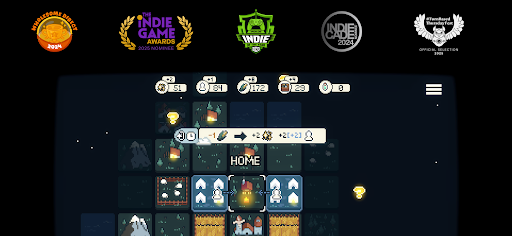
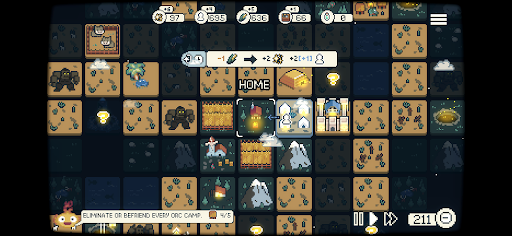
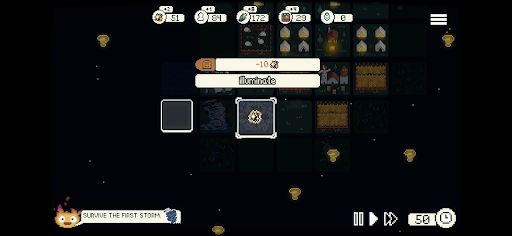
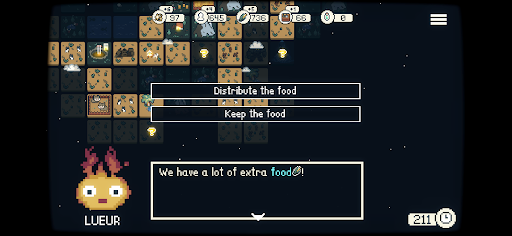
In a world of darkness, you are the ruler of a kingdom lost to shadows. On a quest to save your people, you discover Lueur—a mythical, fiery companion who will light your way.
Decades ago, obsidian monoliths fell from the sky, bringing a creeping darkness that consumed the land. Now, with the power of Lueur, you can push back the shadows and reclaim your realm.
But what kind of ruler will you be?
Created by solo developer Darenn Keller, Dawnfolk blends minimalist strategy, exploration, and city-building into a relaxing yet deeply rewarding experience.
Explore an uncharted medieval fantasy world, manage resources, build cities, and survive against many dangers.
Minigames add a unique challenge to supporting your people. The better you perform, the more resources you gain—helping your community weather the darkness.
Every choice matters as you explore different strategies and play styles. Grow your settlement from a handful of tents into a thriving city in less than an hour, with no need for long tutorials or complex systems.
Designed to feel familiar yet fresh, the game focuses on exploration and experimentation—where discovery is part of the journey.
Your choices will shape the fate of your people.
Will you succeed in bringing light back to the world?
Features
- A Comfy Game: A strategy experience designed for relaxed play, wherever you are.
- Easy to learn: No long tutorials or complex menus—jump in and start building.
- Short sessions: Grow from nothing to a thriving city in under an hour.
- Mixing Macro and Micro: Blend city-building with mini-games inspired by farming sims and RPGs. Earn bonus resources through skill-based challenges that break up city management.
- Game Modes: Multiple ways to play, including real-time, turn-based, and adjustable difficulty.
- Incentivized Discovery: Explore, experiment, and uncover systems at your own pace—the game won’t tell you everything.
- Minimalist Design: Focused mechanics that deliver depth without unnecessary complexity.
- Interactive Story: Your buildings shape evolving stories. Your choices determine outcomes and directly impact your city—will you rule with kindness or pragmatism?
और दिखाएं

1. MEmu इंस्टॉलर को डाउनलोड करें और इंस्टॉलेशन को पूरा करें

2. MEmu शुरू करें फिर होमपेज पर Google Play खोलें

3. Google Play में Dawnfolk खोजें
Install
4. Dawnfolk डाउनलोड कर इंस्टॉल करें
5. इंस्टॉल पूरा होने पर आइकन दबाएं

6. MEmu से पीसी पर Dawnfolk खेलने का आनंद लें
MEmu Play सबसे बेहतरीन मुफ़्त Android एमुलेटर है और 5 करोड़ लोग पहले ही इसके शानदार Android गेमिंग अनुभव का आनंद ले चुके हैं। MEmu 9 वर्चुअलाइज़ेशन तकनीक आपको अपने PC पर हज़ारों Android गेम, यहाँ तक कि सबसे ज़्यादा ग्राफ़िक्स वाले गेम भी, आसानी से खेलने की सुविधा देती है।
असीमित बैटरी या मोबाइल डेटा के साथ बेहतर ग्राफिक्स के साथ बड़ी स्क्रीन; लंबी अवधि।
कीबोर्ड और माउस या गेमपैड के उत्तम नियंत्रण के लिए संपूर्ण कीमैपिंग का समर्थन करता हैं।
एक ही पीसी पर मल्टी-इंस्टेंस मैनेजर के साथ एक समय में कई गेम खाते या कार्य कर सकते हैं।
Play Dawnfolk on PC by following steps: