Dawnfolk
Atualizada
Versão atual
Oferecido por

Com toda a sua paixão por jogar Dawnfolk, não deixe os polegares te atrapalharem em uma pequena tela do seu celular. Jogue como um profissional e tenha controle total do seu jogo com teclado e mouse. O MEmu oferece todas as coisas que você está esperando. Baixe e jogue Dawnfolk no PC. Jogue o tempo que quiser, sem mais limitações de bateria, dados móveis e aquelas ligações enquanto estiver jogando. O novíssimo MEmu 9 é a melhor escolha de jogar Dawnfolk no PC. Com grandes novidades no sistema de mapeamento que faz Dawnfolk um jogo de PC real. Nossa equipe melhorou o gerenciamento de várias instâncias do Android, reduzindo tempo de reprodução de 2 ou mais contas no mesmo dispositivo. O mais importante, nosso mecanimos de emulação exclusivo pode liberar todo o potencial do seu PC sem travamentos, rodando tudo liso. Nós nos preocupamos não apenas com você joga, mas com todo o processo de desfrutar de 100% do seu jogo favorito.
Mostre mais
Download do Dawnfolk no PC com MEmu Android Emulador: Divirta-se jogando na tela grande. Em um mundo envolto pela escuridão, você é o governante de um reino perdido nas sombras.
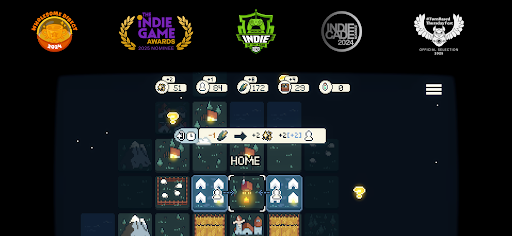
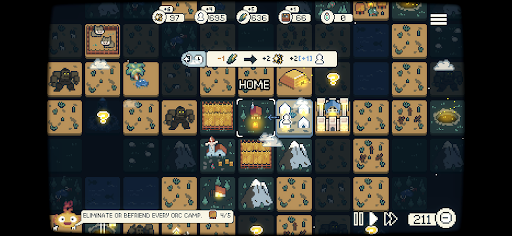
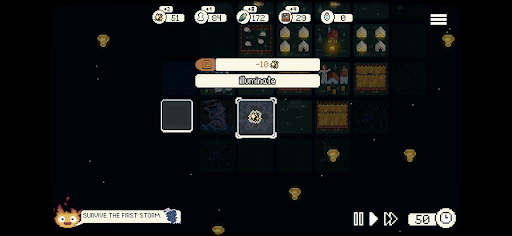
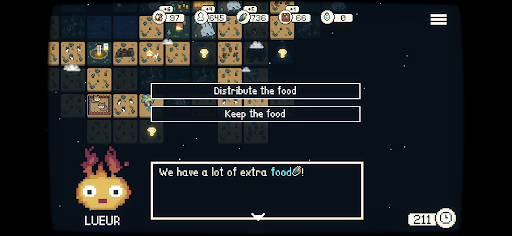
Em um mundo envolto pela escuridão, você é o governante de um reino perdido nas sombras. Em uma missão para salvar seu povo, você descobre Lueur — uma companheira mítica e flamejante que iluminará seu caminho.
Décadas atrás, monólitos de obsidiana caíram do céu, trazendo uma escuridão crescente que consumiu a terra. Agora, com o poder de Lueur, você pode afastar as sombras e reconquistar seu reino.
Mas que tipo de governante você será?
Criado pelo desenvolvedor solo Darenn Keller, Dawnfolk combina estratégia minimalista, exploração e construção de cidades em uma experiência relaxante e profundamente recompensadora.
Explore um mundo de fantasia medieval inexplorado, gerencie recursos, construa cidades e sobreviva a inúmeros perigos.
Minijogos adicionam desafios únicos ao cuidado com seu povo. Quanto melhor você se sair, mais recursos ganhará, ajudando sua comunidade a resistir à escuridão.
Cada escolha importa enquanto você explora diferentes estratégias e estilos de jogo. Transforme um pequeno acampamento de tendas em uma cidade próspera em menos de uma hora, sem a necessidade de longos tutoriais ou sistemas complexos.
Projetado para ser familiar e ao mesmo tempo inovador, o jogo se concentra na exploração e na experimentação — onde a descoberta faz parte da jornada.
Suas escolhas moldarão o destino do seu povo.
Você conseguirá trazer a luz de volta ao mundo?
Recursos
Um jogo aconchegante: Uma experiência de estratégia criada para uma jogabilidade relaxante, onde quer que você esteja.
Fácil de aprender: Sem longos tutoriais ou menus complexos — entre direto na ação e comece a construir.
Sessões curtas: Evolua do nada para uma cidade próspera em menos de uma hora.
Misturando Macro e Micro: Combine construção de cidades com minijogos inspirados em simuladores de fazenda e RPGs. Ganhe recursos extras por meio de desafios baseados em habilidade que diversificam a gestão da cidade.
Modos de jogo: Diversas formas de jogar, incluindo tempo real, turnos e dificuldade ajustável.
Descoberta recompensada: Explore, experimente e descubra sistemas no seu próprio ritmo — o jogo não vai revelar tudo para você.
Design minimalista: Mecânicas focadas que oferecem profundidade sem complexidade desnecessária.
História interativa: Seus edifícios moldam histórias em constante evolução. Suas escolhas determinam os resultados e impactam diretamente sua cidade — você governará com bondade ou pragmatismo?
Mostre mais

1. Faça o download do instalador do MEmu e conclua a instalação

2. Inicie o MEmu e depois abra o Google Play na página inicial

3. Pesquise Dawnfolk no Google Play
Install
4. Baixe e Instale Dawnfolk
5. Na conclusão da instalação, clique no ícone para iniciar

6. Divirta-se jogando Dawnfolk no PC com MEmu
O MEmu App Player é o melhor emulador de Android grátis e 50 milhões de pessoas já desfrutam de sua excelente experiência de jogos no Android. A tecnologia de virtualização do MEmu permite que você jogue milhares de jogos do Android sem problemas no seu PC, mesmo os com gráficos mais intensivos.
Tela maior com gráficos melhores; Longa duração e sem limitação de bateria ou dados móveis.
Suporte completo ao Mapaeamento de Teclas para controle preciso do teclado e mouse ou gamepad.
Várias contas de jogos ou tarefas em um único PC de uma só vez com o Gerenciador de várias instâncias.
Play Dawnfolk on PC by following steps: