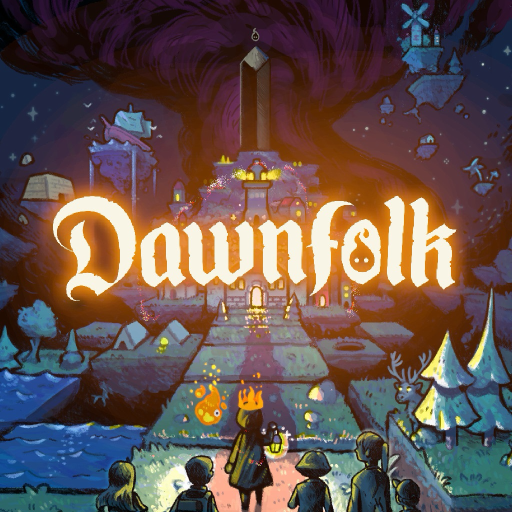
Dawnfolk
อัปเดตเมื่อ
เวอร์ชันปัจจุบัน
1.0.8
ให้บริการโดย

เวลาคุณเล่น Dawnfolk, คุณอาจรู้สึกว่ามือคุณอาจบังจอแล้วทำให้ไม่ได้เล่นแบบเต็มที่. เล่นแบบไร้ขีดจำกัดด้วยเม้าส์และคีย์บอร์ด. MEmu มีตัวเลือกหลายอย่างให้คุณใช้งานเกมที่คุณเล่นแบบที่คุณต้องการ. ดาวน์โหลดและเล่น Dawnfolk บน PC. เล่นนานแค่ไหนก็ได้, ไม่ต้องชาร์จแบตเตอรี่, หรือเจอคนโทรเข้ามาระหว่างเล่น. MEmu 9 เป็นตัวเลือกสำหรับการเล่น Dawnfolk บน PC. ทางทีมงานเราได้ปรับแต่งเกม, ปรับให้เล่นเกมบางเกมได้เหมือนเล่น Dawnfolk เป็นเกม PC เช่นเล็งด้วยเม้าส์หรือใช้คีย์บอร์ด. ระบบของเรายังทำให้คุณสามารถเปิดเล่นได้มากกว่า 2 เกมพร้อมๆกันในคอมของคุณ. และที่สำคัญที่สุด, ระบบโปรแกรมของเราสามารถทำให้คุณใช้ระบบของ PC ทำให้เกมลื่นเหมือนกับใช้โทรศัพท์รุ่นล่าสุด. เราไม่ได้ดูแลเรื่องการเล่นเกม, แต่เราดูแลถึงความสนุกสนานที่คุณได้จากการเล่นด้วย.
แสดงเพิ่มเติม
ดาวน์โหลด Dawnfolk บน PC ด้วย MEmu Android Emulator สนุกกับการเล่นบนหน้าจอขนาดใหญ่ ในโลกแห่งความมืดมิด คุณคือผู้ปกครองอาณาจักรที่จมอยู่ในเงามืด ในภารกิจช่วยชีวิตผู้คนของคุณ คุณได้พบกับลูเออร์—สหายในตำนานผู้เปี่ยมด้วยพลังแห่งไฟ ผู้ที่จะส่องสว่างนำทางคุณ.
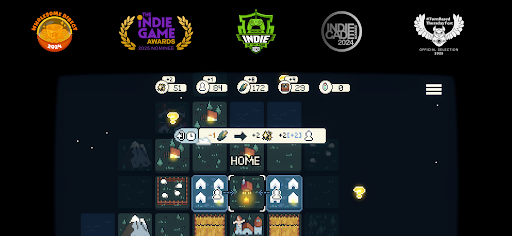
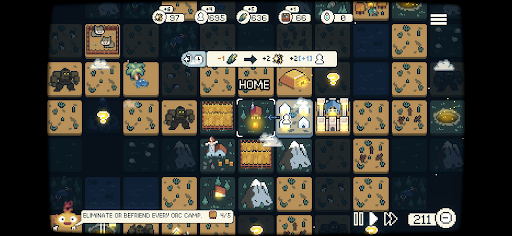
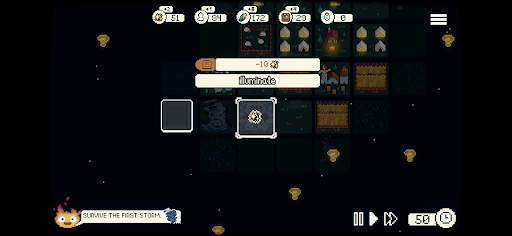
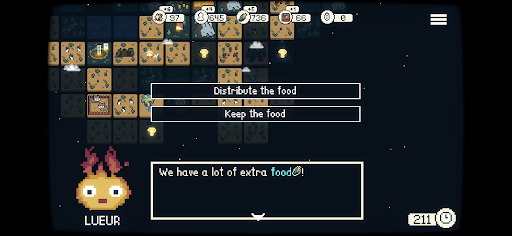
ในโลกแห่งความมืดมิด คุณคือผู้ปกครองอาณาจักรที่จมอยู่ในเงามืด ในภารกิจช่วยชีวิตผู้คนของคุณ คุณได้พบกับลูเออร์—สหายในตำนานผู้เปี่ยมด้วยพลังแห่งไฟ ผู้ที่จะส่องสว่างนำทางคุณ
Dawnfolk สร้างสรรค์โดยนักพัฒนาเกมเพียงคนเดียว Darenn Keller ผสมผสานกลยุทธ์แบบมินิมอล การสำรวจ และการสร้างเมืองเข้าด้วยกัน มอบประสบการณ์ที่ผ่อนคลายแต่คุ้มค่าอย่างลึกซึ้ง
หลายสิบปีก่อน แท่งหินออบซิเดียนตกลงมาจากท้องฟ้า นำมาซึ่งความมืดมิดที่คืบคลานเข้ามากลืนกินแผ่นดิน ตอนนี้ ด้วยพลังของลูเออร์ คุณสามารถผลักดันเงามืดและกอบกู้ดินแดนของคุณได้
แต่คุณจะเป็นผู้ปกครองแบบไหน?
สำรวจโลกแฟนตาซีในยุคกลางที่ไม่เคยมีใครสำรวจมาก่อน บริหารจัดการทรัพยากร สร้างเมือง และเอาชีวิตรอดจากอันตรายมากมาย
มินิเกมเพิ่มความท้าทายที่ไม่เหมือนใครในการดูแลผู้คนของคุณ ยิ่งคุณทำได้ดีเท่าไหร่ คุณก็จะได้รับทรัพยากรมากขึ้นเท่านั้น ซึ่งจะช่วยให้ชุมชนของคุณเอาชนะความมืดมิดได้
ทุกการตัดสินใจมีความสำคัญ ในขณะที่คุณสำรวจกลยุทธ์และสไตล์การเล่นที่แตกต่างกัน สร้างชุมชนของคุณจากเต็นท์เพียงไม่กี่หลังให้กลายเป็นเมืองที่เจริญรุ่งเรืองในเวลาไม่ถึงหนึ่งชั่วโมง โดยไม่ต้องเสียเวลาเรียนรู้บทเรียนยาวๆ หรือใช้ระบบที่ซับซ้อน
เกมนี้ออกแบบมาให้รู้สึกคุ้นเคยแต่ก็สดใหม่ เน้นการสำรวจและการทดลอง ซึ่งการค้นพบเป็นส่วนหนึ่งของการเดินทาง
การตัดสินใจของคุณจะกำหนดชะตากรรมของผู้คนของคุณ
คุณจะประสบความสำเร็จในการนำแสงสว่างกลับคืนสู่โลกหรือไม่?
คุณสมบัติ
- เกมที่เล่นสบาย: ประสบการณ์เกมวางแผนที่ออกแบบมาเพื่อการเล่นที่ผ่อนคลาย ไม่ว่าคุณจะอยู่ที่ไหน
- เรียนรู้ได้ง่าย: ไม่ต้องเรียนรู้บทเรียนยาวๆ หรือเมนูที่ซับซ้อน—เริ่มสร้างได้เลย
- ช่วงเวลาสั้นๆ: สร้างจากศูนย์ไปสู่เมืองที่เจริญรุ่งเรืองในเวลาไม่ถึงหนึ่งชั่วโมง
- ผสมผสานมหภาคและจุลภาค: ผสมผสานการสร้างเมืองกับมินิเกมที่ได้รับแรงบันดาลใจจากเกมจำลองการทำฟาร์มและเกม RPG รับทรัพยากรโบนัสผ่านความท้าทายตามทักษะที่ช่วยแบ่งช่วงการจัดการเมือง
- โหมดเกม: มีหลายวิธีในการเล่น รวมถึงแบบเรียลไทม์ แบบผลัดกันเล่น และปรับระดับความยากได้
- แรงจูงใจในการค้นพบ: สำรวจ ทดลอง และค้นพบระบบต่างๆ ด้วยตนเอง เกมจะไม่บอกทุกอย่างให้คุณทราบ
- การออกแบบที่เรียบง่าย: กลไกที่เน้นความลึกซึ้งโดยไม่ซับซ้อนโดยไม่จำเป็น
- เรื่องราวแบบโต้ตอบ: สิ่งก่อสร้างของคุณจะกำหนดเรื่องราวที่เปลี่ยนแปลงไป ทางเลือกของคุณจะกำหนดผลลัพธ์และส่งผลกระทบโดยตรงต่อเมืองของคุณ คุณจะปกครองด้วยความเมตตาหรือด้วยหลักปฏิบัติ?
แสดงเพิ่มเติม

1. ดาวน์โหลดตัวติดตั้ง MEmu และสิ้นสุดการติดตั้ง

2. เริ่ม MEmu จากนั้นเปิด Google Play บนหน้าแรก

3. ค้นหา Dawnfolk ใน Google Play
Install
4. ดาวน์โหลดและติดตั้ง Dawnfolk
5. เมื่อติดตั้งเสร็จให้คลิกที่ไอคอนเพื่อเริ่มใช้งาน

6. สนุกกับการเล่น Dawnfolk บนพีซีด้วย MEmu
MEmu App Player เป็นอีมูเลเตอร์ Android ที่ดีที่สุดและผู้คนกว่า 50 ล้านคนเพลิดเพลินไปกับประสบการณ์การเล่นเกม Android ที่ยอดเยี่ยม เทคโนโลยีการจำลองเสมือนของ MEmu ช่วยให้คุณเล่นเกม Android หลายพันเกมได้อย่างราบรื่นบนพีซีของคุณแม้แต่เกมที่ต้องใช้กราฟิกมากที่สุด
จอใหญ่และกราฟฟิกสวยกว่า; เล่นได้นาน, ไม่ต้องใช้แบตเตอรี่โทรศัพท์หรือเน็ตโทรศัพท์.
ระบบปรับแต่งปุ่มคีย์บอร์ดและเม้าส์ตามที่คุณเลือก
เล่นมากกว่าหนึ่งเกมบน PC ในเวลาเดียวกันด้วยระบบหลายจอหรือ Multi-Instance manager.
Play Dawnfolk on PC by following steps:






















![[ไกด์เกม] CookieRun Classic แนะนำ 5 คุกกี้น่าปั้น น่าลงทุน ที่มือใหม่ห้ามพลาด! (เล่นบน PC ผ่าน MEmu ให้ลื่นสุด ๆ) PC](https://www.memuplay.com/blog/wp-content/uploads/2026/08/579c01ab-a953-45b3-8115-9b6279b7d6f9.png)