Sanrio Kawaii Me Live!
Aktualisiert
Aktuelle Version
Angeboten von

Bei all Ihrer Leidenschaft für das Spielen von Sanrio Kawaii Me Live! sollten Ihre Hände nicht auf einen winzigen Bildschirm Ihres Telefons beschränkt sein. Spielen Sie wie ein Profi und übernehmen Sie die volle Kontrolle über Ihr Spiel mit Tastatur und Maus. MEmu bietet Ihnen all die Dinge, die Sie erwarten. Laden Sie Sanrio Kawaii Me Live! herunter und spielen Sie es auf dem PC. Spielen Sie so lange, wie Sie wollen, ohne Grenzwerte für Akku, mobile Daten und störende Anrufe. Das brandneue MEmu 9 ist die beste Wahl, um Sanrio Kawaii Me Live! auf dem PC zu spielen. Das exquisite voreingestellte Tastaturbelegungssystem, das mit unserem Fachwissen vorbereitet wurde, macht Sanrio Kawaii Me Live! zu einem echten PC-Spiel. Der MEmu Multi-Instanz-Manager ermöglicht das Spielen von 2 oder mehr Konten auf demselben Gerät. Und das Wichtigste: Unsere exklusive Emulations-Engine kann das volle Potenzial Ihres PCs freisetzen und für reibungslose Abläufe sorgen.
Mehr anzeigen
Laden Sie Play Sanrio Kawaii Me Live! auf dem PC mit MEmu Android Emulator. Viel Spaß beim Spielen auf großmundieren. Join your favorite Sanrio characters.
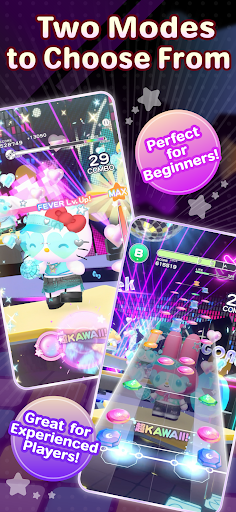
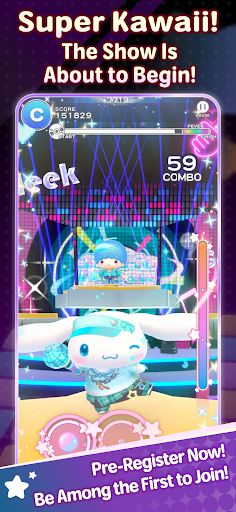
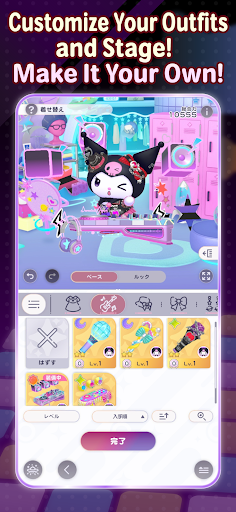
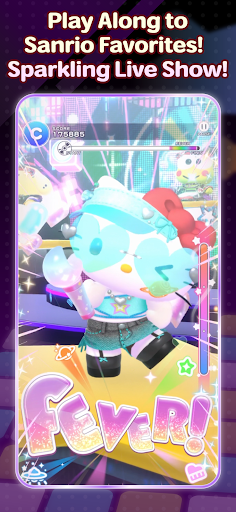
Join your favorite Sanrio characters
and create an incredibly “super KAWAII” live stage!
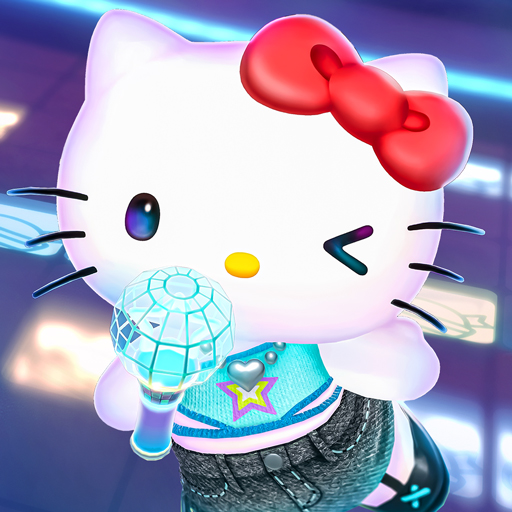
“Sanrio Kawaii Me Live!” (Kawamira) is a rhythm and dance game where you can have a blast dancing along with the characters to the music on a sparkling cosmic stage
■ Two modes for everyone to enjoy
We’ve got two modes: “Performance Mode,” where characters show off their KAWAII dance moves with simple controls, and “Technical Mode,” where you can enjoy a full-fledged rhythm game!
Whether you’re new to rhythm games or an advanced player, have fun at your own pace.
■ Create a one-of-a-kind live show
Customize live outfits, stage decorations, and special effects to your liking!
Collect your favorite items to make the stage sparkle, or go all out on the characters’ live outfits and special effects… Create your very own, one-of-a-kind live show.
■ Loads of songs included
The game features plenty of your favorite Sanrio songs, including “KAWAII FESTIVAL” from the popular Sanrio Puroland parade and “Pompompurin and Muffin’s Pompom Beat” by Pompompurin.
Game-exclusive remix versions are also scheduled to appear. New songs will be released one after another, so stay tuned!
The game also features original songs written by various artists!
Plus! “Almond Dialogue” by “Zutto Mayonaka de Ii no ni.” has been chosen as the theme song for Kawamira.
These tie-in songs vividly bring the world of Kawamira to life.
The joy of dancing to the beat, the excitement of sharing the stage with the characters, and the ultimate sense of immersion created by your own customizations—*Sanrio Kawaii Me Live!* packs it all in
So, let’s get your very own super KAWAII live show started!
■This game is perfect for:
<Sanrio games and Hello Kitty fans>
• Hello Kitty fans looking for new Sanrio games to play
• Anyone who grew up with Hello Kitty, My Melody, Kuromi, Pompompurin and Cinnamoroll
• Fans waiting for Sanrio Games to launch a new mobile title
• Hello Kitty fashion lovers who want a Hello Kitty game to match
<Rhythm game newcomers and music games pros>
• First-timers who want a rhythm game with simple controls
• Players new to music games who want an easy place to start
• Veterans of rhythm games who want challenging tracks to master
• Fans of music games where characters dance to every beat
• J-pop lovers who want music games full of catchy character songs
<Dress up and customization lovers>
• Dress up fans who want to style live costumes their own way
• Players who want a dress up game where the stage changes too
• Anyone who wants to dress up Hello Kitty and friends in brand-new looks
• Collectors chasing every outfit in a cute dress up game
<Sanrio games for every moment>
• Players who want music games and dress up in one single app
• Commuters who want a cute rhythm game for the ride
• Anyone who needs a relaxing rhythm game to wind down before bed
• Sanrio Games fans excited for the 2027 launch
Mehr anzeigen

1. Laden das MEmu-Installationsprogramm herunter und beenden die Installation

2. MEmu starten und Google Play auf der Homepage öffnen

3. Suchen Sanrio Kawaii Me Live! in Google Play
Install
4. Herunterladen und Installieren Sanrio Kawaii Me Live!
5. Klicken nach Abschluss der Installation auf das Symbol, um es zu starten

6. Viel Spaß beim Spielen von Sanrio Kawaii Me Live! auf dem PC mit MEmu
MEmu App Player ist der beste kostenlose Android-Emulator und 50 Millionen Menschen genießen bereits seine hervorragende Android-Gaming-Erfahrung. Mit der MEmu-Virtualisierungstechnologie können Sie Tausende von Android-Spielen problemlos auf Ihrem PC spielen, selbst bei grafikintensiven Spielen.
BGrößeres Bild mit besserer Grafik; Keine unterbrechungen, keine sorgen um Akku
Komplette Tastenbelegung unterstützt mit Maus und Tastatur oder Controller
Mit dem „Multi-Instance-Manager“ können Sie mehrere Spielkonten oder Spiele gleichzeitig auf einem PC ausführen.
Play Sanrio Kawaii Me Live! on PC by following steps: