Sanrio Kawaii Me Live!
Updated
Current Version
Offered By

With your passion for Sanrio Kawaii Me Live!, you shouldn’t have to limit yourself to the small screen of a phone. Play like a pro and take full control of the game using a keyboard and mouse. MEmu gives you everything you’re looking for. Download and play Sanrio Kawaii Me Live! on PC. Play as long as you want — no more worries about battery life, mobile data, or unexpected calls. The all-new MEmu 9 is the best way to play Sanrio Kawaii Me Live! on PC. With our expertly designed keymapping system, Sanrio Kawaii Me Live! feels just like a real PC game. The MEmu multi-instance manager lets you run two or more accounts on the same device at the same time. Most importantly, our exclusive emulation engine unlocks your PC’s full potential, delivering smooth and seamless performance.
Show more
Download Sanrio Kawaii Me Live! on PC with MEmu Android Emulator. Enjoy playing on big screen. Join your favorite Sanrio characters.
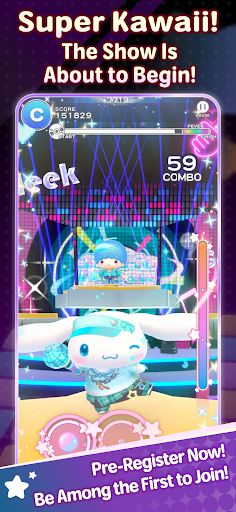
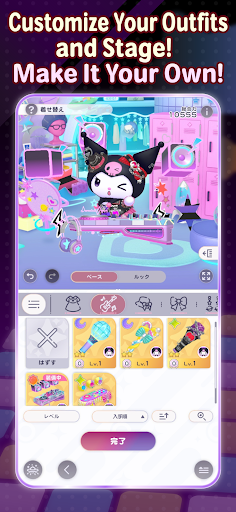
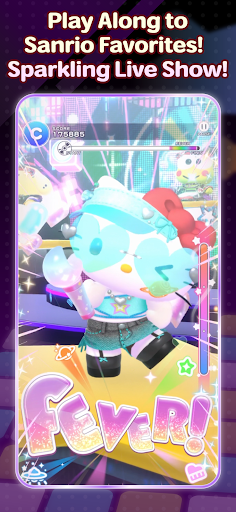
Join your favorite Sanrio characters
and create an incredibly “super KAWAII” live stage!
“Sanrio Kawaii Me Live!” (Kawamira) is a rhythm and dance game where you can have a blast dancing along with the characters to the music on a sparkling cosmic stage
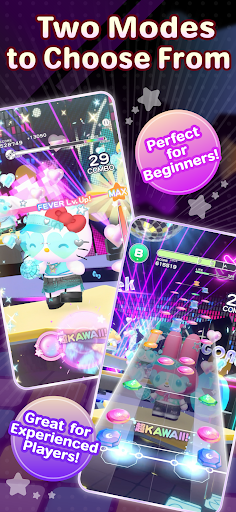
■ Two modes for everyone to enjoy
We’ve got two modes: “Performance Mode,” where characters show off their KAWAII dance moves with simple controls, and “Technical Mode,” where you can enjoy a full-fledged rhythm game!
Whether you’re new to rhythm games or an advanced player, have fun at your own pace.
■ Create a one-of-a-kind live show
Customize live outfits, stage decorations, and special effects to your liking!
Collect your favorite items to make the stage sparkle, or go all out on the characters’ live outfits and special effects… Create your very own, one-of-a-kind live show.
■ Loads of songs included
The game features plenty of your favorite Sanrio songs, including “KAWAII FESTIVAL” from the popular Sanrio Puroland parade and “Pompompurin and Muffin’s Pompom Beat” by Pompompurin.
Game-exclusive remix versions are also scheduled to appear. New songs will be released one after another, so stay tuned!
The game also features original songs written by various artists!
Plus! “Almond Dialogue” by “Zutto Mayonaka de Ii no ni.” has been chosen as the theme song for Kawamira.
These tie-in songs vividly bring the world of Kawamira to life.
The joy of dancing to the beat, the excitement of sharing the stage with the characters, and the ultimate sense of immersion created by your own customizations—*Sanrio Kawaii Me Live!* packs it all in
So, let’s get your very own super KAWAII live show started!
■This game is perfect for:
<Sanrio games and Hello Kitty fans>
• Hello Kitty fans looking for new Sanrio games to play
• Anyone who grew up with Hello Kitty, My Melody, Kuromi, Pompompurin and Cinnamoroll
• Fans waiting for Sanrio Games to launch a new mobile title
• Hello Kitty fashion lovers who want a Hello Kitty game to match
<Rhythm game newcomers and music games pros>
• First-timers who want a rhythm game with simple controls
• Players new to music games who want an easy place to start
• Veterans of rhythm games who want challenging tracks to master
• Fans of music games where characters dance to every beat
• J-pop lovers who want music games full of catchy character songs
<Dress up and customization lovers>
• Dress up fans who want to style live costumes their own way
• Players who want a dress up game where the stage changes too
• Anyone who wants to dress up Hello Kitty and friends in brand-new looks
• Collectors chasing every outfit in a cute dress up game
<Sanrio games for every moment>
• Players who want music games and dress up in one single app
• Commuters who want a cute rhythm game for the ride
• Anyone who needs a relaxing rhythm game to wind down before bed
• Sanrio Games fans excited for the 2027 launch
Show more

1. Download MEmu installer and finish the setup

2. Start MEmu then open Google Play on the desktop

3. Search Sanrio Kawaii Me Live! in Google Play
Install
4. Download and Install Sanrio Kawaii Me Live!
5. On install completion click the icon to start

6. Enjoy playing Sanrio Kawaii Me Live! on PC with MEmu
MEmu Play is the best Android emulator and 100 million people already enjoy its superb Android gaming experience. The MEmu virtualization technology empowers you to play thousands of Android games smoothly on your PC, even the most graphic-intensive ones.
Bigger screen with better graphics; Long duration, without limitation of battery or mobile data.
Full Keymapping support for precise control of keyboard and mouse or gamepad.
Multiple game accounts or tasks on single PC at one time with Multi-Instance manager.
Play Sanrio Kawaii Me Live! on PC by following steps: