Sanrio Kawaii Me Live!
อัปเดตเมื่อ
เวอร์ชันปัจจุบัน
ให้บริการโดย

เวลาคุณเล่น Sanrio Kawaii Me Live!, คุณอาจรู้สึกว่ามือคุณอาจบังจอแล้วทำให้ไม่ได้เล่นแบบเต็มที่. เล่นแบบไร้ขีดจำกัดด้วยเม้าส์และคีย์บอร์ด. MEmu มีตัวเลือกหลายอย่างให้คุณใช้งานเกมที่คุณเล่นแบบที่คุณต้องการ. ดาวน์โหลดและเล่น Sanrio Kawaii Me Live! บน PC. เล่นนานแค่ไหนก็ได้, ไม่ต้องชาร์จแบตเตอรี่, หรือเจอคนโทรเข้ามาระหว่างเล่น. MEmu 9 เป็นตัวเลือกสำหรับการเล่น Sanrio Kawaii Me Live! บน PC. ทางทีมงานเราได้ปรับแต่งเกม, ปรับให้เล่นเกมบางเกมได้เหมือนเล่น Sanrio Kawaii Me Live! เป็นเกม PC เช่นเล็งด้วยเม้าส์หรือใช้คีย์บอร์ด. ระบบของเรายังทำให้คุณสามารถเปิดเล่นได้มากกว่า 2 เกมพร้อมๆกันในคอมของคุณ. และที่สำคัญที่สุด, ระบบโปรแกรมของเราสามารถทำให้คุณใช้ระบบของ PC ทำให้เกมลื่นเหมือนกับใช้โทรศัพท์รุ่นล่าสุด. เราไม่ได้ดูแลเรื่องการเล่นเกม, แต่เราดูแลถึงความสนุกสนานที่คุณได้จากการเล่นด้วย.
แสดงเพิ่มเติม
ดาวน์โหลด Sanrio Kawaii Me Live! บน PC ด้วย MEmu Android Emulator สนุกกับการเล่นบนหน้าจอขนาดใหญ่ Join your favorite Sanrio characters.
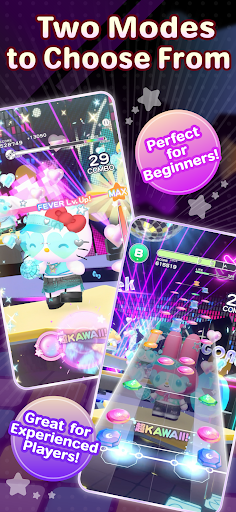
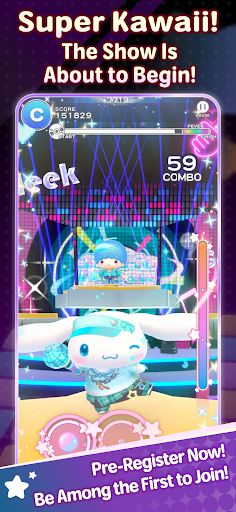
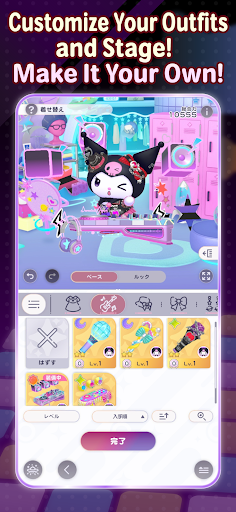
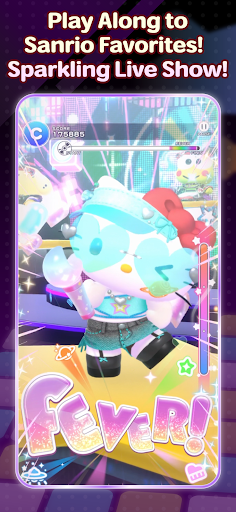
Join your favorite Sanrio characters
and create an incredibly “super KAWAII” live stage!
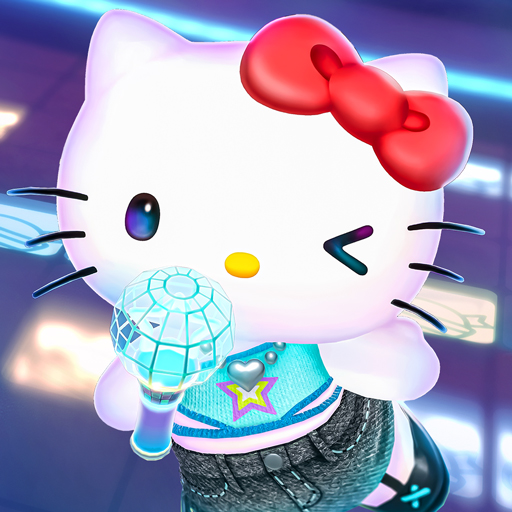
“Sanrio Kawaii Me Live!” (Kawamira) is a rhythm and dance game where you can have a blast dancing along with the characters to the music on a sparkling cosmic stage
■ Two modes for everyone to enjoy
We’ve got two modes: “Performance Mode,” where characters show off their KAWAII dance moves with simple controls, and “Technical Mode,” where you can enjoy a full-fledged rhythm game!
Whether you’re new to rhythm games or an advanced player, have fun at your own pace.
■ Create a one-of-a-kind live show
Customize live outfits, stage decorations, and special effects to your liking!
Collect your favorite items to make the stage sparkle, or go all out on the characters’ live outfits and special effects… Create your very own, one-of-a-kind live show.
■ Loads of songs included
The game features plenty of your favorite Sanrio songs, including “KAWAII FESTIVAL” from the popular Sanrio Puroland parade and “Pompompurin and Muffin’s Pompom Beat” by Pompompurin.
Game-exclusive remix versions are also scheduled to appear. New songs will be released one after another, so stay tuned!
The game also features original songs written by various artists!
Plus! “Almond Dialogue” by “Zutto Mayonaka de Ii no ni.” has been chosen as the theme song for Kawamira.
These tie-in songs vividly bring the world of Kawamira to life.
The joy of dancing to the beat, the excitement of sharing the stage with the characters, and the ultimate sense of immersion created by your own customizations—*Sanrio Kawaii Me Live!* packs it all in
So, let’s get your very own super KAWAII live show started!
■This game is perfect for:
<Sanrio games and Hello Kitty fans>
• Hello Kitty fans looking for new Sanrio games to play
• Anyone who grew up with Hello Kitty, My Melody, Kuromi, Pompompurin and Cinnamoroll
• Fans waiting for Sanrio Games to launch a new mobile title
• Hello Kitty fashion lovers who want a Hello Kitty game to match
<Rhythm game newcomers and music games pros>
• First-timers who want a rhythm game with simple controls
• Players new to music games who want an easy place to start
• Veterans of rhythm games who want challenging tracks to master
• Fans of music games where characters dance to every beat
• J-pop lovers who want music games full of catchy character songs
<Dress up and customization lovers>
• Dress up fans who want to style live costumes their own way
• Players who want a dress up game where the stage changes too
• Anyone who wants to dress up Hello Kitty and friends in brand-new looks
• Collectors chasing every outfit in a cute dress up game
<Sanrio games for every moment>
• Players who want music games and dress up in one single app
• Commuters who want a cute rhythm game for the ride
• Anyone who needs a relaxing rhythm game to wind down before bed
• Sanrio Games fans excited for the 2027 launch
แสดงเพิ่มเติม

1. ดาวน์โหลดตัวติดตั้ง MEmu และสิ้นสุดการติดตั้ง

2. เริ่ม MEmu จากนั้นเปิด Google Play บนหน้าแรก

3. ค้นหา Sanrio Kawaii Me Live! ใน Google Play
Install
4. ดาวน์โหลดและติดตั้ง Sanrio Kawaii Me Live!
5. เมื่อติดตั้งเสร็จให้คลิกที่ไอคอนเพื่อเริ่มใช้งาน

6. สนุกกับการเล่น Sanrio Kawaii Me Live! บนพีซีด้วย MEmu
MEmu App Player เป็นอีมูเลเตอร์ Android ที่ดีที่สุดและผู้คนกว่า 50 ล้านคนเพลิดเพลินไปกับประสบการณ์การเล่นเกม Android ที่ยอดเยี่ยม เทคโนโลยีการจำลองเสมือนของ MEmu ช่วยให้คุณเล่นเกม Android หลายพันเกมได้อย่างราบรื่นบนพีซีของคุณแม้แต่เกมที่ต้องใช้กราฟิกมากที่สุด
จอใหญ่และกราฟฟิกสวยกว่า; เล่นได้นาน, ไม่ต้องใช้แบตเตอรี่โทรศัพท์หรือเน็ตโทรศัพท์.
ระบบปรับแต่งปุ่มคีย์บอร์ดและเม้าส์ตามที่คุณเลือก
เล่นมากกว่าหนึ่งเกมบน PC ในเวลาเดียวกันด้วยระบบหลายจอหรือ Multi-Instance manager.
Play Sanrio Kawaii Me Live! on PC by following steps:
























![[ไกด์เกม] CookieRun Classic แนะนำ 5 คุกกี้น่าปั้น น่าลงทุน ที่มือใหม่ห้ามพลาด! (เล่นบน PC ผ่าน MEmu ให้ลื่นสุด ๆ) PC](https://www.memuplay.com/blog/wp-content/uploads/2026/08/579c01ab-a953-45b3-8115-9b6279b7d6f9.png)