Sanrio Kawaii Me Live!
Actualizada
Versión actual
Ofrecida por

Con toda tu pasión para jugar Sanrio Kawaii Me Live!, no se supone que tus manos estén limitadas en una pequeña pantalla de tu teléfono. Juega como un profesional y obtén el control total de tu juego con el teclado y el mouse. MEmu le ofrece todas las cosas que espera. Descargar y jugar Sanrio Kawaii Me Live! en PC. Juega todo el tiempo que quieras, sin más limitaciones de batería, datos móviles y llamadas molestas. El nuevo MEmu 9 es la mejor opción para jugar Sanrio Kawaii Me Live! en PC. Preparado con nuestra experiencia, el exquisito sistema de keymapping preestablecido convierte a Sanrio Kawaii Me Live! en un verdadero juego de PC. Codificado con nuestra absorción, el administrador de instancias múltiples hace posible jugar 2 o más cuentas en el mismo dispositivo. Y lo más importante, nuestro exclusivo motor de emulación puede liberar todo el potencial de su PC, hacer que todo sea más fluido. Nos importa no solo cómo juegas, sino también todo el proceso de disfrutar de la felicidad de los juegos.
Más detalles
Descargar Sanrio Kawaii Me Live! en PC con MEmu Android Emulador. Disfruta jugando en la pentalla grande. Join your favorite Sanrio characters.
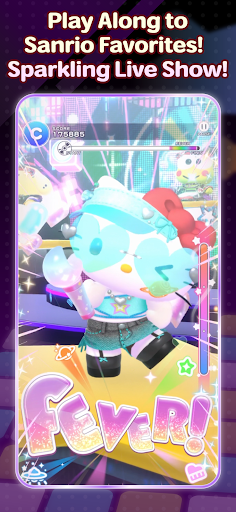
Join your favorite Sanrio characters
and create an incredibly “super KAWAII” live stage!
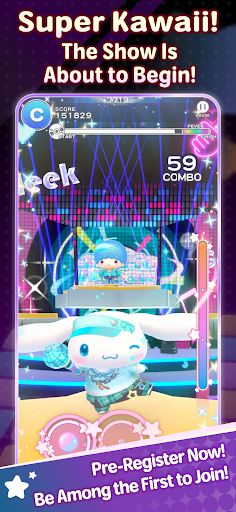
“Sanrio Kawaii Me Live!” (Kawamira) is a rhythm and dance game where you can have a blast dancing along with the characters to the music on a sparkling cosmic stage
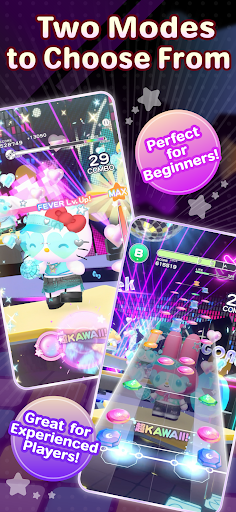
■ Two modes for everyone to enjoy
We’ve got two modes: “Performance Mode,” where characters show off their KAWAII dance moves with simple controls, and “Technical Mode,” where you can enjoy a full-fledged rhythm game!
Whether you’re new to rhythm games or an advanced player, have fun at your own pace.
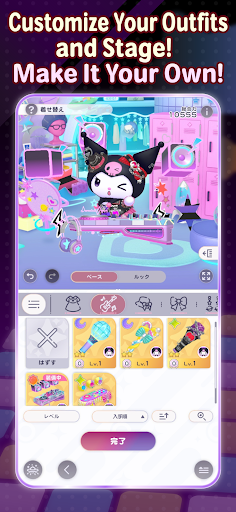
■ Create a one-of-a-kind live show
Customize live outfits, stage decorations, and special effects to your liking!
Collect your favorite items to make the stage sparkle, or go all out on the characters’ live outfits and special effects… Create your very own, one-of-a-kind live show.
■ Loads of songs included
The game features plenty of your favorite Sanrio songs, including “KAWAII FESTIVAL” from the popular Sanrio Puroland parade and “Pompompurin and Muffin’s Pompom Beat” by Pompompurin.
Game-exclusive remix versions are also scheduled to appear. New songs will be released one after another, so stay tuned!
The game also features original songs written by various artists!
Plus! “Almond Dialogue” by “Zutto Mayonaka de Ii no ni.” has been chosen as the theme song for Kawamira.
These tie-in songs vividly bring the world of Kawamira to life.
The joy of dancing to the beat, the excitement of sharing the stage with the characters, and the ultimate sense of immersion created by your own customizations—*Sanrio Kawaii Me Live!* packs it all in
So, let’s get your very own super KAWAII live show started!
■This game is perfect for:
<Sanrio games and Hello Kitty fans>
• Hello Kitty fans looking for new Sanrio games to play
• Anyone who grew up with Hello Kitty, My Melody, Kuromi, Pompompurin and Cinnamoroll
• Fans waiting for Sanrio Games to launch a new mobile title
• Hello Kitty fashion lovers who want a Hello Kitty game to match
<Rhythm game newcomers and music games pros>
• First-timers who want a rhythm game with simple controls
• Players new to music games who want an easy place to start
• Veterans of rhythm games who want challenging tracks to master
• Fans of music games where characters dance to every beat
• J-pop lovers who want music games full of catchy character songs
<Dress up and customization lovers>
• Dress up fans who want to style live costumes their own way
• Players who want a dress up game where the stage changes too
• Anyone who wants to dress up Hello Kitty and friends in brand-new looks
• Collectors chasing every outfit in a cute dress up game
<Sanrio games for every moment>
• Players who want music games and dress up in one single app
• Commuters who want a cute rhythm game for the ride
• Anyone who needs a relaxing rhythm game to wind down before bed
• Sanrio Games fans excited for the 2027 launch
Más detalles

1. Descargar el instalador de MEmu y finalice la instalación

2. Iniciar MEmu y abrir Google Play en la página de inicio

3. Buscar Sanrio Kawaii Me Live! en Google Play
Install
4. Descargar y instalar Sanrio Kawaii Me Live!
5. Hacer click al icono para iniciar

6. Disfruta jugando Sanrio Kawaii Me Live! en PC con MEmu
MEmu App Player es el mejor emulador de Android gratuito y 50 millones de personas ya están disfrutando su magnífica experiencia jugando en Android. La tecnología de virtualización de MEmu te permite jugar a miles de juegos Android suavemente en tu PC, incluso los más intensivos gráficamente.
Pantalla más grande con mejores gráficos; Larga duración, sin limitación de batería o datos móviles.
Soporte completo de keymapping para un control preciso del teclado y el mouse o gamepad.
Múltiples cuentas de juegos o tareas en una sola PC a la vez con el administrador de instancias múltiples.
Play Sanrio Kawaii Me Live! on PC by following steps: