All Document Reader and Viewer PC

All Document Reader and Viewer auf dem PC herunterlanden

All Document Reader and Viewer PC

All Document Reader and Viewer

  • Aktualisiert

  • Aktuelle Version

    1

  • Angeboten von

    All Document Reader and Viewer PC

Eigenschaften von All Document Reader and Viewer auf dem PC

Machen Sie sich keine Sorgen mehr über überhöhte Gebühren, wenn Sie All Document Reader and Viewer auf Ihrem Mobiltelefon verwenden, befreien Sie sich von dem winzigen Bildschirm und genießen Sie die Nutzung der App auf einem viel größeren Display. Von nun an können Sie Ihre App mit Tastatur und Maus im Vollbildmodus nutzen. MEmu bietet Ihnen all die überraschenden Funktionen, die Sie erwartet haben: schnelle Installation und einfache Einrichtung, intuitive Steuerung, keine Einschränkungen mehr durch Batterie, mobile Daten und störende Anrufe. Der brandneue MEmu 9 ist die beste Wahl für die Nutzung von All Document Reader and Viewer auf Ihrem Computer. Mit unserer Absorption kodiert, ermöglicht der Multi-Instanz-Manager die Eröffnung von 2 oder mehr Konten zur gleichen Zeit. Und das Wichtigste, unsere exklusive Emulations-Engine kann das volle Potenzial Ihres PCs freisetzen und alles reibungslos und angenehm gestalten.

Mehr anzeigen

Bilder & Videos von All Document Reader and Viewer auf dem PC

Laden Sie Play All Document Reader and Viewer auf dem PC mit MEmu Android Emulator. Viel Spaß beim Spielen auf großmundieren. All Document Reader and Viewer app is an all-in-one tool for viewing and managing various document types, including PDFs, Word, XLSX, PowerPoint, and more.

App-Informationen

All Document Reader and Viewer app is an all-in-one tool for viewing and managing various document types, including PDFs, Word, XLSX, PowerPoint, and more. With its user-friendly interface, document scanner app allows you to easily open, view, and file manager your documents. The file reader is ideal for students, professionals, and anyone needing a versatile PDF, Docx, Powerpoint, XLSX reader.

Key features of Alldocs reader

✅ Read and View - All Files Support

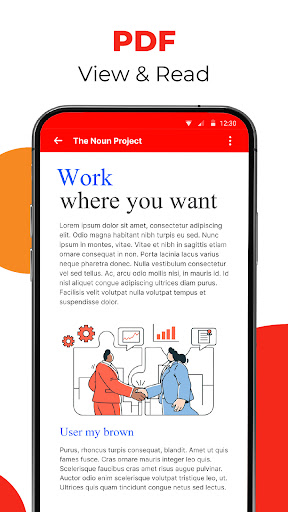
⚡PDF Reader: View and read PDF files with ease.
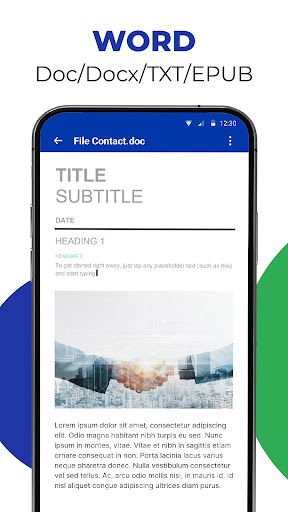
⚡Word Viewer: Open and read Word documents (.doc, .docx).
⚡XLSX Viewer: Access and view XLSX spreadsheets (.xls, .xlsx).
⚡PowerPoint Viewer: PPT Reader, open and view PowerPoint presentations (.ppt, .pptx).
⚡Text File Viewer: Read plain text files (.txt).

✅ File Management

⚡File Browser: A built-in file manager to locate and manage your documents.
⚡Quick Search: Search functionality to quickly find specific documents.
⚡Favorites: Mark important documents for easy access.

✅ Scan & Convert to PDF/Word

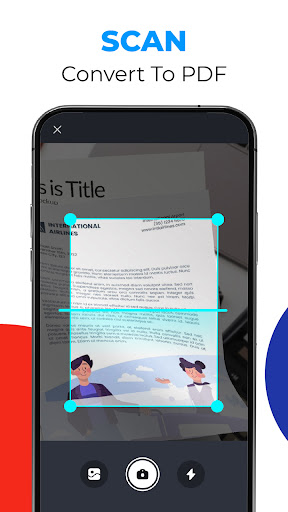
⚡The Scan to Convert to PDF feature offers a quick and efficient way to digitize physical documents directly from your smartphone. With just a few taps, you can scan documents, and convert them into high-quality PDFs. Whether you need to scan a single page or multiple pages, the app's batch scanning feature streamlines the process, making it perfect for business, school, or personal use.

⚡The Scan to Convert to Word feature allows users to easily transform physical documents into editable Word files. the app accurately converts it into a Word format (.doc or .docx).

Major Benefit of AllDoc App

The All Document Reader and Viewer app offers a range of benefits that make it an essential tool for users who frequently work with different types of documents. Here are the key advantages:

Mehr anzeigen

So installierst du All Document Reader and Viewer auf dem PC

  • All Document Reader and Viewer PC

    1. Laden das MEmu-Installationsprogramm herunter und beenden die Installation

  • All Document Reader and Viewer PC

    2. MEmu starten und Google Play auf der Homepage öffnen

  • All Document Reader and Viewer PC

    3. Suchen All Document Reader and Viewer in Google Play

  • All Document Reader and Viewer PC Install

    4. Herunterladen und Installieren All Document Reader and Viewer

  • All Document Reader and Viewer PC

    5. Klicken nach Abschluss der Installation auf das Symbol, um es zu starten

  • All Document Reader and Viewer PC
    All Document Reader and Viewer PC All Document Reader and Viewer PC

    6. Verwenden Sie MEmu, um All Document Reader and Viewer auf Ihrem PC zu nutzen

Warum MEmu für All Document Reader and Viewer nutzen

MEmu Play ist aktuell der beste kostenlose Android-Emulator und bietet 50 Millionen Nutzern ein überragendes Android-App-Erlebnis. Dank der Virtualisierungstechnologie von MEmu können Sie Tausende von Android-Apps problemlos auf Ihrem Computer nutzen, selbst solche mit hohen Grafikanforderungen.

  • BGrößeres Bild mit besserer Grafik; Keine unterbrechungen, keine sorgen um Akku

  • Komplette Tastenbelegung unterstützt mit Maus und Tastatur oder Controller

  • Mit dem „Multi-Instance-Manager“ können Sie mehrere Spielkonten oder Spiele gleichzeitig auf einem PC ausführen.

Bereit es zu benutzen?

Andere Spiele von TrustedOffice

Heiße Themen

All Document Reader and Viewer - FAQs

  • Wie verwende ich All Document Reader and Viewer auf dem PC?

    Use All Document Reader and Viewer on PC by following steps:

    • Download MEmu, then install and launch it
    • Login to Google Play Store, install the app
    • Enjoy using the app on PC with MEmu
  • Was sind die Mindestsystemanforderungen, um All Document Reader and Viewer auf dem PC auszuführen?
    • Intel or AMD Processor
    • Microsoft Windows 7 and above
    • 2GB of memory
    • 5GB of free disk space
    • Hardware Virtualization Technology