GTA 5 Mobile
تاریخ بهروزرسانی
نسخه کنونی
3.0.9
ارائهکننده

با تمام اشتیاق شما به بازی GTA 5 Mobile، قرار نیست دست های شما روی صفحه نمایش کوچک گوشی شما محدود شود. مانند یک حرفه ای بازی کنید و کنترل کامل بازی خود را با صفحه کلید و ماوس بدست آورید.MEmu همه ی انتظاراتی که دارید را برآورده می کند.GTA 5 Mobile را بر روی رایانه شخصی دانلود و بازی کنید. تا زمانی که می خواهید بازی کنید، دیگر محدودیتی در باتری، داده تلفن همراه و تماس های مزاحم وجود ندارد.MEmu 9 کاملاً جدید و بهترین انتخاب برای بازی GTA 5 Mobile روی رایانه شخصی است. با تخصص ما، سیستم keymapping از پیش تعیین شده عالی،GTA 5 Mobile را به یک بازی رایانه شخصی واقعی تبدیل می کند.مدیریت چند موردی MEmu امکان اجرای 2 یا چندین حساب در یک دستگاه را فراهم می کند.و مهمتر از همه، موتور شبیهسازی انحصاری ما میتواند پتانسیل کامل رایانه شما را آزاد کند و همه چیز را روان کند.
بیشتر نشان بده
دانلود بازی GTA 5 Mobile برای کامپیوتر با MEmu Play. از بازی روی صفحه نمایش بزرگ لذت ببرید. GTA 5 Mobile is an open-world action-adventure game.

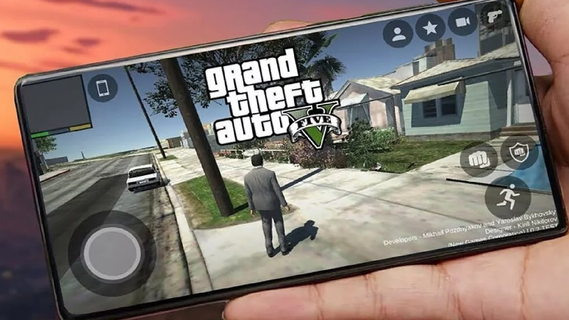
GTA 5 Mobile is an open-world action-adventure game. Initially released for consoles and PC, it has become a cultural phenomenon. With the increasing power of mobile devices, there's growing interest in experiencing GTA 5 on mobile. This guide explores the features that make GTA 5 an engaging mobile experience, covering gameplay mechanics, graphics, controls, and additional enhancements.Core featuresFull GTAV story on your phoneGTA 5 Mobile streams the complete Story Mode, so you can switch between Michael, Franklin, and Trevor and continue missions from your save. Progress syncs with your linked account, and you can pick up where you left off on your console or PC.GTA Online accessYou can enter GTA Online with up to 30 players, join cooperative Heists, race in Stunt Races, and visit social hubs such as nightclubs and car meets. New players can also use the Career Builder to start faster with curated businesses and vehicles.Flexible cloud and remote optionsGTA 5 Mobile works through supported services such as Xbox Cloud Gaming, GeForce NOW, or Shadow PC. In addition, you can use remote play from your own PC with apps like Steam Link or Moonlight to stream your owned copy of the game.Mobile friendly controlsThere are on screen touch layouts for driving, combat, and menus, and you can pair a Bluetooth controller for more precise input. This helps you handle shooting, driving, and quick swapping between characters with less effort on a small screen.Continuous GTA Online updatesGTA 5 Mobile keeps pace with ongoing GTA Online updates because content is delivered from the source platform. Therefore you can join new modes, vehicles, and activities the same day they arrive, either solo or with friends.Touchscreen ControlsThe mobile version features intuitive touchscreen controls designed for ease of use. This includes virtual joysticks, customizable button layouts, and gesture-based controls. The interface is streamlined to ensure that players can easily navigate the game's menus and interact with the environment.How to Start Playing GTA 5 Mobile on Your PhoneBelow are the basic steps for Android devices, including local APK installation and control setup. If you use PC streaming, the following steps for controls and graphics settings are also applicable.Visit the APKPure page and click "Download APK" to download GTA 5 Mobile to your device. Once the download is complete, if required, allow installation from this source in your security settings.Run the installer to install the GTA 5 Mobile APK. Then open the game, grant the necessary permissions, and download any additional resources/cache files within the app as needed.Access the control settings. Select a touch layout and adjust the button size and transparency. Next, connect a Bluetooth gamepad (enable Bluetooth on your phone, complete the pairing process, then choose the button configuration scheme in the game).Open the graphics settings. Adjust the resolution, texture quality, and target FPS based on your deviceâs temperature and battery life. Apply the changes and restart the game if necessary.Start a new game. Complete the initial tutorial, save your progress, and enter free mode to experience various side activities. This way, you can alternate between story missions and exploring the world.Download and start GTA 5 MobileGTA 5 Mobile lets you enjoy GTAV and GTA Online through cloud streaming or remote play, with touch controls and controller support tailored for mobile. Click "Download APK" to get the GTA 5 Mobile APK latest version of supported clients on APKPure, sign in to your service, and begin playing on your device.
بیشتر نشان بده

1. نصب کننده Memu را دانلود کرده و راه اندازی را تمام کنید

2. Memu را اجرا کنید و سپس گوگل پلی را بر روی دستکتاپ باز کنید

3. GTA 5 Mobile را بر روی گوگل پلی جستجو کنید
Install
4. GTA 5 Mobile را دانلود و نصب کنید
5. پس از اتمام نصب روی آیکون کلیک کنید تا اجرا شود

6. از بازی کردن GTA 5 Mobile بر روی رایانه شخصی با MEmu لذت ببرید
MEmu بهترین نمونه ساز رایگان اندروید است و پیش از این 50 میلیون نفر از تجربه بسیار خوب بازی اندروید در آن لذت برده اند. تکنولوژی مجازی ساز MEmu شما را قادر می سازد هزاران بازی اندرویدی را در کامپیوتر به طور روان اجرا کنید، حتی آنهایی که گرافیک سنگین تری دارند.
صفحه نمایش بزرگتر با گرافیک بهتر؛ زمان طولانی تر، بدون محدودیت باتری یا داده تلفن همراه.
پشتیبانی کامل از Keymapping برای کنترل دقیق صفحه کلید و ماوس یا گیم پد.
چندین حساب بازی یا وظایف در یک رایانه شخصی در یک زمان با مدیریت همزمان همه
Play GTA 5 Mobile on PC by following steps: