GTA 5 Mobile
Aktualizováno
Aktuální verze
3.0.9
Od vývojáře

With all your passion for playing GTA 5 Mobile, you hands are not supposed to be limited on a tiny screen of your phone. Play like a pro and get full control of your game with keyboard and mouse. MEmu offers you all the things that you are expecting. Download and play GTA 5 Mobile on PC. Play as long as you want, no more limitations of battery, mobile data and disturbing calls. The brand new MEmu 9 is the best choice of playing GTA 5 Mobile on PC. Prepared with our expertise, the exquisite preset keymapping system makes GTA 5 Mobile a real PC game. MEmu multi-instance manager makes playing 2 or more accounts on the same device possible. And the most important, our exclusive emulation engine can release full potential of your PC, make everything smooth.
Show more
Vychutnejte si vynikající zážitek z přehrávání GTA 5 Mobile na PC s MEMU App Player. Je to silný bezplatný emulátor pro Android, který vám umožní hrát tisíce her v systému Android. GTA 5 Mobile is an open-world action-adventure game.

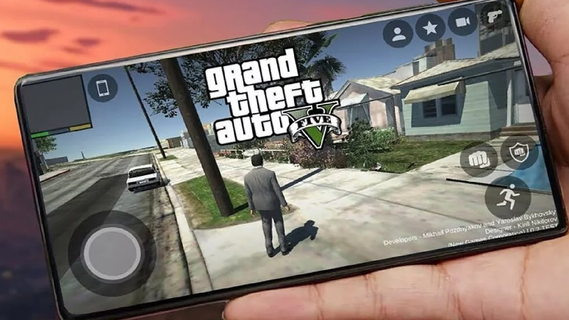
GTA 5 Mobile is an open-world action-adventure game. Initially released for consoles and PC, it has become a cultural phenomenon. With the increasing power of mobile devices, there's growing interest in experiencing GTA 5 on mobile. This guide explores the features that make GTA 5 an engaging mobile experience, covering gameplay mechanics, graphics, controls, and additional enhancements.Core featuresFull GTAV story on your phoneGTA 5 Mobile streams the complete Story Mode, so you can switch between Michael, Franklin, and Trevor and continue missions from your save. Progress syncs with your linked account, and you can pick up where you left off on your console or PC.GTA Online accessYou can enter GTA Online with up to 30 players, join cooperative Heists, race in Stunt Races, and visit social hubs such as nightclubs and car meets. New players can also use the Career Builder to start faster with curated businesses and vehicles.Flexible cloud and remote optionsGTA 5 Mobile works through supported services such as Xbox Cloud Gaming, GeForce NOW, or Shadow PC. In addition, you can use remote play from your own PC with apps like Steam Link or Moonlight to stream your owned copy of the game.Mobile friendly controlsThere are on screen touch layouts for driving, combat, and menus, and you can pair a Bluetooth controller for more precise input. This helps you handle shooting, driving, and quick swapping between characters with less effort on a small screen.Continuous GTA Online updatesGTA 5 Mobile keeps pace with ongoing GTA Online updates because content is delivered from the source platform. Therefore you can join new modes, vehicles, and activities the same day they arrive, either solo or with friends.Touchscreen ControlsThe mobile version features intuitive touchscreen controls designed for ease of use. This includes virtual joysticks, customizable button layouts, and gesture-based controls. The interface is streamlined to ensure that players can easily navigate the game's menus and interact with the environment.How to Start Playing GTA 5 Mobile on Your PhoneBelow are the basic steps for Android devices, including local APK installation and control setup. If you use PC streaming, the following steps for controls and graphics settings are also applicable.Visit the APKPure page and click "Download APK" to download GTA 5 Mobile to your device. Once the download is complete, if required, allow installation from this source in your security settings.Run the installer to install the GTA 5 Mobile APK. Then open the game, grant the necessary permissions, and download any additional resources/cache files within the app as needed.Access the control settings. Select a touch layout and adjust the button size and transparency. Next, connect a Bluetooth gamepad (enable Bluetooth on your phone, complete the pairing process, then choose the button configuration scheme in the game).Open the graphics settings. Adjust the resolution, texture quality, and target FPS based on your deviceâs temperature and battery life. Apply the changes and restart the game if necessary.Start a new game. Complete the initial tutorial, save your progress, and enter free mode to experience various side activities. This way, you can alternate between story missions and exploring the world.Download and start GTA 5 MobileGTA 5 Mobile lets you enjoy GTAV and GTA Online through cloud streaming or remote play, with touch controls and controller support tailored for mobile. Click "Download APK" to get the GTA 5 Mobile APK latest version of supported clients on APKPure, sign in to your service, and begin playing on your device.
Show more

1. Stáhněte si instalační program MEmu a dokončete instalaci

2. Spusťte MEmu a poté otevřete Google Play na ploše

3. Vyhledejte GTA 5 Mobile v Google Play
Install
4. Stáhněte a nainstalujte GTA 5 Mobile
5. Po dokončení instalace klikněte na ikonu pro spuštění

6. Užijte si hraní GTA 5 Mobile na PC s MEmu
MEmu je zdarma a ten nejlepší Android emulátor. 50 milionů lidí si užívá jeho nejlepší herní zážitky. Technologie virtualizace MEmu ti dovolí plynule hrát Android hry na PC a to i ty nejnáročnější.
Větší obrazovka s lepší grafikou; Dlouhá výdrž bez omezení baterie nebo mobilních dat.
Plná podpora mapování kláves pro přesné ovládání klávesnice a myši nebo gamepadu.
Více herních účtů nebo úkolů na jednom počítači najednou s Multi-Instance Managerem.
Play GTA 5 Mobile on PC by following steps: