GTA 5 Mobile
تازہ کاری
موجودہ ورژن
3.0.9
پیشکش بذریعہ

GTA 5 Mobile کھیلنے کے اپنے پورے جنون کے دوران آپ کے ہاتھ آپ کے فون کی ایک چھوٹی سی اسکرین تک محدود نہیں ہونے چاہئیں۔ پرو کی طرح کھیلیں اور کی بورڈ اور ماؤس کے سہارے اپنے گیم پر مکمل کنٹرول حاصل کریں۔ MEmu آپ کو وہ تمام چیزیں پیش کرتا ہے جس کی آپ امید کرتے ہیں۔ پی سی پر GTA 5 Mobile ڈاؤن لوڈ کریں اور کھیلیں۔ جتنی دیر تک آپ چاہیں کھیلیں، بیٹری، موبائل ڈیٹا کی کوئی حد نہیں ہے اور پریشان کن کالز نہیں ہیں۔ نئے برانڈ کا MEmu 9 پی سی پر GTA 5 Mobile کھیلنے کا بہترین اختیار ہے۔ ہماری مہارت کی مدد سے تیار کردہ، شاندار پری سیٹ کی میپنگ سسٹم GTA 5 Mobile کو ایک ریئل پی سی گیم بناتا ہے۔ MEmu کثیر نظیری منیجرایک ہی ڈیوائس پر 2 یا زیادہ اکاؤنٹس پلے کرنا ممکن بناتا ہے۔ اور سب سے اہم بات یہ ہے کہ، ہمارا خصوصی ایمولیشن انجن آپ کے پی سی کی مکمل طاقت ریلیز کرتے ہوئے ہر چیز ہموار بنا سکتا ہے۔
مزید دکھائیں
MEmu Play کے ساتھ PC پر GTA 5 Mobile ڈاؤن لوڈ کریں۔ بڑی اسکرین پر کھیلنے کا لطف اٹھائیں۔ Grand Theft Auto V (GTA 5) is an open-world action-adventure game developed by Rockstar Games.

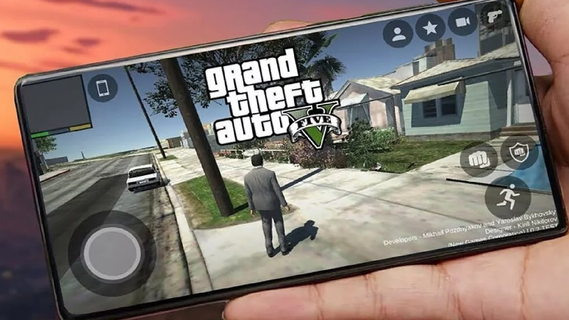
Grand Theft Auto V (GTA 5) is an open-world action-adventure game developed by Rockstar Games. Initially released for consoles and PC, it has become a cultural phenomenon. With the increasing power of mobile devices, there's growing interest in experiencing GTA 5 on mobile. This guide explores the features that make GTA 5 an engaging mobile experience, covering gameplay mechanics, graphics, controls, and additional enhancements.Gameplay MechanicsStory ModeGTA 5's story mode features three protagonists: Michael, Trevor, and Franklin. Each character has a unique storyline that interweaves with the others, providing a rich, narrative-driven experience. The mobile version retains all the cinematic cutscenes, engaging dialogues, and varied missions that made the original game popular.Open World ExplorationThe open-world environment of Los Santos and Blaine County is fully accessible on mobile. Players can explore a vast landscape, from bustling city streets to serene countryside. The mobile version includes dynamic weather, day-night cycles, and a living world filled with NPCs and wildlife.Missions and ActivitiesGTA 5 on mobile offers a wide range of missions and side activities. Players can engage in heists, car chases, and various side quests such as racing, flying, and sports activities. These missions are designed to be immersive and challenging, akin to the console and PC versions.Graphics and PerformanceVisual QualityThe mobile version aims to deliver high-quality visuals comparable to older console versions. This includes detailed character models, realistic environments, and impressive lighting effects. Advanced graphics settings allow players to customize their visual experience based on their device's capabilities.Performance OptimizationGTA 5 on mobile is optimized for a range of devices to ensure smooth gameplay. This includes frame rate adjustments, resolution scaling, and efficient use of mobile hardware. Players can expect a balanced performance that provides an enjoyable gaming experience without excessive battery drain or overheating.Controls and User InterfaceTouchscreen ControlsThe mobile version features intuitive touchscreen controls designed for ease of use. This includes virtual joysticks, customizable button layouts, and gesture-based controls. The interface is streamlined to ensure that players can easily navigate the game's menus and interact with the environment.Controller SupportFor those who prefer a traditional gaming experience, GTA 5 on mobile supports Bluetooth controllers. This includes popular options like Xbox and PlayStation controllers. Controller support enhances gameplay precision and comfort, particularly during complex missions or intense combat scenarios.
مزید دکھائیں

1. MEmu انسٹالر ڈاؤن لوڈ کریں اور سیٹ اپ مکمل کریں

2. MEmu شروع کریں اسکے بعد ڈیسکٹاپ پر Google Play کھولیں

3. Google Play میں GTA 5 Mobile تلاش کریں
Install
4. GTA 5 Mobile ڈاؤن لوڈ کریں اور انسٹال کریں
5. انسٹال مکمل ہونے کے بعد سٹارٹ کرنے کے لیے آئیکن پر کلک کریں

6. MEmu کے ساتھ پی سی پر GTA 5 Mobile کھیلنے کا لطف لیں
MEmu پلے بہترین اینڈرائڈ ایمولیٹر ہے اور 100 ملین لوگ اس کے زبردست اینڈرائڈ گیمنگ تجربہ سے لطف اندوز ہو رہے ہیں۔ MEmu کی ورچولائزیشن ٹیکنالوجی آپ کو اپنے PC پر ہزاروں اینڈرائڈ گیمز یہاں تک کہ انتہائی گرافک والے گیمز باسہولت کھیلنے کی طاقت دیتی ہے۔
بہتر گرافکس کے ساتھ بڑی اسکرین؛ طویل دورانیہ، بیٹری یا لامحدود موبائل ڈیٹا کے بغیر۔
کی بورڈ اور ماؤس یا گیم پیڈ کے عین مطابق کنٹرول کے لیے کی میپنگ کا پورا سپورٹ۔
کثیر مثالی منیجر کے ساتھ بیک وقت ایک پی سی پر متعدد گیم اکاؤنٹس یا ٹاسکس۔
پی سی پر درج ذیل مراحل پر عمل کرتے ہوئے GTA 5 Mobile کھیلیں: