GTA 5 Mobile
Aggiornata
Versione corrente
3.0.9
Offerta da

Vista tutta la passione dimostrata nel giocare a GTA 5 Mobile, le tue mani non dovrebbero essere limitate al minuscolo schermo di un telefono. Gioca come un professionista e ottieni il pieno controllo del gioco con tastiera e mouse. MEmu ti offre tutto ciò che ti aspetti. Scarica e gioca a GTA 5 Mobile su PC. Gioca quanto vuoi, niente più limitazioni di batteria, dati mobili e chiamate inquietanti. Il nuovissimo MEmu 9 è la scelta migliore per giocare a GTA 5 Mobile su PC. Realizzato sulla base della nostra esperienza, lo squisito sistema di mappatura dei tasti preimpostati rende GTA 5 Mobile un vero e proprio gioco per PC. MEmu è un gestore multi-instanza che permette di giocare con 2 o più account sullo stesso dispositivo. E la cosa più importante, il nostro esclusivo motore di emulazione può liberare tutto il potenziale del tuo PC, rendendo tutto fluido.
Mostra altro
Scarica GTA 5 Mobile su PC con MEmu Android Emulator. Divertiti giocando sul grande schermo. Grand Theft Auto V (GTA 5) is an open-world action-adventure game developed by Rockstar Games.

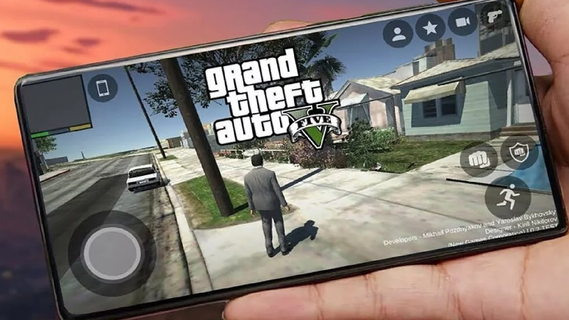
Grand Theft Auto V (GTA 5) is an open-world action-adventure game developed by Rockstar Games. Initially released for consoles and PC, it has become a cultural phenomenon. With the increasing power of mobile devices, there's growing interest in experiencing GTA 5 on mobile. This guide explores the features that make GTA 5 an engaging mobile experience, covering gameplay mechanics, graphics, controls, and additional enhancements.Gameplay MechanicsStory ModeGTA 5's story mode features three protagonists: Michael, Trevor, and Franklin. Each character has a unique storyline that interweaves with the others, providing a rich, narrative-driven experience. The mobile version retains all the cinematic cutscenes, engaging dialogues, and varied missions that made the original game popular.Open World ExplorationThe open-world environment of Los Santos and Blaine County is fully accessible on mobile. Players can explore a vast landscape, from bustling city streets to serene countryside. The mobile version includes dynamic weather, day-night cycles, and a living world filled with NPCs and wildlife.Missions and ActivitiesGTA 5 on mobile offers a wide range of missions and side activities. Players can engage in heists, car chases, and various side quests such as racing, flying, and sports activities. These missions are designed to be immersive and challenging, akin to the console and PC versions.Graphics and PerformanceVisual QualityThe mobile version aims to deliver high-quality visuals comparable to older console versions. This includes detailed character models, realistic environments, and impressive lighting effects. Advanced graphics settings allow players to customize their visual experience based on their device's capabilities.Performance OptimizationGTA 5 on mobile is optimized for a range of devices to ensure smooth gameplay. This includes frame rate adjustments, resolution scaling, and efficient use of mobile hardware. Players can expect a balanced performance that provides an enjoyable gaming experience without excessive battery drain or overheating.Controls and User InterfaceTouchscreen ControlsThe mobile version features intuitive touchscreen controls designed for ease of use. This includes virtual joysticks, customizable button layouts, and gesture-based controls. The interface is streamlined to ensure that players can easily navigate the game's menus and interact with the environment.Controller SupportFor those who prefer a traditional gaming experience, GTA 5 on mobile supports Bluetooth controllers. This includes popular options like Xbox and PlayStation controllers. Controller support enhances gameplay precision and comfort, particularly during complex missions or intense combat scenarios.
Mostra altro

1. Scarica il programma di installazione di MEmu e completa l'installazione

2. Avvia il Memu e apri il Google Play sulla homepage

3. Cerca GTA 5 Mobile in Google Play
Install
4. Scarica e installa GTA 5 Mobile
5. Al termine dell'installazione, fai clic sull'icona per avviar

6. Divertiti giocando a GTA 5 Mobile su PC con MEmu
MEmu App Player è il miglior emulatore Android gratuito, utilizzato da 50 milioni di persone per ottenere un'esperienza di gioco Android superba. La tecnilogia di virtualizzazione MEmu ti permette di giocare a migliaia di giochi Android con semplicità sul tuo computer, anche i giochi con la grafica più esigente.
Schermo più grande con una grafica migliore; Lunga durata, senza limitazione di batteria o dati mobili.
Supporto completo per mappa di tastiera per un controllo preciso di tastiera e mouse o gamepad.
Multipli account di gioco o attività su un singolo PC contemporaneamente con il gestore di multi istanza.
Play GTA 5 Mobile on PC by following steps: