GTA 5 Mobile
Ενημερώθηκε
Τρέχουσα έκδοση
3.0.9
Προσφέρεται από

Με όλο το πάθος σας για το παιχνίδι GTA 5 Mobile, τα χέρια σας δεν πρέπει να περιορίζονται σε μια μικροσκοπική οθόνη του τηλεφώνου σας. Παίξτε σαν επαγγελματίας και αποκτήστε τον πλήρη έλεγχο του παιχνιδιού σας με πληκτρολόγιο και ποντίκι. Το MEmu σας προσφέρει όλα όσα περιμένετε. Κατεβάστε και παίξτε GTA 5 Mobile σε υπολογιστή. Παίξτε όσο θέλετε, χωρίς άλλους περιορισμούς μπαταρίας, δεδομένων κινητής τηλεφωνίας και ενοχλητικών κλήσεων. Το ολοκαίνουργιο MEmu 9 είναι η καλύτερη επιλογή για να παίξετε GTA 5 Mobile σε υπολογιστή. Ετοιμασμένο με την εμπειρία μας, το εξαιρετικό σύστημα προκαθορισμένης αντιστοίχισης πλήκτρων καθιστά το GTA 5 Mobile ένα πραγματικό παιχνίδι υπολογιστή. Ο διαχειριστής πολλαπλών περιπτώσεων MEmu καθιστά δυνατό το παιχνίδι με 2 ή περισσότερους λογαριασμούς στην ίδια συσκευή. Και το πιο σημαντικό, η αποκλειστική μηχανή εξομοίωσης μας μπορεί να απελευθερώσει πλήρως τις δυνατότητες του υπολογιστή σας, κάνοντας τα πάντα ομαλά.
Show more
Απολαύστε την υπέροχη εμπειρία αναπαραγωγής του GTA 5 Mobile σε υπολογιστή με το MEMU App Player. Πρόκειται για έναν ισχυρό δωρεάν εξομοιωτή Android που σας επιτρέπει να παίζετε χιλιάδες παιχνίδια Android. GTA 5 Mobile is an open-world action-adventure game.

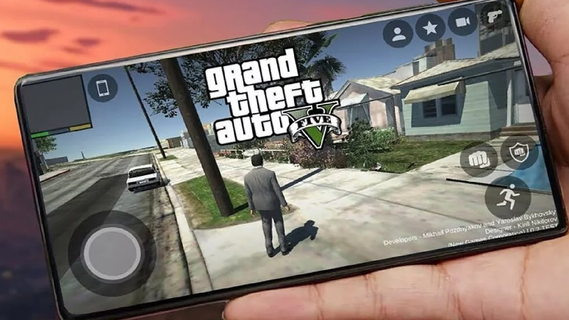
GTA 5 Mobile is an open-world action-adventure game. Initially released for consoles and PC, it has become a cultural phenomenon. With the increasing power of mobile devices, there's growing interest in experiencing GTA 5 on mobile. This guide explores the features that make GTA 5 an engaging mobile experience, covering gameplay mechanics, graphics, controls, and additional enhancements.Core featuresFull GTAV story on your phoneGTA 5 Mobile streams the complete Story Mode, so you can switch between Michael, Franklin, and Trevor and continue missions from your save. Progress syncs with your linked account, and you can pick up where you left off on your console or PC.GTA Online accessYou can enter GTA Online with up to 30 players, join cooperative Heists, race in Stunt Races, and visit social hubs such as nightclubs and car meets. New players can also use the Career Builder to start faster with curated businesses and vehicles.Flexible cloud and remote optionsGTA 5 Mobile works through supported services such as Xbox Cloud Gaming, GeForce NOW, or Shadow PC. In addition, you can use remote play from your own PC with apps like Steam Link or Moonlight to stream your owned copy of the game.Mobile friendly controlsThere are on screen touch layouts for driving, combat, and menus, and you can pair a Bluetooth controller for more precise input. This helps you handle shooting, driving, and quick swapping between characters with less effort on a small screen.Continuous GTA Online updatesGTA 5 Mobile keeps pace with ongoing GTA Online updates because content is delivered from the source platform. Therefore you can join new modes, vehicles, and activities the same day they arrive, either solo or with friends.Touchscreen ControlsThe mobile version features intuitive touchscreen controls designed for ease of use. This includes virtual joysticks, customizable button layouts, and gesture-based controls. The interface is streamlined to ensure that players can easily navigate the game's menus and interact with the environment.How to Start Playing GTA 5 Mobile on Your PhoneBelow are the basic steps for Android devices, including local APK installation and control setup. If you use PC streaming, the following steps for controls and graphics settings are also applicable.Visit the APKPure page and click "Download APK" to download GTA 5 Mobile to your device. Once the download is complete, if required, allow installation from this source in your security settings.Run the installer to install the GTA 5 Mobile APK. Then open the game, grant the necessary permissions, and download any additional resources/cache files within the app as needed.Access the control settings. Select a touch layout and adjust the button size and transparency. Next, connect a Bluetooth gamepad (enable Bluetooth on your phone, complete the pairing process, then choose the button configuration scheme in the game).Open the graphics settings. Adjust the resolution, texture quality, and target FPS based on your deviceâs temperature and battery life. Apply the changes and restart the game if necessary.Start a new game. Complete the initial tutorial, save your progress, and enter free mode to experience various side activities. This way, you can alternate between story missions and exploring the world.Download and start GTA 5 MobileGTA 5 Mobile lets you enjoy GTAV and GTA Online through cloud streaming or remote play, with touch controls and controller support tailored for mobile. Click "Download APK" to get the GTA 5 Mobile APK latest version of supported clients on APKPure, sign in to your service, and begin playing on your device.
Show more

1. Κατεβάστε το πρόγραμμα εγκατάστασης MEmu και ολοκληρώστε την εγκατάσταση

2. Ξεκινήστε το MEmu και στη συνέχεια ανοίξτε το Google Play στην επιφάνεια εργασίας

3. Αναζητήστε τον GTA 5 Mobile στο Google Play
Install
4. Λήψη και εγκατάσταση του GTA 5 Mobile
5. Μόλις ολοκληρωθεί η εγκατάσταση, κάντε κλικ στο εικονίδιο για να ξεκινήσετε

6. Enjoy playing GTA 5 Mobile on PC with MEmu
Το MEmu Play, αποτελεί την ιδανικότερη δωρεάν λύση για την εξομοίωση του λειτουργικού Android, και χρησιμοποιείται ήδη από περισσότερους από 50 εκατομμύρια χρήστες, ο οποίοι απολαμβάνουν, την καταπληκτική εμπειρία παιχνιδιού που προσφέρεται μέσω της εφαρμογής. Με τη χρήση του MEmu Virtualization, είναι δυνατή η αναπαραγωγή παιχνιδιών Android στον υπολογιστή, ακόμη και εκείνων που απαιτούν μεγάλη επεξεργαστική ισχύ γραφικών, δίχως συμβιβασμούς στην ποιότητα και στην εμπειρία χρήσης, ακριβώς όπως ένα τελευταίας γενιάς κινητό τηλέφωνο.
Μεγαλύτερη οθόνη με καλύτερα γραφικά. Μεγάλη διάρκεια ζωής, χωρίς περιορισμό μπαταρίας ή δεδομένων κινητής τηλεφωνίας.
Πλήρης υποστήριξη αντιστοίχισης πλήκτρων για ακριβή έλεγχο του πληκτρολογίου και του ποντικιού ή του gamepad.
Πολλαπλοί λογαριασμοί παιχνιδιών ή εργασίες σε έναν υπολογιστή ταυτόχρονα με τον διαχειριστή πολλαπλών περιπτώσεων.
Play GTA 5 Mobile on PC by following steps: