GTA 5 Mobile
Actualizada
Versión actual
3.0.9
Ofrecida por

Con toda tu pasión para jugar GTA 5 Mobile, no se supone que tus manos estén limitadas en una pequeña pantalla de tu teléfono. Juega como un profesional y obtén el control total de tu juego con el teclado y el mouse. MEmu le ofrece todas las cosas que espera. Descargar y jugar GTA 5 Mobile en PC. Juega todo el tiempo que quieras, sin más limitaciones de batería, datos móviles y llamadas molestas. El nuevo MEmu 9 es la mejor opción para jugar GTA 5 Mobile en PC. Preparado con nuestra experiencia, el exquisito sistema de keymapping preestablecido convierte a GTA 5 Mobile en un verdadero juego de PC. Codificado con nuestra absorción, el administrador de instancias múltiples hace posible jugar 2 o más cuentas en el mismo dispositivo. Y lo más importante, nuestro exclusivo motor de emulación puede liberar todo el potencial de su PC, hacer que todo sea más fluido. Nos importa no solo cómo juegas, sino también todo el proceso de disfrutar de la felicidad de los juegos.
Más detalles
Descargar GTA 5 Mobile en PC con MEmu Android Emulador. Disfruta jugando en la pentalla grande. Grand Theft Auto V (GTA 5) is an open-world action-adventure game developed by Rockstar Games.

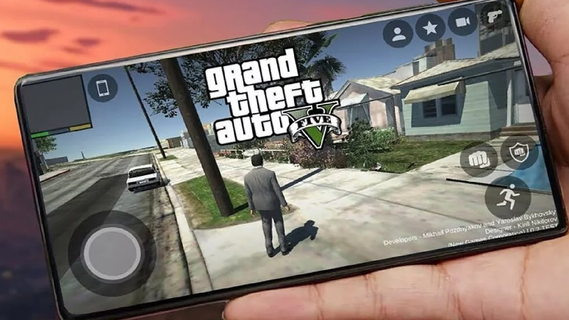
Grand Theft Auto V (GTA 5) is an open-world action-adventure game developed by Rockstar Games. Initially released for consoles and PC, it has become a cultural phenomenon. With the increasing power of mobile devices, there's growing interest in experiencing GTA 5 on mobile. This guide explores the features that make GTA 5 an engaging mobile experience, covering gameplay mechanics, graphics, controls, and additional enhancements.Gameplay MechanicsStory ModeGTA 5's story mode features three protagonists: Michael, Trevor, and Franklin. Each character has a unique storyline that interweaves with the others, providing a rich, narrative-driven experience. The mobile version retains all the cinematic cutscenes, engaging dialogues, and varied missions that made the original game popular.Open World ExplorationThe open-world environment of Los Santos and Blaine County is fully accessible on mobile. Players can explore a vast landscape, from bustling city streets to serene countryside. The mobile version includes dynamic weather, day-night cycles, and a living world filled with NPCs and wildlife.Missions and ActivitiesGTA 5 on mobile offers a wide range of missions and side activities. Players can engage in heists, car chases, and various side quests such as racing, flying, and sports activities. These missions are designed to be immersive and challenging, akin to the console and PC versions.Graphics and PerformanceVisual QualityThe mobile version aims to deliver high-quality visuals comparable to older console versions. This includes detailed character models, realistic environments, and impressive lighting effects. Advanced graphics settings allow players to customize their visual experience based on their device's capabilities.Performance OptimizationGTA 5 on mobile is optimized for a range of devices to ensure smooth gameplay. This includes frame rate adjustments, resolution scaling, and efficient use of mobile hardware. Players can expect a balanced performance that provides an enjoyable gaming experience without excessive battery drain or overheating.Controls and User InterfaceTouchscreen ControlsThe mobile version features intuitive touchscreen controls designed for ease of use. This includes virtual joysticks, customizable button layouts, and gesture-based controls. The interface is streamlined to ensure that players can easily navigate the game's menus and interact with the environment.Controller SupportFor those who prefer a traditional gaming experience, GTA 5 on mobile supports Bluetooth controllers. This includes popular options like Xbox and PlayStation controllers. Controller support enhances gameplay precision and comfort, particularly during complex missions or intense combat scenarios.
Más detalles

1. Descargar el instalador de MEmu y finalice la instalación

2. Iniciar MEmu y abrir Google Play en la página de inicio

3. Buscar GTA 5 Mobile en Google Play
Install
4. Descargar y instalar GTA 5 Mobile
5. Hacer click al icono para iniciar

6. Disfruta jugando GTA 5 Mobile en PC con MEmu
MEmu App Player es el mejor emulador de Android gratuito y 50 millones de personas ya están disfrutando su magnífica experiencia jugando en Android. La tecnología de virtualización de MEmu te permite jugar a miles de juegos Android suavemente en tu PC, incluso los más intensivos gráficamente.
Pantalla más grande con mejores gráficos; Larga duración, sin limitación de batería o datos móviles.
Soporte completo de keymapping para un control preciso del teclado y el mouse o gamepad.
Múltiples cuentas de juegos o tareas en una sola PC a la vez con el administrador de instancias múltiples.
Play GTA 5 Mobile on PC by following steps: