GTA 5 Mobile
อัปเดตเมื่อ
เวอร์ชันปัจจุบัน
3.0.9
ให้บริการโดย

เวลาคุณเล่น GTA 5 Mobile, คุณอาจรู้สึกว่ามือคุณอาจบังจอแล้วทำให้ไม่ได้เล่นแบบเต็มที่. เล่นแบบไร้ขีดจำกัดด้วยเม้าส์และคีย์บอร์ด. MEmu มีตัวเลือกหลายอย่างให้คุณใช้งานเกมที่คุณเล่นแบบที่คุณต้องการ. ดาวน์โหลดและเล่น GTA 5 Mobile บน PC. เล่นนานแค่ไหนก็ได้, ไม่ต้องชาร์จแบตเตอรี่, หรือเจอคนโทรเข้ามาระหว่างเล่น. MEmu 9 เป็นตัวเลือกสำหรับการเล่น GTA 5 Mobile บน PC. ทางทีมงานเราได้ปรับแต่งเกม, ปรับให้เล่นเกมบางเกมได้เหมือนเล่น GTA 5 Mobile เป็นเกม PC เช่นเล็งด้วยเม้าส์หรือใช้คีย์บอร์ด. ระบบของเรายังทำให้คุณสามารถเปิดเล่นได้มากกว่า 2 เกมพร้อมๆกันในคอมของคุณ. และที่สำคัญที่สุด, ระบบโปรแกรมของเราสามารถทำให้คุณใช้ระบบของ PC ทำให้เกมลื่นเหมือนกับใช้โทรศัพท์รุ่นล่าสุด. เราไม่ได้ดูแลเรื่องการเล่นเกม, แต่เราดูแลถึงความสนุกสนานที่คุณได้จากการเล่นด้วย.
แสดงเพิ่มเติม
ดาวน์โหลด GTA 5 Mobile บน PC ด้วย MEmu Android Emulator สนุกกับการเล่นบนหน้าจอขนาดใหญ่ Grand Theft Auto V (GTA 5) is an open-world action-adventure game developed by Rockstar Games.
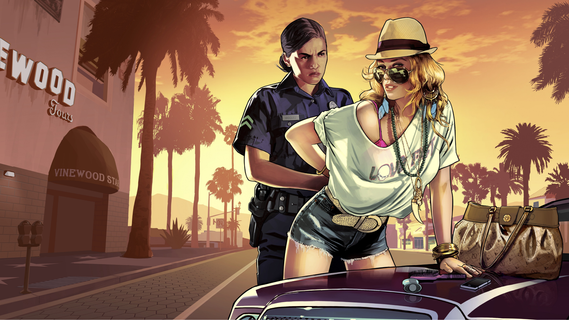
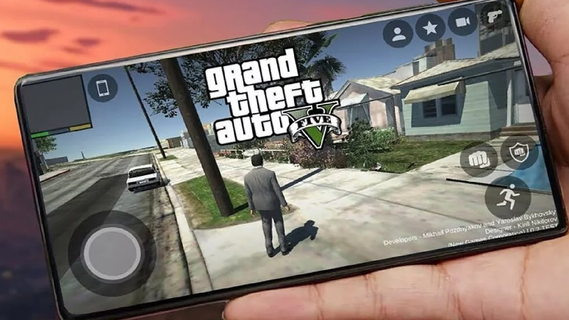
Grand Theft Auto V (GTA 5) is an open-world action-adventure game developed by Rockstar Games. Initially released for consoles and PC, it has become a cultural phenomenon. With the increasing power of mobile devices, there's growing interest in experiencing GTA 5 on mobile. This guide explores the features that make GTA 5 an engaging mobile experience, covering gameplay mechanics, graphics, controls, and additional enhancements.Gameplay MechanicsStory ModeGTA 5's story mode features three protagonists: Michael, Trevor, and Franklin. Each character has a unique storyline that interweaves with the others, providing a rich, narrative-driven experience. The mobile version retains all the cinematic cutscenes, engaging dialogues, and varied missions that made the original game popular.Open World ExplorationThe open-world environment of Los Santos and Blaine County is fully accessible on mobile. Players can explore a vast landscape, from bustling city streets to serene countryside. The mobile version includes dynamic weather, day-night cycles, and a living world filled with NPCs and wildlife.Missions and ActivitiesGTA 5 on mobile offers a wide range of missions and side activities. Players can engage in heists, car chases, and various side quests such as racing, flying, and sports activities. These missions are designed to be immersive and challenging, akin to the console and PC versions.Graphics and PerformanceVisual QualityThe mobile version aims to deliver high-quality visuals comparable to older console versions. This includes detailed character models, realistic environments, and impressive lighting effects. Advanced graphics settings allow players to customize their visual experience based on their device's capabilities.Performance OptimizationGTA 5 on mobile is optimized for a range of devices to ensure smooth gameplay. This includes frame rate adjustments, resolution scaling, and efficient use of mobile hardware. Players can expect a balanced performance that provides an enjoyable gaming experience without excessive battery drain or overheating.Controls and User InterfaceTouchscreen ControlsThe mobile version features intuitive touchscreen controls designed for ease of use. This includes virtual joysticks, customizable button layouts, and gesture-based controls. The interface is streamlined to ensure that players can easily navigate the game's menus and interact with the environment.Controller SupportFor those who prefer a traditional gaming experience, GTA 5 on mobile supports Bluetooth controllers. This includes popular options like Xbox and PlayStation controllers. Controller support enhances gameplay precision and comfort, particularly during complex missions or intense combat scenarios.
แสดงเพิ่มเติม

1. ดาวน์โหลดตัวติดตั้ง MEmu และสิ้นสุดการติดตั้ง

2. เริ่ม MEmu จากนั้นเปิด Google Play บนหน้าแรก

3. ค้นหา GTA 5 Mobile ใน Google Play
Install
4. ดาวน์โหลดและติดตั้ง GTA 5 Mobile
5. เมื่อติดตั้งเสร็จให้คลิกที่ไอคอนเพื่อเริ่มใช้งาน

6. สนุกกับการเล่น GTA 5 Mobile บนพีซีด้วย MEmu
MEmu App Player เป็นอีมูเลเตอร์ Android ที่ดีที่สุดและผู้คนกว่า 50 ล้านคนเพลิดเพลินไปกับประสบการณ์การเล่นเกม Android ที่ยอดเยี่ยม เทคโนโลยีการจำลองเสมือนของ MEmu ช่วยให้คุณเล่นเกม Android หลายพันเกมได้อย่างราบรื่นบนพีซีของคุณแม้แต่เกมที่ต้องใช้กราฟิกมากที่สุด
จอใหญ่และกราฟฟิกสวยกว่า; เล่นได้นาน, ไม่ต้องใช้แบตเตอรี่โทรศัพท์หรือเน็ตโทรศัพท์.
ระบบปรับแต่งปุ่มคีย์บอร์ดและเม้าส์ตามที่คุณเลือก
เล่นมากกว่าหนึ่งเกมบน PC ในเวลาเดียวกันด้วยระบบหลายจอหรือ Multi-Instance manager.
Play GTA 5 Mobile on PC by following steps: