BanG Dream! Our Notes
अपडेट किया गया
वर्तमान वर्शन
1.0.1
संसाधन

अपने सेलफोन पर BanG Dream! Our Notes का उपयोग करते समय ओवरचार्ज के बारे में चिंता करना बंद करें, अपने आप को छोटी स्क्रीन से मुक्त करें और बहुत बड़े डिस्प्ले पर ऐप का उपयोग करने का आनंद लें। अब से, कीबोर्ड और माउस के साथ अपने ऐप का पूर्ण-स्क्रीन अनुभव प्राप्त करें। एमईएमयू आपको उन सभी आश्चर्यजनक सुविधाओं की पेशकश करता है जिनकी आपको उम्मीद थी: त्वरित इंस्टॉल और आसान सेटअप, सहज नियंत्रण, बैटरी की कोई सीमा नहीं, मोबाइल डेटा और परेशान कॉल। आपके कंप्यूटर पर BanG Dream! Our Notes का उपयोग करने का सबसे अच्छा विकल्प नया MEmu 9 है। हमारे अवशोषण के साथ कोडित, बहु-उदाहरण प्रबंधक एक ही समय में 2 या अधिक खाते खोलना संभव बनाता है। और सबसे महत्वपूर्ण, हमारा अनन्य उत्सर्जन इंजन आपके पीसी की पूरी क्षमता को जारी कर सकता है, सब कुछ सुचारू और सुखद बना सकता है।
और दिखाएं
डाउनलोड करें BanG Dream! Our Notes पीसी पर MEmu एंड्रॉयड एमुलेटर के साथ बड़े पर्दे पर खेलने का आनंद लें। पेश है BanG Dream!
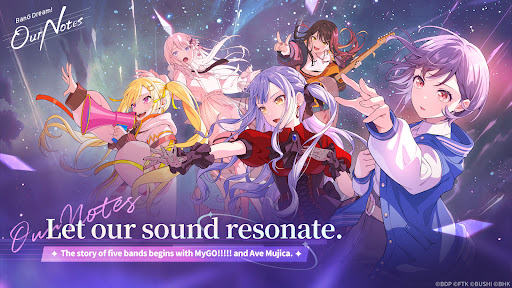
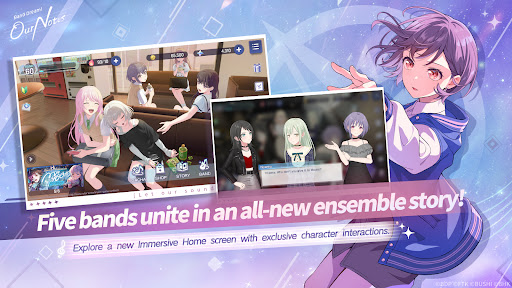
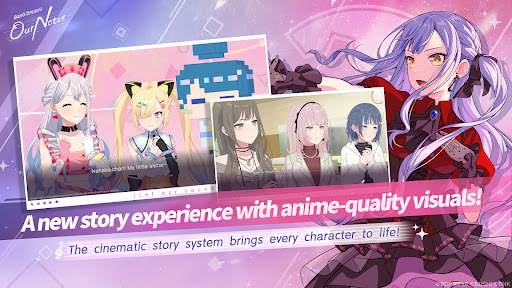
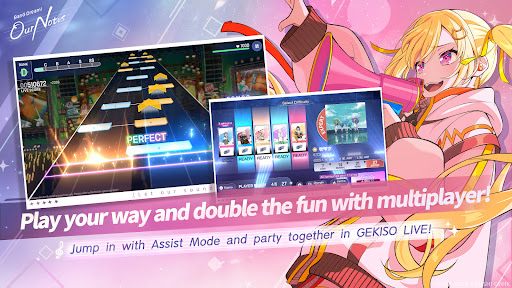
पेश है BanG Dream! Our Notes, BanG Dream! Project का एक बिल्कुल नया रिदम गेम एडवेंचर!
पांच बैंड्स के गानों की एक विस्तृत श्रृंखला का आनंद लें और एक नई, रोमांचक कहानी को जानें जो आपका इंतज़ार कर रही है.
◆नया रिदम गेम सिस्टम: “GEKISO LIVE”◆
रिदम गेम खेलते समय अब खास GEKISO सेक्शन दिखाई देंगे!
कॉम्बो, सटीक टाइमिंग और यहां तक कि किस्मत भी—एक रोमांचक नए गेमप्ले अनुभव में अपने रिदम गेम कौशल को परखें!
BanG Dream! के असली लाइव परफॉर्मेंस के रोमांच और मग्नता को महसूस करें और पांच खिलाड़ियों तक के साथ पार्टी-स्टाइल रिदम गेमप्ले का मज़ा लें!
Our Notes में एक खास नया सिस्टम भी है: असिस्ट मोड!
चाहे आप रिदम गेम्स में नए हों या बस एक आरामदायक अनुभव की तलाश में हों, असिस्ट मोड सभी को परफॉर्मेंस का आनंद लेने और अपनी गति से बेहतर होने का मौका देता है.
◆ओरिजिनल गानों से लेकर लेटेस्ट हिट कवर्स तक◆
BanG Dream! एनीमे में दिखाए गए मशहूर ओरिजिनल गानों से लेकर MyGO!!!!! के ट्रैक्स तक एवे मुजिका से लेकर लोकप्रिय कवर गानों की एक विस्तृत श्रृंखला तक, यह लाइनअप आनंद लेने के लिए संगीत से भरपूर है!
नवीनतम हिट्स से लेकर प्रिय क्लासिक्स तक, अपने पसंदीदा गाने बजाएं.
आप BanG Dream! एनीमे श्रृंखला के विभिन्न प्रदर्शन दृश्य और संगीत वीडियो भी देख सकते हैं.
साथ ही, प्रशंसकों के पसंदीदा बैंड MyGO!!!!! और Ave Mujica के नवीनतम ट्रैक सबसे पहले Our Notes में उपलब्ध होंगे!
【BanG Dream! गाने】
・Mayoiuta / MyGO!!!!!
・KiLLKiSS / Ave Mujica
・Haruhikage (MyGO!!!!! ver.) / MyGO!!!!!
・MUGEN MY WORLD / Mugendai MewType
・Kishi Kaisen / millsage
・Homie’s Tie!! / Ikka Dumb Rock!
...और भी बहुत कुछ
और भी कवर गाने जल्द ही आने वाले हैं!
◆पांच बैंडों द्वारा बुनी गई नई कहानियां◆
MyGO!!!!!, Ave Mujica और Mugendai MewType के साथ-साथ, millsage और Ikka Dumb Rock! भी मंच पर आ रहे हैं!
सिनेमैटिक स्टोरी सिस्टम के साथ, पात्र जीवंत भावों के साथ चलते हैं, ठीक वैसे ही जैसे किसी फिल्म या एनीमे में होते हैं.
विशेष दृश्यों में एनिमेटेड सीक्वेंस भी शामिल हैं, जिनमें बिल्कुल नए कट्स भी हैं.
विज़ुअल इफेक्ट्स और सचित्र दृश्यों की एक विस्तृत श्रृंखला मिलकर एक शानदार और नया कहानी अनुभव प्रदान करती है.
MyGO!!!!!, Ave Mujica और Mugendai MewType की परिचित एनीमे कहानियों को गेम के विशेष दृष्टिकोण से फिर से जिएं. आप Our Notes में उपलब्ध एनीमे कहानियों को आगे बढ़ाने वाले विशेष एपिसोड का भी आनंद ले सकते हैं. वहीं, millsage और Ikka Dumb Rock! बिल्कुल नई और मौलिक कहानियां पेश करेंगे.
पांच विशिष्ट बैंडों और कुल 25 अद्वितीय सदस्यों द्वारा बुनी गई जीवंत कहानियों का अनुभव करें.
◆आधिकारिक वेबसाइट◆
https://bdon.biligames.com/?lang=en-us
©BanG Dream! प्रोजेक्ट ©FROMTOKYO ©Bushiroad. प्रकाशक: BILIBILI HK LIMITED
और दिखाएं

1. MEmu इंस्टॉलर को डाउनलोड करें और इंस्टॉलेशन को पूरा करें

2. MEmu शुरू करें फिर होमपेज पर Google Play खोलें

3. Google Play में BanG Dream! Our Notes खोजें
Install
4. BanG Dream! Our Notes डाउनलोड कर इंस्टॉल करें
5. इंस्टॉल पूरा होने पर आइकन दबाएं

6. MEmu से पीसी पर BanG Dream! Our Notes खेलने का आनंद लें
MEmu Play सबसे बेहतरीन मुफ़्त Android एमुलेटर है और 5 करोड़ लोग पहले ही इसके शानदार Android गेमिंग अनुभव का आनंद ले चुके हैं। MEmu 9 वर्चुअलाइज़ेशन तकनीक आपको अपने PC पर हज़ारों Android गेम, यहाँ तक कि सबसे ज़्यादा ग्राफ़िक्स वाले गेम भी, आसानी से खेलने की सुविधा देती है।
असीमित बैटरी या मोबाइल डेटा के साथ बेहतर ग्राफिक्स के साथ बड़ी स्क्रीन; लंबी अवधि।
कीबोर्ड और माउस या गेमपैड के उत्तम नियंत्रण के लिए संपूर्ण कीमैपिंग का समर्थन करता हैं।
एक ही पीसी पर मल्टी-इंस्टेंस मैनेजर के साथ एक समय में कई गेम खाते या कार्य कर सकते हैं।
Play BanG Dream! Our Notes on PC by following steps: