AUTO-FIRE: Cyberpunk FPS
Updated
Current Version
Offered By

With your passion for AUTO-FIRE: Cyberpunk FPS, you shouldn’t have to limit yourself to the small screen of a phone. Play like a pro and take full control of the game using a keyboard and mouse. MEmu gives you everything you’re looking for. Download and play AUTO-FIRE: Cyberpunk FPS on PC. Play as long as you want — no more worries about battery life, mobile data, or unexpected calls. The all-new MEmu 9 is the best way to play AUTO-FIRE: Cyberpunk FPS on PC. With our expertly designed keymapping system, AUTO-FIRE: Cyberpunk FPS feels just like a real PC game. The MEmu multi-instance manager lets you run two or more accounts on the same device at the same time. Most importantly, our exclusive emulation engine unlocks your PC’s full potential, delivering smooth and seamless performance.
Show more
Download AUTO-FIRE: Cyberpunk FPS on PC with MEmu Android Emulator. Enjoy playing on big screen. Welcome to AUTO-FIRE, a thrilling futuristic cyberpunk FPS shooter where neon lights, high technology, and tactical warfare collide!
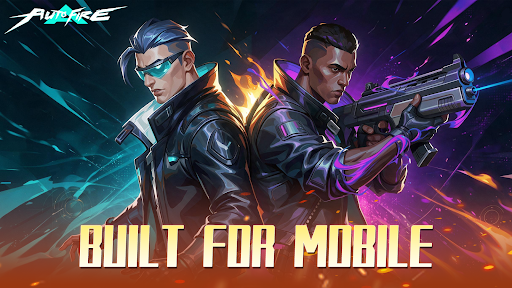
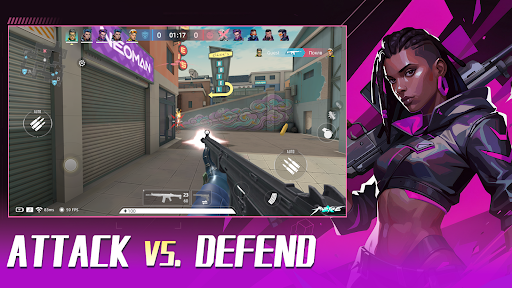
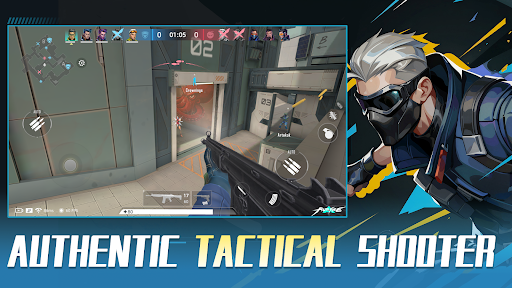
Welcome to AUTO-FIRE, a thrilling futuristic cyberpunk FPS shooter where neon lights, high technology, and tactical warfare collide! Step into this vibrant, chaotic metropolis and dominate the battlefield in intense 5v5 multiplayer battles.
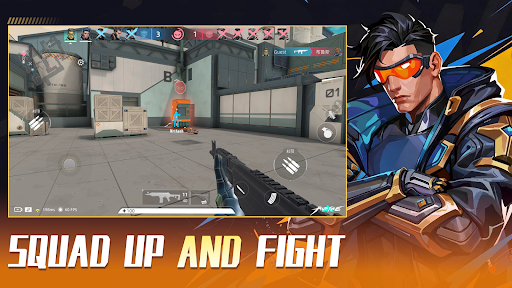
We blend the tense, tactical feel of classic competitive FPS titles with an optimized, mobile-first Auto-Shooting system. Master your movement, positioning, and strategy without fighting complicated inputs!
【KEY FEATURES】
● Immersive Cyberpunk Aesthetic:
Explore a stunning 3D neon city. Every high-tech facility, dark alley, and futuristic street corner is crafted to deliver a pulse-pounding sci-fi FPS experience.
● Smart Auto-Fire Controls:
Ditch the clunky mobile inputs! Our innovative auto-aim and fire mechanics let you focus on positioning, tactical cover, and high-speed action. Easy to learn, thrilling to master.
● Tactical 5v5 Multiplayer PvP:
Team up with friends in competitive multiplayer modes. Fast-paced gunfights, strategic map control, and precise teamwork are your keys to victory in every 5v5 match.
● Extensive Sci-Fi Arsenal & Customization:
Unlock, collect, and upgrade a massive variety of futuristic weapons, snipers, and tactical gear. Build your custom loadout to fit your unique shooting playstyle.
● Dynamic Combat Maps:
Battle across diverse environments—from high-tech data centers to gritty neon streets. Every PvP arena offers fresh tactical angles and intense encounters.
【WHY PLAY AUTO-FIRE?】
- Smooth Tap-to-Move & Smart Auto-Fire mechanics
- Fast-paced 5v5 PvP action designed specifically for mobile
- Regular updates with new maps, weapons, and seasonal events
The future city needs a new tactical legend. Are you ready to rise through the ranks and dominate the neon grid?
Download AUTO-FIRE today and experience the next generation of mobile cyberpunk FPS action!
Show more

1. Download MEmu installer and finish the setup

2. Start MEmu then open Google Play on the desktop

3. Search AUTO-FIRE: Cyberpunk FPS in Google Play
Install
4. Download and Install AUTO-FIRE: Cyberpunk FPS
5. On install completion click the icon to start

6. Enjoy playing AUTO-FIRE: Cyberpunk FPS on PC with MEmu
MEmu Play is the best Android emulator and 100 million people already enjoy its superb Android gaming experience. The MEmu virtualization technology empowers you to play thousands of Android games smoothly on your PC, even the most graphic-intensive ones.
Bigger screen with better graphics; Long duration, without limitation of battery or mobile data.
Full Keymapping support for precise control of keyboard and mouse or gamepad.
Multiple game accounts or tasks on single PC at one time with Multi-Instance manager.
Play AUTO-FIRE: Cyberpunk FPS on PC by following steps: