Beyblade Burst Rivals
Updated
Current Version
3.11.9
Offered By

With your passion for Beyblade Burst Rivals, you shouldn’t have to limit yourself to the small screen of a phone. Play like a pro and take full control of the game using a keyboard and mouse. MEmu gives you everything you’re looking for. Download and play Beyblade Burst Rivals on PC. Play as long as you want — no more worries about battery life, mobile data, or unexpected calls. The all-new MEmu 9 is the best way to play Beyblade Burst Rivals on PC. With our expertly designed keymapping system, Beyblade Burst Rivals feels just like a real PC game. The MEmu multi-instance manager lets you run two or more accounts on the same device at the same time. Most importantly, our exclusive emulation engine unlocks your PC’s full potential, delivering smooth and seamless performance.
Show more
Download Beyblade Burst Rivals on PC with MEmu Android Emulator. Enjoy playing on big screen. BEYBLADE BURST RIVALS is the official fast-paced match-3 puzzle battle game for BEYBLADE BURST!

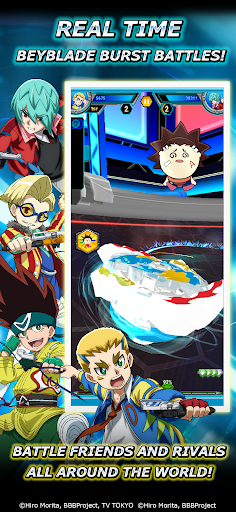
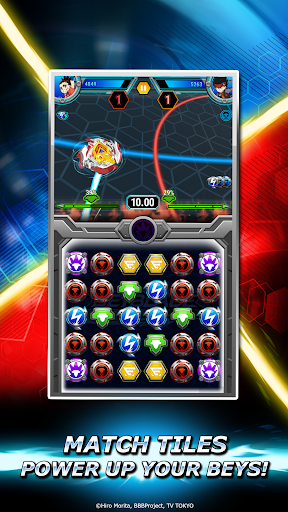
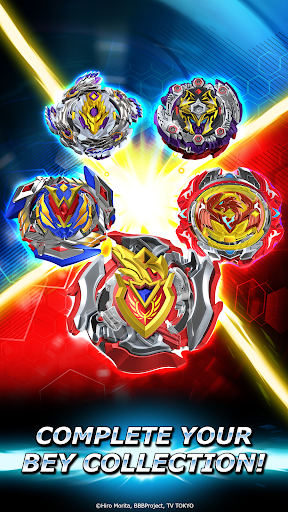
BEYBLADE BURST RIVALS is the official fast-paced match-3 puzzle battle game for BEYBLADE BURST!
Choose your favorite character, become a Master Blader, and enter BEYBLADE BURST tournaments! Use rare and powerful Beys with the help of your loyal Avatars and LET IT RIP in epic battles!
Collect an arsenal of Beys and upgrade them, unlocking special Bey techniques that provide a decisive edge for the ultimate battle. Which ones will you master?
Use strategy to defeat your opponents and strive for Ring Out Finishes, Survivor Finishes, and epic Burst Finishes!
Do you have what it takes to become the best Blader in the world? Grab your Bey and LET IT RIP!
FAST-PACED MATCH 3 BEYBLADE BURST BATTLES:
• Unleash epic Bey Techniques in battle!
• Use your favorite Bey Techniques like Rush Launch, Counter Break, Quake Launch and more!
• Switch your Beys between rounds to perfect your strategy!
BATTLE HEAD-TO-HEAD WITH YOUR FAVORITE BLADERS, BEYS & AVATARS:
• Collect and use all your favorite Beys in battle including Victory Valtryek, Storm Spryzen, Raging Roktavor, Xeno Xcalius, Lost Lúinor and more!
• Battle all your favorite characters including Valt, Aiger, Rantaro, Daigo, Ken, Wakiya, Xander, Zac, Shu, Lui and more!
• Activate your devoted Avatars, charge up, sit back and watch their explosive affects across the board
• Challenge the best Bladers!
COLLECT THE RAREST AVATARS, BLADERS & BEYS:
• Discover rare and epic loot by opening Bey Boxes!
• Collect, level up and manage your Avatars, Bladers and Beys and use their powers strategically in battle!
• The more powerful the Blader or Bey, the better their stats, powers and abilities will be!
• New Bladers and Beys are added all the time!
BUILD YOUR ARSENAL OF RARE BEYS:
• Build your arsenal of rare Beys and battle with them in the Beystadium!
• Collect 5-star Beys to unlock new Bey Techniques!
• Earn experience and level up your Beys to unlock their true potential!
BECOME THE BEST BLADER IN THE WORLD:
• Compete in tournaments in awesome locations like Mountaintop, Seaside, and the National Stadium!
• Train your arsenal of Beys by battling in Quick Play!
• Compete in special weekly tournaments for epic rewards!
• Defeat the greatest Bladers and earn your place in history!
Follow us to get the latest NEWS and UPDATES:
Twitter - @Beyblade_Rivals
Instagram - @beybladeburstrivals
Discord - https://discord.gg/M92MT2J
Show more

1. Download MEmu installer and finish the setup

2. Start MEmu then open Google Play on the desktop

3. Search Beyblade Burst Rivals in Google Play
Install
4. Download and Install Beyblade Burst Rivals
5. On install completion click the icon to start

6. Enjoy playing Beyblade Burst Rivals on PC with MEmu
MEmu Play is the best Android emulator and 100 million people already enjoy its superb Android gaming experience. The MEmu virtualization technology empowers you to play thousands of Android games smoothly on your PC, even the most graphic-intensive ones.
Bigger screen with better graphics; Long duration, without limitation of battery or mobile data.
Full Keymapping support for precise control of keyboard and mouse or gamepad.
Multiple game accounts or tasks on single PC at one time with Multi-Instance manager.
Play Beyblade Burst Rivals on PC by following steps: