学園アイドルマスター
Updated
Current Version
2.1.0
Offered By

With your passion for 学園アイドルマスター, you shouldn’t have to limit yourself to the small screen of a phone. Play like a pro and take full control of the game using a keyboard and mouse. MEmu gives you everything you’re looking for. Download and play 学園アイドルマスター on PC. Play as long as you want — no more worries about battery life, mobile data, or unexpected calls. The all-new MEmu 9 is the best way to play 学園アイドルマスター on PC. With our expertly designed keymapping system, 学園アイドルマスター feels just like a real PC game. The MEmu multi-instance manager lets you run two or more accounts on the same device at the same time. Most importantly, our exclusive emulation engine unlocks your PC’s full potential, delivering smooth and seamless performance.
Show more
Download 学園アイドルマスター on PC with MEmu Android Emulator. Enjoy playing on big screen. A completely new addition to the “Idolmaster” series, the school idol training simulation “Gakumasu” is now available!

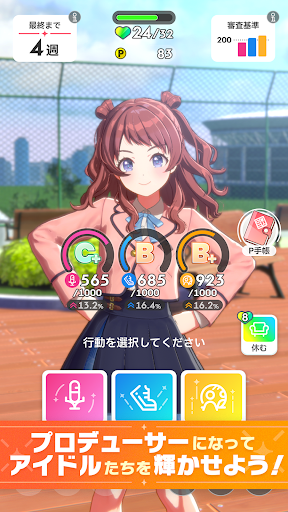


A completely new addition to the “Idolmaster” series, the school idol training simulation “Gakumasu” is now available!
Let's make the budding idols who have various charms and problems shine with your production!
◆Introduction◆
The setting is Hatsei Academy, an idol training school.
You are a new student entering the producer department.
We scout unique idols who belong to the idol department and aim for their dreams,
Let's bloom their charm and grow them into idols through production!
◆Get better at singing and dancing!?Next generation idol training simulation◆
At the time of the production, the girls had not yet learned how to sing or dance.
Let's grow your ability as an idol through your production and aim to pass the exam!
At the live stage after the exam, their performance on stage changes as they grow.
We will continue to produce repeatedly, and our goal is to perform at packed arenas!
◆Growing as an “idol” leads to growing as a “person”◆
By proceeding with their production, a one-on-one story between you and the idol will unfold.
Their weaknesses as idols and their hidden worries...
As a producer, work closely with the girls, deepen your bond, and aim to become a top idol together!
◆What is the “THE IDOLM@STER” series◆
This is an idol-produced game series that started in 2005 as a game machine for amusement facilities.
Affectionately known as ``Idolmaster'', the game system that trains idols as a producer, unique characters, and music are supported by many customers.
“THE IDOLM@STER” “THE IDOLM@STER CINDERELLA GIRLS” “THE IDOLM@STER MILLION LIVE!” ”
``THE IDOLM@STER SideM'' and ``THE IDOLM@STER Shiny Colors'' have existed, and this work is the first completely new work in six years.
[Operating environment and other inquiries]
https://bnfaq.channel.or.jp/title/3043
*Please be sure to use this app in the operating environment specified in the link above. Please note that even if you use the app in the operating environment, the app may not work properly depending on your usage status or device-specific factors.
THE IDOLM@STER™& ©Bandai Namco Entertainment Inc.
Show more

1. Download MEmu installer and finish the setup

2. Start MEmu then open Google Play on the desktop

3. Search 学園アイドルマスター in Google Play
Install
4. Download and Install 学園アイドルマスター
5. On install completion click the icon to start

6. Enjoy playing 学園アイドルマスター on PC with MEmu
MEmu Play is the best Android emulator and 100 million people already enjoy its superb Android gaming experience. The MEmu virtualization technology empowers you to play thousands of Android games smoothly on your PC, even the most graphic-intensive ones.
Bigger screen with better graphics; Long duration, without limitation of battery or mobile data.
Full Keymapping support for precise control of keyboard and mouse or gamepad.
Multiple game accounts or tasks on single PC at one time with Multi-Instance manager.
Play 学園アイドルマスター on PC by following steps: