Grass Master – Cutting Game
Updated
Current Version
1.4.0
Offered By

With your passion for Grass Master – Cutting Game, you shouldn’t have to limit yourself to the small screen of a phone. Play like a pro and take full control of the game using a keyboard and mouse. MEmu gives you everything you’re looking for. Download and play Grass Master – Cutting Game on PC. Play as long as you want — no more worries about battery life, mobile data, or unexpected calls. The all-new MEmu 9 is the best way to play Grass Master – Cutting Game on PC. With our expertly designed keymapping system, Grass Master – Cutting Game feels just like a real PC game. The MEmu multi-instance manager lets you run two or more accounts on the same device at the same time. Most importantly, our exclusive emulation engine unlocks your PC’s full potential, delivering smooth and seamless performance.
Show more
Download Grass Master – Cutting Game on PC with MEmu Android Emulator. Enjoy playing on big screen. THE MORE YOU MOW.
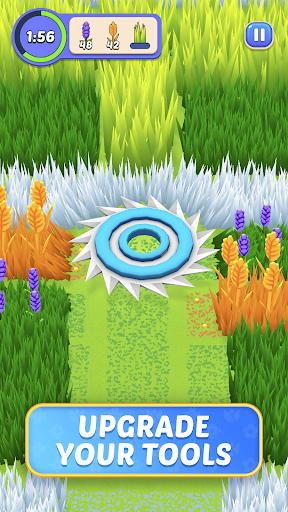
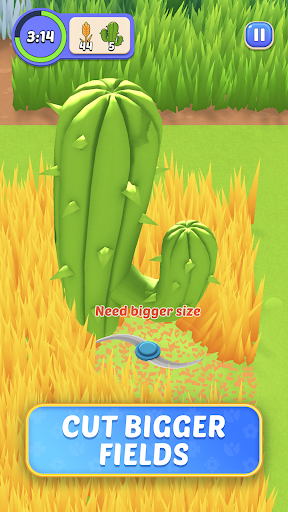
THE MORE YOU MOW
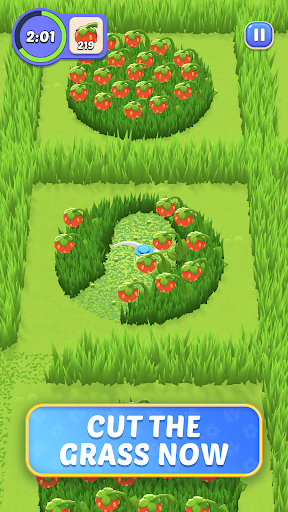
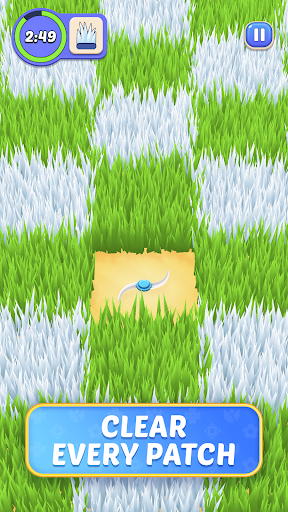
Mowing the lawn usually means hot, sweaty work, but thanks to this grass cutting lawnmower game you’ll be able to enjoy all the satisfaction of a job well done, with none of the hard work! Grass Master is a fun and relaxing mowing simulator where each level you’ll work to cut the different grasses in flowers as fast as possible. With great graphics and that ASMR feel it’s the perfect answer to a hard day of work – so satisfying!
MOW, MOW, MOW THE HAY
Armed with your trusty lawnmower, each level you’ll receive a list of items to cut: orange grass, red tulips, green shrubs, the list goes on! Once the timer starts it’s up to you to figure out the best and fastest way to cut everything. As you cut the grass, your mower will grow and speed up, so think ahead to what bigger items might be coming up that you need to prepare for. Relaxing and cheerful, this lawnmower game does it all!
Fun features:
Lawnmowing madness – Who ever thought grass cutting could be fun? This game will change your mind! Different types of grasses, flowers, and even trees await trimming, making this an enjoyable game for all skill levels. As you progress you’ll start to recognize which plants to go for first to make the biggest impact.
Relaxing ASMR – Nothing takes the edge off of your stress like a little haptic action – not only that, but the accompanying graphics really help set the mood! While you do need to beat the timer there are boosters a’plenty in case you’re just not feeling it, and the levels flow seamlessly together, allowing you to keep playing to your heart’s content.
Satisfying gameplay – Great graphics, smooth controls, bright colors, and straightforward play means you don’t need to mess around learning strange rules or fighting against flashing colors. Sit back, relax and guide your lawnmower through the maze of plants.
Steely strategy – It’s not all mindless play here. Different levels have different objectives, so why not try out some different ideas and see which ones move you along the fastest? Whether you cut the grass in a circle or head straight towards your objective, there’s never a dull moment (or blade.)
THE MOWING SIMULATOR THAT LEAVES YOU SATISFIED
Grass cutting can be so relaxing, at least when done in a lawnmower game! A mowing simulator with impeccable ASMR vibes, Grass Master is your ticket to a stress-free day. Guide your lawnmower through cheerful flora to cut them down as you enjoy trying out different strategies: will you stick to just the areas you need to move on or cut it all? Whatever your choice, let Grass Master mow your stress away!
Privacy Policy: https://say.games/privacy-policy
Terms of Use: https://say.games/terms-of-use
Show more

1. Download MEmu installer and finish the setup

2. Start MEmu then open Google Play on the desktop

3. Search Grass Master – Cutting Game in Google Play
Install
4. Download and Install Grass Master – Cutting Game
5. On install completion click the icon to start

6. Enjoy playing Grass Master – Cutting Game on PC with MEmu
MEmu Play is the best Android emulator and 100 million people already enjoy its superb Android gaming experience. The MEmu virtualization technology empowers you to play thousands of Android games smoothly on your PC, even the most graphic-intensive ones.
Bigger screen with better graphics; Long duration, without limitation of battery or mobile data.
Full Keymapping support for precise control of keyboard and mouse or gamepad.
Multiple game accounts or tasks on single PC at one time with Multi-Instance manager.
Play Grass Master – Cutting Game on PC by following steps: