Loop Master™: Color Jam Sort
Updated
Current Version
1.1.2
Offered By

With your passion for Loop Master™: Color Jam Sort, you shouldn’t have to limit yourself to the small screen of a phone. Play like a pro and take full control of the game using a keyboard and mouse. MEmu gives you everything you’re looking for. Download and play Loop Master™: Color Jam Sort on PC. Play as long as you want — no more worries about battery life, mobile data, or unexpected calls. The all-new MEmu 9 is the best way to play Loop Master™: Color Jam Sort on PC. With our expertly designed keymapping system, Loop Master™: Color Jam Sort feels just like a real PC game. The MEmu multi-instance manager lets you run two or more accounts on the same device at the same time. Most importantly, our exclusive emulation engine unlocks your PC’s full potential, delivering smooth and seamless performance.
Show more
Download Loop Master™: Color Jam Sort on PC with MEmu Android Emulator. Enjoy playing on big screen. Loop Master™: Color Jam Sort is a relaxing puzzle with a fresh conveyor twist, blending colorful sorting, smart crate filling, and smooth loop-based logic into a calm but satisfying experience.

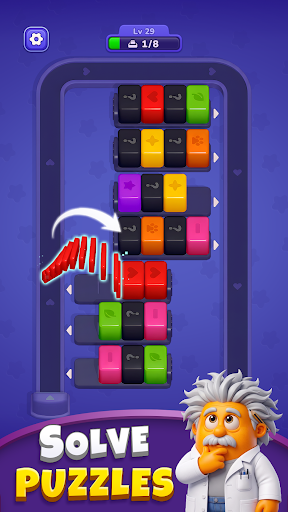
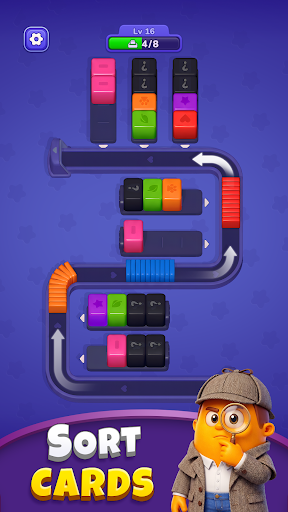
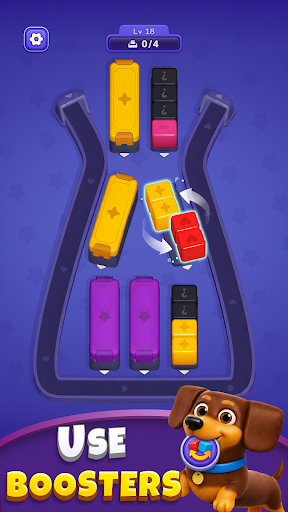
Loop Master™: Color Jam Sort is a relaxing puzzle with a fresh conveyor twist, blending colorful sorting, smart crate filling, and smooth loop-based logic into a calm but satisfying experience.
In Loop Master™: Color Jam Sort, you sort colorful cubes and cards into matching crates in a relaxing conveyor loop puzzle with no timers and no rush. Just pure color sort gameplay that clears your mind while you clear the board. If you love sorting games with unique conveyor mechanics and cozy puzzle vibes, this is your perfect match.
Sorting in Motion
This is more than a simple color sort. The loop keeps everything moving, so timing, order, and space management matter just as much as matching the right colors.
One Conveyor Loop, One Goal
In Loop Master™: Color Jam Sort, every move is about keeping the conveyor flowing, matching colors efficiently, and making smart use of limited space.
• Tap to send cubes onto the conveyor and set the loop in motion.
• As cubes travel around the belt, they wait for the right crate to open up.
• Gather four cubes of the same color in one crate to combine them into a complete piece.
Keep the Loop Clear
• Watch the conveyor capacity carefully, because only a limited number of cube groups can stay on the loop at once.
• If the conveyor fills up and no useful moves remain, the round comes to an end.
• Every open slot can change your next move, so keeping space available is part of the puzzle itself.
• In some levels, only the top color is visible at first, while the cubes below stay hidden until they are revealed one by one.
• This hidden-color twist makes every early move more important, because one choice can affect which colors appear next.
Plan your moves, control the flow, and enjoy the satisfaction of every perfect merge.
Tools to Keep the Loop Moving
When the conveyor gets crowded, the right tool can help you fix mistakes, reopen space, and keep your sorting plan alive.
• Undo – Take the card on the conveyor back to the box and undo your last move. It’s perfect for correcting a rushed decision before it causes bigger problems.
• Shuffle – Select a plank and shuffle the color cubes inside. Use it to reset a tricky arrangement and open up new matching possibilities.
• Extra – Add 2 more capacity slots when you need more room. It gives you valuable breathing space when the loop gets tight and every open spot matters.
More Levels, More Rewards
Every completed level gives you something to look forward to. Win more levels to earn rewards, collect level gifts, and unlock limited-time perks like 30-minute unlimited lives that let you keep playing with fewer interruptions.
Why You’ll Love It
• A fresh conveyor loop twist that makes every sort feel more dynamic.
• Clean, low-randomness puzzle play where smart planning pays off.
• Great for a quick break, with enough depth to keep longer sessions rewarding.
• Offline-friendly gameplay that fits wherever you want to play.
• A great match for fans of color sorting, card puzzles, and calm brain games.
Ready to clear the loop and master the flow? Start Loop Master™: Color Jam Sort now and enjoy a fresh sorting puzzle built around calm strategy and satisfying progress.
Clear the Loop. Match the Card. Sort the Cube.
Terms of Service: https://orangeonelimited.com/useragreement.html
Privacy Policy: https://orangeonelimited.com/privacy.html
Show more

1. Download MEmu installer and finish the setup

2. Start MEmu then open Google Play on the desktop

3. Search Loop Master™: Color Jam Sort in Google Play
Install
4. Download and Install Loop Master™: Color Jam Sort
5. On install completion click the icon to start

6. Enjoy playing Loop Master™: Color Jam Sort on PC with MEmu
MEmu Play is the best Android emulator and 100 million people already enjoy its superb Android gaming experience. The MEmu virtualization technology empowers you to play thousands of Android games smoothly on your PC, even the most graphic-intensive ones.
Bigger screen with better graphics; Long duration, without limitation of battery or mobile data.
Full Keymapping support for precise control of keyboard and mouse or gamepad.
Multiple game accounts or tasks on single PC at one time with Multi-Instance manager.
Play Loop Master™: Color Jam Sort on PC by following steps: