時之歌:無盡之詩
Updated
Current Version
1.0.2
Offered By

With your passion for 時之歌:無盡之詩, you shouldn’t have to limit yourself to the small screen of a phone. Play like a pro and take full control of the game using a keyboard and mouse. MEmu gives you everything you’re looking for. Download and play 時之歌:無盡之詩 on PC. Play as long as you want — no more worries about battery life, mobile data, or unexpected calls. The all-new MEmu 9 is the best way to play 時之歌:無盡之詩 on PC. With our expertly designed keymapping system, 時之歌:無盡之詩 feels just like a real PC game. The MEmu multi-instance manager lets you run two or more accounts on the same device at the same time. Most importantly, our exclusive emulation engine unlocks your PC’s full potential, delivering smooth and seamless performance.
Show more
Download 時之歌:無盡之詩 on PC with MEmu Android Emulator. Enjoy playing on big screen. 【虛空求生 吃雞新玩法】《時之歌》首創大型沙盤“吃雞”玩法——「虛空求生」正式上線!


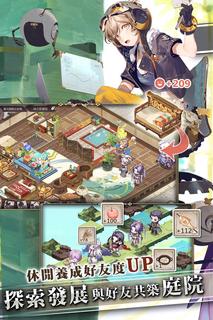
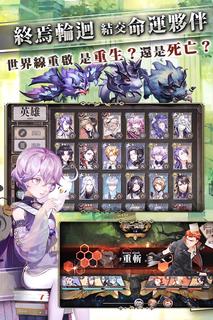
【虛空求生 吃雞新玩法】《時之歌》首創大型沙盤“吃雞”玩法——「虛空求生」正式上線!超過100名引導者將空降在危機四伏的虛空世界中,從同一起點開始,實時公平競技,在被侵蝕的危機逼近之前,搜刮資源提升實力來消滅對手!戰局瞬息即變,絕境逆襲,活到最後就是贏家。虛空求生,等你來吃雞!【二次元大型策略SLG 百萬玩家真實對戰】《時之歌》採無縫即時策略對戰,世界局勢每分每秒都在變化。玩家每個舉動,每個決定都影響著維爾哈倫大陸的結局。人與人間、同盟與同盟間、國家與國家間,一場真實的策略博弈對抗正在啟動!【大型二次元原創品牌】《時之歌》為泛音堂出品的大型二次元原創品牌,小說、漫畫、動畫、歌曲,全方位發展。擁有龐大的世界觀、跌宕起伏的史詩劇情,打造超過30首風格多樣的高品質的原創音樂,編織出維爾哈倫大陸一段全新的冒險旅程。【四國協力RPG 共同抵禦滅世者】末日預兆,降臨於維爾哈倫大陸。政教合一的古老東國「楻」、新興的移民南國「塔帕茲」、煉金發達的北聯邦「艾格尼薩」以及重拜武力的西國「弗爾薩瑞斯」,由至高神欽點的「引導者」需聯合四國,共同協力抵禦滅世者,拯救世界。【大型沙盤策略玩法 國家協力發展】《時之歌》首創大型沙盤策略玩法,自由佔地擴張國家領土,是戰爭還是和平,是朋友還是敵人,是結盟還是獨自發展,所有選擇都是自由的,國家發展由你作主。【與好友共築庭院 休閒養成好友度UP】豐富有趣的庭院系統,引導者可根據喜好自由派遣英雄進行採集、烹飪,以及房屋DIY等任務,打造屬於引導者獨一無二的特色庭院!庭院舒適度的提升,有利提升英雄的好感度喔!【終焉輪迴 重啟世界線】終焉是一個周期性玩法。滅世者、異獸都是世界負能量的產物。他們妄圖破壞「起源奇點」,摧毀世界。引導者須不斷通過試煉消滅它們,隨即終焉結束,世界線將被強制重置。陷入了終焉輪迴的你,當前所做的一切選擇,都將影響未來的發展,世界線將持續交織輪轉。是重生?還是死亡?■本遊戲內容涉及性、暴力、虛擬戀愛或結婚、遊戲角色穿著凸顯性特徵之服飾,依遊戲軟體分際管理辦法分類為輔15級,15歲以上之人始得使用■本遊戲為免費使用,遊戲內另提供購買虛擬遊戲幣、物品等付費服務■長時間進行遊戲,請注意使用時間,避免沉迷於遊戲
Show more

1. Download MEmu installer and finish the setup

2. Start MEmu then open Google Play on the desktop

3. Search 時之歌:無盡之詩 in Google Play
Install
4. Download and Install 時之歌:無盡之詩
5. On install completion click the icon to start

6. Enjoy playing 時之歌:無盡之詩 on PC with MEmu
MEmu Play is the best Android emulator and 100 million people already enjoy its superb Android gaming experience. The MEmu virtualization technology empowers you to play thousands of Android games smoothly on your PC, even the most graphic-intensive ones.
Bigger screen with better graphics; Long duration, without limitation of battery or mobile data.
Full Keymapping support for precise control of keyboard and mouse or gamepad.
Multiple game accounts or tasks on single PC at one time with Multi-Instance manager.
Play 時之歌:無盡之詩 on PC by following steps: