
Blades Tale
Updated
Current Version
1.0.5
Offered By

With your passion for Blades Tale, you shouldn’t have to limit yourself to the small screen of a phone. Play like a pro and take full control of the game using a keyboard and mouse. MEmu gives you everything you’re looking for. Download and play Blades Tale on PC. Play as long as you want — no more worries about battery life, mobile data, or unexpected calls. The all-new MEmu 9 is the best way to play Blades Tale on PC. With our expertly designed keymapping system, Blades Tale feels just like a real PC game. The MEmu multi-instance manager lets you run two or more accounts on the same device at the same time. Most importantly, our exclusive emulation engine unlocks your PC’s full potential, delivering smooth and seamless performance.
Show more
Download Blades Tale on PC with MEmu Android Emulator. Enjoy playing on big screen. Blades Tale is a FREE MMORPG, set in an eastern Wuxia fantasy world, with unique Wuxia battles and stunning visuals powered by Unity engine, you can become a true master of martial arts!

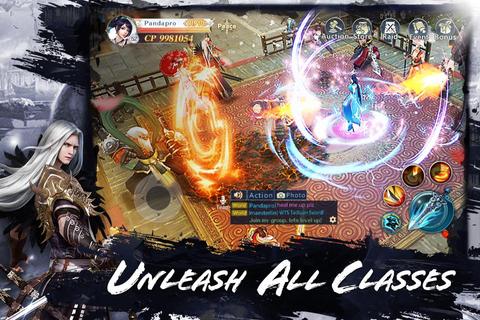
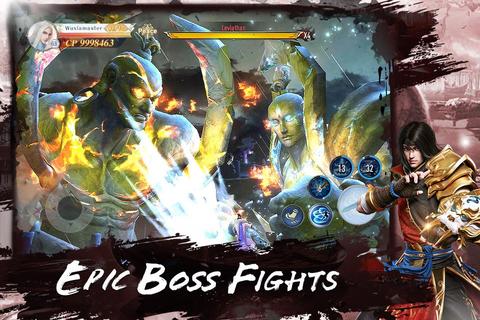
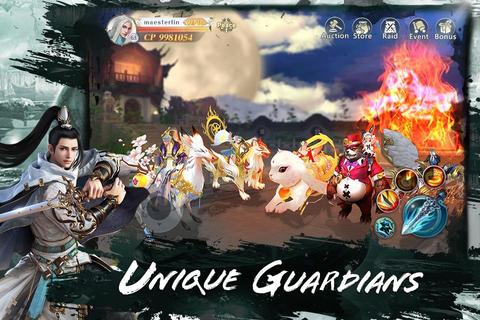
Blades Tale is a FREE MMORPG, set in an eastern Wuxia fantasy world, with unique Wuxia battles and stunning visuals powered by Unity engine, you can become a true master of martial arts! Grab your friends and start your journey in this eastern Wuxia fantasy world! GAME PLAY 【Exclusive Rewards, Unique Guardians】 -Rewards for players at all levels, among them, the Guardians is a big addition to the game! Its mighty posture and superior strength towers among the existing mounts. Players now have a chance to get it for free! 【The 7-Day Dating System】 -The 7-day dating system has arrived! Configure your dating settings, get matched with people around your area. The system includes; chatting, kiting lanterns, summoning pets, and enjoy a sweet leisurely love life in different romantic sceneries. 【Unleash All Classes】 -Swap classes instantly! Equip; Sword, Fist, Bow, and Parasol, four weapons at your will. Every detail is designed flawlessly, with customizable skills and one exclusive ultimate, enjoy a never before seen hand to hand combat experience. 【Customize your Wings】 -With the new Wing system, players will have more options for character progression. In addition the Wing transmogrify can be adjusted to your own desired style. 【Free Trading, Earn Your First Bucket of Gold】 -A wealthy life awaits you! The game offers a Free Trading System for players, allowing the extra equipment on hand to be converted into your first bucket of gold! Be sure to match with your friends in the game. Gather your teammates, buff them up and jump into action! 【Story Background】 -The story revolves around Duan Huiyin and Yan ShiSi, while different alliances are at total war. As the main storyline proceeds the two childhood sweethearts, Duan Huiyin and Yan ShiSi eventually turned against each other. Regrettably, the evil spirits used the two to collect and activate the power of the “Godstone” eventually shrouding the world with darkness. To ensure Yan ShiSi awakens from his own madness, Duan Huiyin burned her own soul, stealing the power from the gods, returning to the past, and hoping to alter her tragic fate.
Show more

1. Download MEmu installer and finish the setup

2. Start MEmu then open Google Play on the desktop

3. Search Blades Tale in Google Play
Install
4. Download and Install Blades Tale
5. On install completion click the icon to start

6. Enjoy playing Blades Tale on PC with MEmu
MEmu Play is the best Android emulator and 100 million people already enjoy its superb Android gaming experience. The MEmu virtualization technology empowers you to play thousands of Android games smoothly on your PC, even the most graphic-intensive ones.
Bigger screen with better graphics; Long duration, without limitation of battery or mobile data.
Full Keymapping support for precise control of keyboard and mouse or gamepad.
Multiple game accounts or tasks on single PC at one time with Multi-Instance manager.
Play Blades Tale on PC by following steps: