
CookieRun: Crumble - Idle RPG
Updated
Current Version
1.2.102
Offered By

With your passion for CookieRun: Crumble - Idle RPG, you shouldn’t have to limit yourself to the small screen of a phone. Play like a pro and take full control of the game using a keyboard and mouse. MEmu gives you everything you’re looking for. Download and play CookieRun: Crumble - Idle RPG on PC. Play as long as you want — no more worries about battery life, mobile data, or unexpected calls. The all-new MEmu 9 is the best way to play CookieRun: Crumble - Idle RPG on PC. With our expertly designed keymapping system, CookieRun: Crumble - Idle RPG feels just like a real PC game. The MEmu multi-instance manager lets you run two or more accounts on the same device at the same time. Most importantly, our exclusive emulation engine unlocks your PC’s full potential, delivering smooth and seamless performance.
Show more
Download CookieRun: Crumble - Idle RPG on PC with MEmu Android Emulator. Enjoy playing on big screen. The Cookies are back in an all-new massive AFK idle RPG!



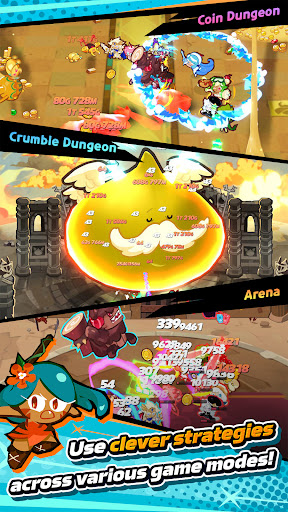
The Cookies are back in an all-new massive AFK idle RPG! Assemble a powerhouse squad of up to 12 legendary Cookies, collect 70+ heroes and pets, and auto battle enemies even offline!
FEATURES:
- EPIC 12-COOKIE SQUAD COMBAT
Why settle for less when you can bring 12? Deploy huge Cookie battalions and watch the screen erupt in skill combos! Mix and match elements, roles, and skill combos to create chaotic tactical synergies that wipe out enemy waves instantly.
- EFFORTLESS AFK IDLE PROGRESSION
Enjoy true idle RPG gameplay! Your Cookies auto-fights 24/7, harvesting upgrade resources while you are offline. Jump back in, claim your rewards, and power up instantly.
- COLLECT & EVOLVE 70+ COOKIES & PETS
Summon a vast roster of legendary Cookies, adorable Pets, and powerful gears. Level up your heroes, unlock game-changing skills, and build the ultimate battle squad.
- COMPETITIVE ARENA & SPECIAL GAME MODES
Climb the leaderboards in Arena PvP battles! Challenge high-tier floors in the Plaque Tower, slay colossal bosses, and farm legendary loot across diverse game modes.
- GROW FASTER WITH GUILD ALLIES
Team up with friends and players worldwide! Lend a helping hand to Guild members, unlock exclusive team buffs, and earn shared rewards to boost your account progression faster.
Ready to lead your Cookies to victory? Download CookieRun: Crumble today!
※ Service Access Permission Guide
[Required Access Permissions]
None
[Optional Access Permissions]
Notifications: For updates on in-game events, benefits, and more
You can enjoy the game without granting these permissions
Note: Some features may be limited if optional permissions aren't granted
[How to Manage Permissions]
Settings > Privacy > Select permission > Toggle on/off as desired
※ Playing as a guest? Your game data will be lost if you uninstall the app.
Developer Contact:
Devsisters Seoul, Republic of Korea, Gangnam-gu Dosan-daero 327, Sinsa-dong, SGF Cheongdam Tower
06019 2118797881 1729215126274312 Gangnam-gu Office
Phone: +82-2-1899-3674
Show more

1. Download MEmu installer and finish the setup

2. Start MEmu then open Google Play on the desktop

3. Search CookieRun: Crumble - Idle RPG in Google Play
Install
4. Download and Install CookieRun: Crumble - Idle RPG
5. On install completion click the icon to start

6. Enjoy playing CookieRun: Crumble - Idle RPG on PC with MEmu
MEmu Play is the best Android emulator and 100 million people already enjoy its superb Android gaming experience. The MEmu virtualization technology empowers you to play thousands of Android games smoothly on your PC, even the most graphic-intensive ones.
Bigger screen with better graphics; Long duration, without limitation of battery or mobile data.
Full Keymapping support for precise control of keyboard and mouse or gamepad.
Multiple game accounts or tasks on single PC at one time with Multi-Instance manager.
Play CookieRun: Crumble - Idle RPG on PC by following steps: