Fate War
Updated
Current Version
1.0.10
Offered By

With your passion for Fate War, you shouldn’t have to limit yourself to the small screen of a phone. Play like a pro and take full control of the game using a keyboard and mouse. MEmu gives you everything you’re looking for. Download and play Fate War on PC. Play as long as you want — no more worries about battery life, mobile data, or unexpected calls. The all-new MEmu 9 is the best way to play Fate War on PC. With our expertly designed keymapping system, Fate War feels just like a real PC game. The MEmu multi-instance manager lets you run two or more accounts on the same device at the same time. Most importantly, our exclusive emulation engine unlocks your PC’s full potential, delivering smooth and seamless performance.
Show more
Download Fate War on PC with MEmu Android Emulator. Enjoy playing on big screen. In an uncharted mythical world, calamities and monsters ravage the land.

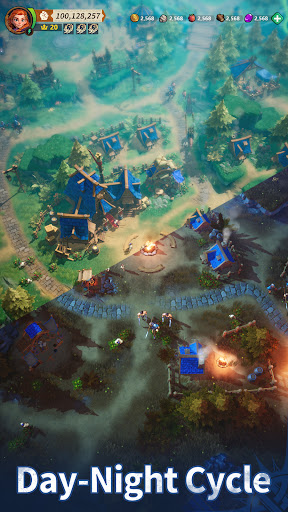
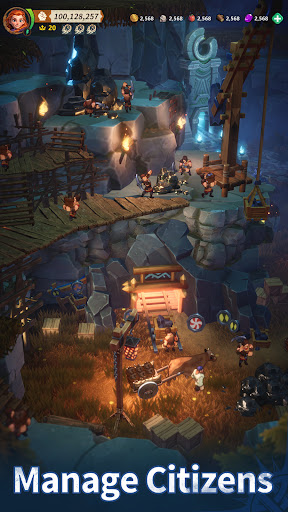

In an uncharted mythical world, calamities and monsters ravage the land. Survivors flee to Sanctuary, desperate to awaken the gods that vanished during Rangarok and reclaim their power.
Amidst the relentless cold, the embers of civilization flicker to life on this isolated island. But ravenous Blackforged, twisted by darkness, now stalk the wilds. Malevolent spirits from another time stir with sinister intent, and emboldened rival Tribes harbor ambitions of conquest...
As the Chieftain of your Tribe, how will you rise to the occasion and ensure your Tribe's survival?
Game Features:
[City-Building, Laidback Management]
Intuitive Simulation Gameplay: Build a thriving settlement of your own on a remote island. Easily manage every citizen's daily life, work, and relationships, and watch as their stories unfold through generations.
[Landscape or Portrait, Your Choice]
Freely Switch Between Modes: Play casually in portrait mode or switch to landscape mode for an immersive experience.
[Realistic World, Enhanced Strategic Depth]
Intricate Gameplay with Dynamic Environments: The shifting of seasons and day-night cycles hold the key to the Tribe's development speed. Master the elements to turn small gains into great victories.
[Free Movement, Tactical Battles]
Innovative Combat Mechanics and Systems: Commanders and Lieutenants fight alongside each other in battle. Manage and position four soldier types to outmaneuver foes and turn the tide of battle.
[Trade and Auction, Rapid Development]
Unique Auction System for Faster Growth: With a fair bidding system on Tribe Bounty, enjoy the thrill of an RPG raid in an SLG title.
[Unique Looks, Endless Customization]
Wide Variety of Cosmetic Items: With territory decorations, Hero skins, chat boxes, and portraits, create a Tribe that is uniquely yours.
[Roguelike Mechanics, Endless Exploration]
Open-World Inspired Design with Infinite Possibilities: Original roguelike gameplay where every expedition, from gathering resources to arming your Tribe, brings new excitement.
===Information===
Official Facebook Page: https://www.facebook.com/FateWarOfficial/
YouTube: https://www.youtube.com/@FateWarOfficial
Discord: https://discord.gg/p4GKHM8MMF
Customer Support: help.fatewar.android@igg.com
Show more

1. Download MEmu installer and finish the setup

2. Start MEmu then open Google Play on the desktop

3. Search Fate War in Google Play
Install
4. Download and Install Fate War
5. On install completion click the icon to start

6. Enjoy playing Fate War on PC with MEmu
MEmu Play is the best Android emulator and 100 million people already enjoy its superb Android gaming experience. The MEmu virtualization technology empowers you to play thousands of Android games smoothly on your PC, even the most graphic-intensive ones.
Bigger screen with better graphics; Long duration, without limitation of battery or mobile data.
Full Keymapping support for precise control of keyboard and mouse or gamepad.
Multiple game accounts or tasks on single PC at one time with Multi-Instance manager.
Play Fate War on PC by following steps: