Foundation: Galactic Frontier
Updated
Current Version
1.1.141.236220
Offered By

With your passion for Foundation: Galactic Frontier, you shouldn’t have to limit yourself to the small screen of a phone. Play like a pro and take full control of the game using a keyboard and mouse. MEmu gives you everything you’re looking for. Download and play Foundation: Galactic Frontier on PC. Play as long as you want — no more worries about battery life, mobile data, or unexpected calls. The all-new MEmu 9 is the best way to play Foundation: Galactic Frontier on PC. With our expertly designed keymapping system, Foundation: Galactic Frontier feels just like a real PC game. The MEmu multi-instance manager lets you run two or more accounts on the same device at the same time. Most importantly, our exclusive emulation engine unlocks your PC’s full potential, delivering smooth and seamless performance.
Show more
Download Foundation: Galactic Frontier on PC with MEmu Android Emulator. Enjoy playing on big screen. Ignite engines, buckle up, and now dive into the epic sci-fi universe of Foundation.
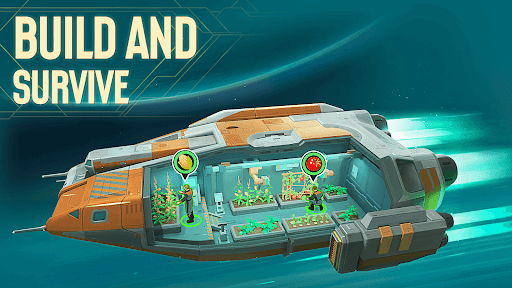
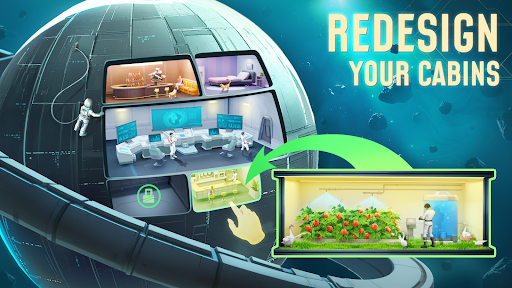
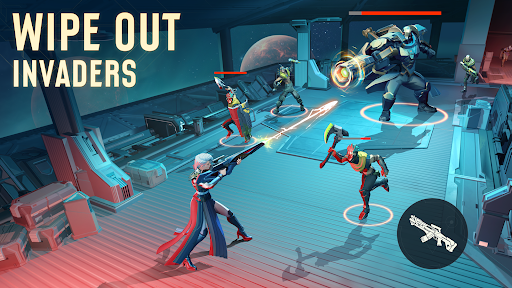

Ignite engines, buckle up, and now dive into the epic sci-fi universe of Foundation.
As the Galactic Empire falls, new factions rise. The fate of humanity is in your hands. Command your starship, explore uncharted space, and dominate this sci-fi saga blending deep strategy with intense action!
Immersive Story: The Master Trader's Galactic Odyssey
-Play a unique role as an interstellar trader/bounty hunter/political strategist navigating between the Empire, Foundation, other factions and rebels.
-Experience cinematic narrative events that react to your decisions — your choices may shape the future of the galaxy.
Mothership Simulation: A Sweet Space Home
-Construct your spaceship! Build different cabins to offer everything you need to survive: food, water recyclers, and oxygen farms... With cannons armed on, it's time to pilot your mobile space haven into the blue sky!
-Foster bonds with your crew, handle emergencies together and breathe life into ship. Every daily greeting adds a little more belonging to your adventures through space.
Star Crew: A Band of Vagabonds
-Encounter heroes of various backgrounds and appearances in space and invite them onboard: a robot with encyclopedic knowledge but misses sarcasm, the legendary space cowboy, even the most wanted criminal.... Roam the cosmos together and write your legend among the stars!
Space Exploration: Thrilling Landing Shooter Combats
-Go explore the galaxy freely, discover tons of floating space ruins and fascinating planets, and get ready for a breathtaking landing battle to uncover hidden secrets!
-Deploy 3-hero strike teams in dynamic landing missions, with various strategic combinations to spark their potential! Use precise control and tactical prowess to overcome alien threats.
Galaxy Wars: A Rising Trade Empire!
-Construct a variety of combat crafts and strategize your fleet formation to exploit and protect your galaxy's trade routes from threats and rivals.
-Join powerful alliances and showcase your RTS skills in large-scale interstellar conflicts. Rise as a dominant force in the galactic economy.
EMBARK NOW! Within the Foundation universe:Write Your Sci-Fi Legend • Build your Ideal Flagship • Build Trade Networks • Command Elite Fleets • Forge Your Galactic Destiny!
Show more

1. Download MEmu installer and finish the setup

2. Start MEmu then open Google Play on the desktop

3. Search Foundation: Galactic Frontier in Google Play
Install
4. Download and Install Foundation: Galactic Frontier
5. On install completion click the icon to start

6. Enjoy playing Foundation: Galactic Frontier on PC with MEmu
MEmu Play is the best Android emulator and 100 million people already enjoy its superb Android gaming experience. The MEmu virtualization technology empowers you to play thousands of Android games smoothly on your PC, even the most graphic-intensive ones.
Bigger screen with better graphics; Long duration, without limitation of battery or mobile data.
Full Keymapping support for precise control of keyboard and mouse or gamepad.
Multiple game accounts or tasks on single PC at one time with Multi-Instance manager.
Play Foundation: Galactic Frontier on PC by following steps: