Jigsort®: Solitaire
Updated
Current Version
1.1.0
Offered By

With your passion for Jigsort®: Solitaire, you shouldn’t have to limit yourself to the small screen of a phone. Play like a pro and take full control of the game using a keyboard and mouse. MEmu gives you everything you’re looking for. Download and play Jigsort®: Solitaire on PC. Play as long as you want — no more worries about battery life, mobile data, or unexpected calls. The all-new MEmu 9 is the best way to play Jigsort®: Solitaire on PC. With our expertly designed keymapping system, Jigsort®: Solitaire feels just like a real PC game. The MEmu multi-instance manager lets you run two or more accounts on the same device at the same time. Most importantly, our exclusive emulation engine unlocks your PC’s full potential, delivering smooth and seamless performance.
Show more
Download Jigsort®: Solitaire on PC with MEmu Android Emulator. Enjoy playing on big screen. Tired of the daily grind?

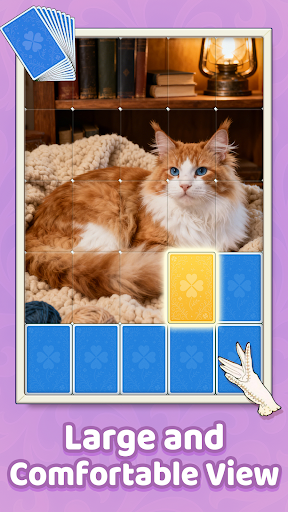
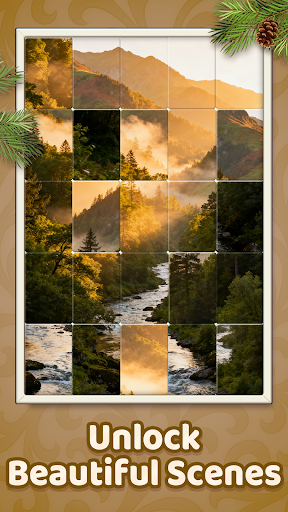
Tired of the daily grind? Looking for a perfect, peaceful escape? An escape that's not just mindless, but truly satisfying and good for your mind?
Welcome to Jigsort® Puzzle! This is a brand-new brain teaser you’ve never seen before. If you love the strategic calm of classic Solitaire and the deep satisfaction of completing a beautiful picture Puzzle, you have just found your new favorite game!
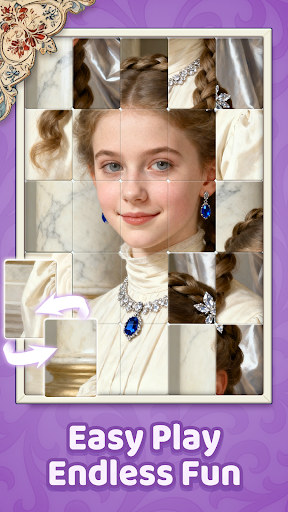
Leave the stress behind and dive into a calm world of stunning HD pictures and smooth, relaxing gameplay. In Jigsort® Puzzle, you'll slide and sort jumbled puzzle pieces. There's nothing quite like that satisfying 'snap!' as the pieces lock perfectly into place. It’s the ultimate blend of a classic picture puzzle and a smooth-as-silk card-sorting game.
How to Play: It's Easy!
You'll start with picture pieces scattered on the board, almost like a shuffled deck of cards.
Simply tap and slide any piece to move it. Your goal is to arrange them in the correct order.
When two pieces that belong together touch, they will 'snap' and lock into place. That's the magic!
Once locked, you can move that entire matched group as one single block. This is key to your strategy!
Keep sorting and sliding until all the pieces find their home and the stunning full picture is revealed!
Pro-Tip: Look for corner and edge pieces first, just like a real jigsaw, to build your strategy! But really, there's no wrong way to play. Just follow the flow.
Why You'll Be Hooked:
A Unique Puzzle Twist This isn't just another jigsaw! We've brilliantly blended the best parts of picture puzzles with the clever, sorting logic of classic Solitaire. It takes the visual 'Aha!' moment of a jigsaw and blends it with the methodical, calming process of sorting. Every move feels purposeful as you bring order to the chaos and watch the beautiful picture emerge from the jumble. It's a one-of-a-kind game experience.
Thousands of Stunning HD Pictures Get lost in our massive, ever-growing gallery of beautiful HD images! Our library is curated for pure beauty. You'll find everything: peaceful nature scenes, adorable animals, famous world landmarks, breathtaking art, cozy cottages, vibrant flowers, amazing patterns, and delicious-looking food. Every single image is a high-resolution treat for your eyes, making the final reveal truly special and rewarding.
That Incredibly Satisfying 'Snap!' Experience our super-smooth sliding controls. We’ve spent months perfecting the feel of the game. A simple swipe is all it takes to move the pieces. The feeling of matching multiple pieces at once in a smart combo is incredibly rewarding and totally addictive. The tactile feedback and audio cues are designed to make every single match feel deeply satisfying. It just feels good to play.
Relax AND Sharpen Your Mind This isn't just a relaxing game; it's a fun brain workout! This is the best kind of 'good for you' fun. It’s a gentle mental jog, not a stressful race. Figuring out the best way to sort and match the pieces will gently boost your logic and spatial skills without you even noticing. You'll feel sharper and more focused after just a few rounds, all while feeling completely at peace. It's the best kind of brainy fun!
Play Anywhere, Anytime (Offline!) No Wi-Fi? No problem! You can enjoy the full game and access all its puzzles even when you're offline. It's the perfect travel companion for flights, road trips, subway commutes, or any time you're off the grid. Your relaxing puzzle journey doesn't have to stop.
Whether you are a picture puzzle expert, a master, or just looking for a beautiful and engaging game to pass the time, Jigsort® Puzzle: Solitaire Fun offers a fresh and joyful experience for everyone.
Terms of Service: https://www.easyfun-games.com/useragreement.html
Privacy Policy: https://www.easyfun-games.com/privacy.html
Show more

1. Download MEmu installer and finish the setup

2. Start MEmu then open Google Play on the desktop

3. Search Jigsort®: Solitaire in Google Play
Install
4. Download and Install Jigsort®: Solitaire
5. On install completion click the icon to start

6. Enjoy playing Jigsort®: Solitaire on PC with MEmu
MEmu Play is the best Android emulator and 100 million people already enjoy its superb Android gaming experience. The MEmu virtualization technology empowers you to play thousands of Android games smoothly on your PC, even the most graphic-intensive ones.
Bigger screen with better graphics; Long duration, without limitation of battery or mobile data.
Full Keymapping support for precise control of keyboard and mouse or gamepad.
Multiple game accounts or tasks on single PC at one time with Multi-Instance manager.
Play Jigsort®: Solitaire on PC by following steps: