Little Big Workshop
Updated
Current Version
1.0.17
Offered By

With your passion for Little Big Workshop, you shouldn’t have to limit yourself to the small screen of a phone. Play like a pro and take full control of the game using a keyboard and mouse. MEmu gives you everything you’re looking for. Download and play Little Big Workshop on PC. Play as long as you want — no more worries about battery life, mobile data, or unexpected calls. The all-new MEmu 9 is the best way to play Little Big Workshop on PC. With our expertly designed keymapping system, Little Big Workshop feels just like a real PC game. The MEmu multi-instance manager lets you run two or more accounts on the same device at the same time. Most importantly, our exclusive emulation engine unlocks your PC’s full potential, delivering smooth and seamless performance.
Show more
Download Little Big Workshop on PC with MEmu Android Emulator. Enjoy playing on big screen. Imagine a magical factory, appearing right in your living room.
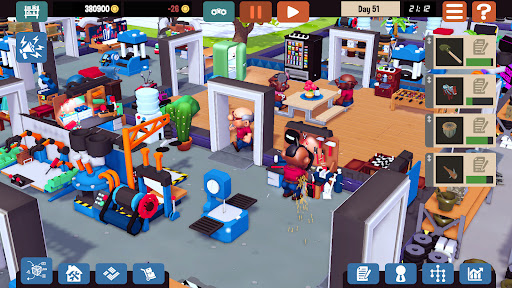
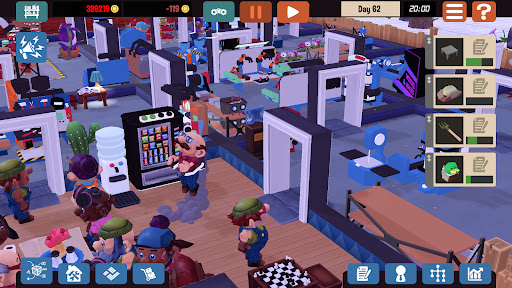
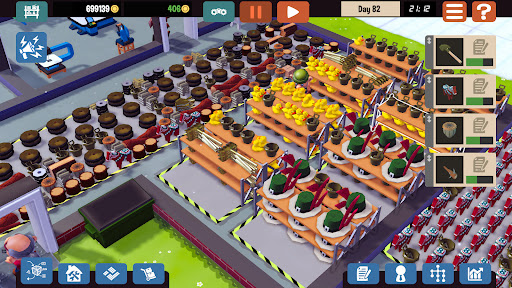
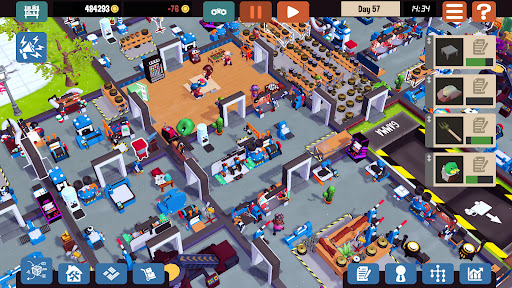
Imagine a magical factory, appearing right in your living room. A carefully planned masterpiece, where diligent workers throw together anything customers want. Rubber ducks and dressers, drones and electric guitars, scooters and other wonderful goods can be created from many different materials and sold for hard cash – cash you invest right back into your factory to get more machines, more workers and grow your business. In Little Big Workshop you become a factory tycoon!
Real factories - made FUN
You are the Big Boss and it’s time to take charge of your very own tabletop factory. Organize the factory floor, manage your workers, purchase machinery, and design efficient production lines - all within the time-limit and to your client's satisfaction!
An open-ended sandbox-experience
Take it easy, it’s a sandbox-experience where you think, ponder and poke at things until you get it to work the way you’d like. Supply products to clients and an ever-changing market, as you produce over 50 unique product types, built from multiple parts and pieces - all of which can be created with different materials and production methods. No two factories should ever look the same.
Tiny hands, big dreams
Start out with just a small workshop and expand to a desk-filling factory. Unlock ever fancier machines, add even more production methods, and most of all, more room. Soon enough you’ll be running multiple production lines, producing hundreds of advanced products each day, and watching with joy as your cute workers do the actual work.
Features:
Varying industries and a wide range of products
Focus on practical problems, not on values, economics, or logistics
Organize all steps of the production on a blueprint
Factories grow as you unlock more desk space
Fully simulated Day/Night-cycle
Take care of your workers! Work them too hard and they drop like flies
Cute model-town art-style
© www.handy-games.com GmbH
Show more

1. Download MEmu installer and finish the setup

2. Start MEmu then open Google Play on the desktop

3. Search Little Big Workshop in Google Play
Install
4. Download and Install Little Big Workshop
5. On install completion click the icon to start

6. Enjoy playing Little Big Workshop on PC with MEmu
MEmu Play is the best Android emulator and 100 million people already enjoy its superb Android gaming experience. The MEmu virtualization technology empowers you to play thousands of Android games smoothly on your PC, even the most graphic-intensive ones.
Bigger screen with better graphics; Long duration, without limitation of battery or mobile data.
Full Keymapping support for precise control of keyboard and mouse or gamepad.
Multiple game accounts or tasks on single PC at one time with Multi-Instance manager.
Play Little Big Workshop on PC by following steps: