Never Grave
Updated
Current Version
1.4.0
Offered By

With your passion for Never Grave, you shouldn’t have to limit yourself to the small screen of a phone. Play like a pro and take full control of the game using a keyboard and mouse. MEmu gives you everything you’re looking for. Download and play Never Grave on PC. Play as long as you want — no more worries about battery life, mobile data, or unexpected calls. The all-new MEmu 9 is the best way to play Never Grave on PC. With our expertly designed keymapping system, Never Grave feels just like a real PC game. The MEmu multi-instance manager lets you run two or more accounts on the same device at the same time. Most importantly, our exclusive emulation engine unlocks your PC’s full potential, delivering smooth and seamless performance.
Show more
Download Never Grave on PC with MEmu Android Emulator. Enjoy playing on big screen. A Metroidvania x Roguelite where you journey with the aid of a cursed hat.
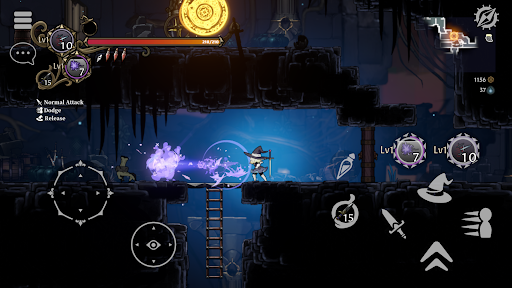
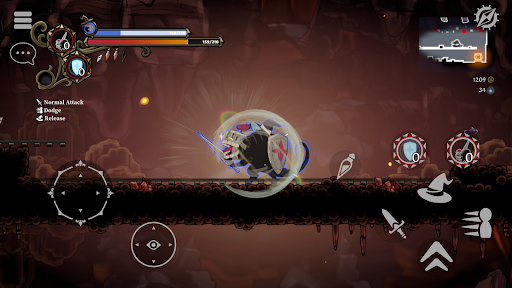
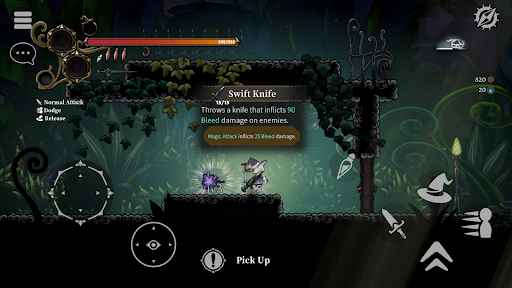
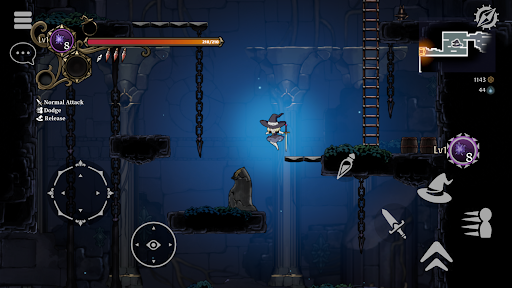
A Metroidvania x Roguelite where you journey with the aid of a cursed hat. Use a variety of magic or possess your enemies to reach the lowest levels! Bring back loot, build up in your village, make a living and strengthen yourself for the next battle! Supports up to 4-player multiplayer.
Authentic 2D action
-Never Grave is 2D action game where you journey with the aid of a cursed hat. Adventure into dungeons, fight with magic, and sometimes even use the terrain to win! Dungeons such as ruins and botanical gardens are auto-generated and change each time you play. Obstacles and puzzles waiting to block your path in the dungeons, so be careful where you step!
Possession system
-Possess enemies using a cursed hat. Use unique abilities from your possessed enemies to gain an advantage in battle!
Rebuild a ruined village
-Use materials collected in the dungeons to clear the rubble of ruined villages, build new facilities and cultivate crops in the fields. Produce food and potions in the village to prepare for the next battle!
Multiplayer
-Multiplayer support for up to four players. Call your friends from other worlds and conquer dungeons together!
Game features
-Metroidvania x Roguelite with an emphasis on exploration.
-Sophisticated and tactilely designed player character controls.
-Possess enemies and use their unique abilities with the unique Possession system.
-Traditional Japanese hand-drawn limited animation is used for character 2D animation.
-Hand-painted backgrounds with depth, as if you are travelling through a world of picture books and cut-out pictures.
-Learn new abilities such as double-jump from artefacts to explore new areas.
-Constantly changing play style depending on the synergy of "traits" associated with magic and items.
-Intense battles with tough bosses. It will take more than just memorizing boss patterns to defeat them without taking damage...
-Rebuild your village. Strengthen yourself through building and production to prepare for the next adventure.
-Explore different terrain each time you play through procedurally generated dungeons.
-Online Co-op Multiplayer. Up to four players can venture into the dungeon together!
-Controller / Gamepad support.
Show more

1. Download MEmu installer and finish the setup

2. Start MEmu then open Google Play on the desktop

3. Search Never Grave in Google Play
Install
4. Download and Install Never Grave
5. On install completion click the icon to start

6. Enjoy playing Never Grave on PC with MEmu
MEmu Play is the best Android emulator and 100 million people already enjoy its superb Android gaming experience. The MEmu virtualization technology empowers you to play thousands of Android games smoothly on your PC, even the most graphic-intensive ones.
Bigger screen with better graphics; Long duration, without limitation of battery or mobile data.
Full Keymapping support for precise control of keyboard and mouse or gamepad.
Multiple game accounts or tasks on single PC at one time with Multi-Instance manager.
Play Never Grave on PC by following steps: