Never Grave
Aktualisiert
Aktuelle Version
1.4.0
Angeboten von

Bei all Ihrer Leidenschaft für das Spielen von Never Grave sollten Ihre Hände nicht auf einen winzigen Bildschirm Ihres Telefons beschränkt sein. Spielen Sie wie ein Profi und übernehmen Sie die volle Kontrolle über Ihr Spiel mit Tastatur und Maus. MEmu bietet Ihnen all die Dinge, die Sie erwarten. Laden Sie Never Grave herunter und spielen Sie es auf dem PC. Spielen Sie so lange, wie Sie wollen, ohne Grenzwerte für Akku, mobile Daten und störende Anrufe. Das brandneue MEmu 9 ist die beste Wahl, um Never Grave auf dem PC zu spielen. Das exquisite voreingestellte Tastaturbelegungssystem, das mit unserem Fachwissen vorbereitet wurde, macht Never Grave zu einem echten PC-Spiel. Der MEmu Multi-Instanz-Manager ermöglicht das Spielen von 2 oder mehr Konten auf demselben Gerät. Und das Wichtigste: Unsere exklusive Emulations-Engine kann das volle Potenzial Ihres PCs freisetzen und für reibungslose Abläufe sorgen.
Mehr anzeigen
Laden Sie Play Never Grave auf dem PC mit MEmu Android Emulator. Viel Spaß beim Spielen auf großmundieren. Ein Metroidvania x Roguelite, in dem du mit Hilfe eines verfluchten Hutes reist.
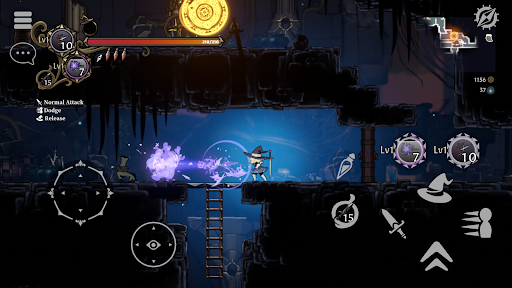
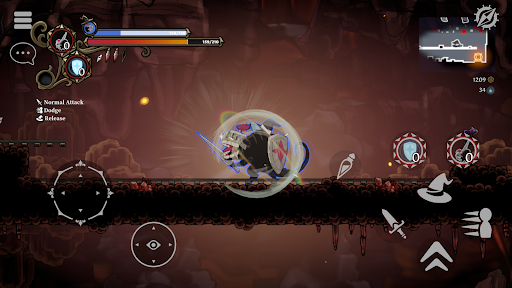
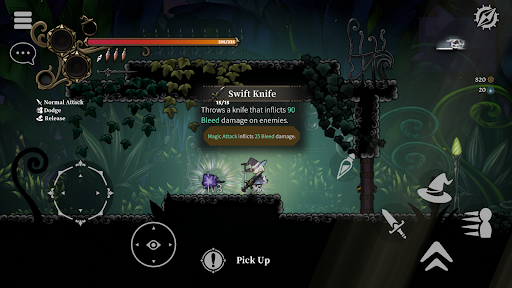
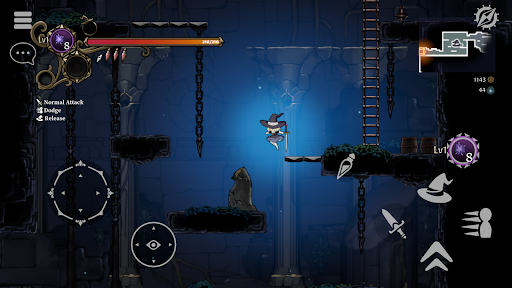
Ein Metroidvania x Roguelite, in dem du mit Hilfe eines verfluchten Hutes reist. Nutze verschiedene Magiearten oder übernimm die Kontrolle über deine Feinde, um die niedrigsten Ebenen zu erreichen! Sammle Beute, baue dein Dorf aus, verdiene deinen Lebensunterhalt und stärke dich für den nächsten Kampf! Unterstützt Multiplayer für bis zu 4 Spieler.
Authentische 2D-Action
- Never Grave ist ein 2D-Actionspiel, in dem du mit Hilfe eines verfluchten Hutes reist. Erkunde Dungeons, kämpfe mit Magie und nutze manchmal sogar das Terrain zu deinem Vorteil! Dungeons wie Ruinen und botanische Gärten werden automatisch generiert und verändern sich bei jedem Spielstart. Hindernisse und Rätsel warten darauf, dir den Weg in den Dungeons zu versperren, also sei vorsichtig, wo du hintrittst!
Besessenheitssystem
- Übernimm die Kontrolle über Feinde mithilfe eines verfluchten Hutes. Nutze die einzigartigen Fähigkeiten deiner besessenen Feinde, um dir im Kampf einen Vorteil zu verschaffen!
Baue ein zerstörtes Dorf wieder auf
- Nutze in den Dungeons gesammelte Materialien, um die Trümmer zerstörter Dörfer zu beseitigen, neue Gebäude zu errichten und Felder zu bestellen. Produziere im Dorf Nahrung und Tränke, um dich auf den nächsten Kampf vorzubereiten!
Mehrspieler
- Mehrspielerunterstützung für bis zu vier Spieler. Lade deine Freunde aus anderen Welten ein und erobert gemeinsam Dungeons!
Spielfunktionen
- Metroidvania x Roguelite mit Fokus auf Erkundung.
- Anspruchsvolle und intuitive Steuerung des Spielcharakters.
- Übernimm die Kontrolle über Gegner und nutze ihre einzigartigen Fähigkeiten mit dem einzigartigen Besitzsystem.
- Traditionelle japanische, handgezeichnete Animationen in limitierter Auflage werden für die 2D-Charakteranimationen verwendet.
- Handgemalte Hintergründe mit Tiefe, die dich in eine Welt aus Bilderbüchern und ausgeschnittenen Bildern entführen.
- Lerne neue Fähigkeiten wie den Doppelsprung mithilfe von Artefakten, um neue Gebiete zu erkunden.
- Ständig wechselnder Spielstil dank der Synergie von Magie- und Gegenstandseigenschaften.
- Intensive Kämpfe gegen starke Bosse. Es reicht nicht, nur ihre Angriffsmuster auswendig zu lernen, um sie unbeschadet zu besiegen.
- Baue dein Dorf wieder auf. Stärke dich durch Gebäude und Produktion, um für das nächste Abenteuer gerüstet zu sein.
- Erkunde bei jedem Durchgang prozedural generierte Dungeons unterschiedliches Terrain.
- Online-Koop-Mehrspielermodus. Bis zu vier Spieler können gemeinsam den Dungeon erkunden!
- Controller-/Gamepad-Unterstützung.
Mehr anzeigen

1. Laden das MEmu-Installationsprogramm herunter und beenden die Installation

2. MEmu starten und Google Play auf der Homepage öffnen

3. Suchen Never Grave in Google Play
Install
4. Herunterladen und Installieren Never Grave
5. Klicken nach Abschluss der Installation auf das Symbol, um es zu starten

6. Viel Spaß beim Spielen von Never Grave auf dem PC mit MEmu
MEmu App Player ist der beste kostenlose Android-Emulator und 50 Millionen Menschen genießen bereits seine hervorragende Android-Gaming-Erfahrung. Mit der MEmu-Virtualisierungstechnologie können Sie Tausende von Android-Spielen problemlos auf Ihrem PC spielen, selbst bei grafikintensiven Spielen.
BGrößeres Bild mit besserer Grafik; Keine unterbrechungen, keine sorgen um Akku
Komplette Tastenbelegung unterstützt mit Maus und Tastatur oder Controller
Mit dem „Multi-Instance-Manager“ können Sie mehrere Spielkonten oder Spiele gleichzeitig auf einem PC ausführen.
Play Never Grave on PC by following steps: