Never Grave
Zaktualizowano
Aktualna wersja
1.4.0
Sprzedawca

Przy całej swojej pasji do grania w Never Grave, twoje ręce nie powinny być ograniczone na małym ekranie telefonu. Graj jak zawodowiec i uzyskaj pełną kontrolę nad grą za pomocą klawiatury i myszy. MEmu oferuje ci wszystko, czego oczekujesz. Pobierz i graj Never Grave na PC. Graj tak długo, jak chcesz, bez ograniczeń baterii, danych komórkowych i niepokojących połączeń. Zupełnie nowy MEmu 9 to najlepszy wybór do grania w Never Grave na PC. Przygotowany dzięki naszej wiedzy, znakomity, wstępnie ustawiony system mapowania klawiszy sprawia, że Never Grave jest prawdziwą grą na PC. Zakodowany naszą absorpcją, menedżer wielu instancji umożliwia granie na 2 lub więcej kontach na tym samym urządzeniu. A co najważniejsze, nasz emulator może uwolnić pełny potencjał twojego komputera, sprawić, że wszystko będzie płynne. Dbamy nie tylko o to, jak grasz, ale także o cały proces czerpania radości z grania.
Pokaż więcej
Ciesz się wspaniałym doświadczeniem podczas grania w Never Grave na komputerze z aplikacją MEMU App Player. Jest to potężny darmowy emulator Androida pozwalający grać w tysiące gier na Androida. Metroidvania x Roguelite, w której podróżujesz z pomocą przeklętego kapelusza.
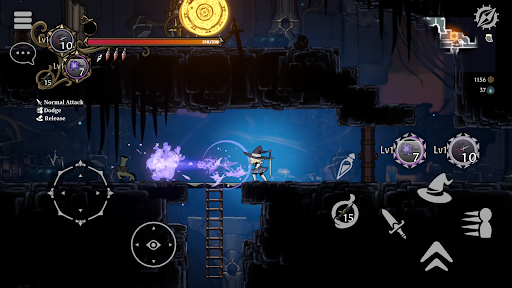
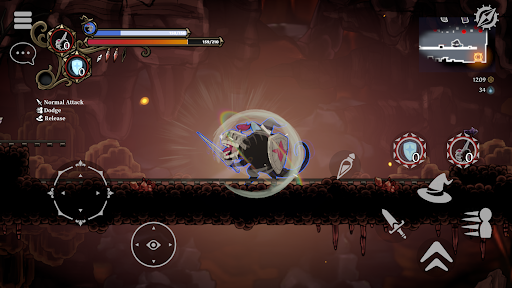
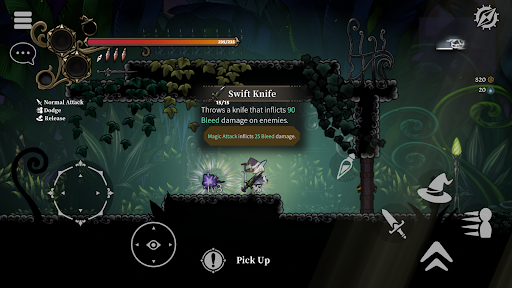
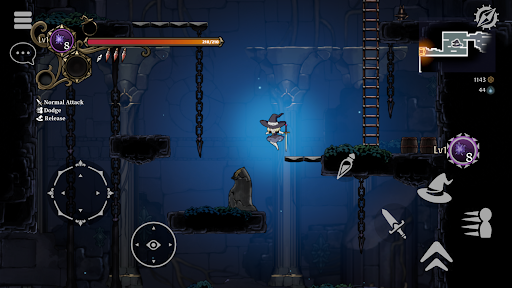
Metroidvania x Roguelite, w której podróżujesz z pomocą przeklętego kapelusza. Używaj różnorodnej magii lub opętaj wrogów, aby dotrzeć do najniższych poziomów! Zbieraj łupy, rozbudowuj swoją wioskę, zarabiaj na życie i wzmacniaj się przed kolejną bitwą! Tryb wieloosobowy dla maksymalnie 4 graczy.
Autentyczna akcja 2D
- Never Grave to gra akcji 2D, w której podróżujesz z pomocą przeklętego kapelusza. Przemierzaj lochy, walcz magią, a czasem nawet wykorzystuj ukształtowanie terenu, aby wygrać! Lochy, takie jak ruiny i ogrody botaniczne, są generowane automatycznie i zmieniają się za każdym razem, gdy grasz. Przeszkody i zagadki czekają, aby zablokować ci drogę w lochach, więc uważaj, gdzie stąpasz!
System opętania
- Opętaj wrogów za pomocą przeklętego kapelusza. Wykorzystaj unikalne umiejętności opętanych wrogów, aby zyskać przewagę w walce!
Odbuduj zrujnowaną wioskę
- Wykorzystaj materiały zebrane w lochach, aby oczyścić gruzy zrujnowanych wiosek, zbudować nowe obiekty i uprawiać plony na polach. Produkuj żywność i mikstury w wiosce, aby przygotować się do kolejnej bitwy!
Tryb wieloosobowy
- Tryb wieloosobowy dla maksymalnie czterech graczy. Zaproś znajomych z innych światów i wspólnie podbijajcie lochy!
Cechy gry
- Metroidvania x Roguelite z naciskiem na eksplorację.
- Wyrafinowane i dotykowe sterowanie postacią.
- Opętaj wrogów i wykorzystaj ich unikalne umiejętności dzięki unikalnemu systemowi opętania.
- W animacji postaci 2D wykorzystano tradycyjną japońską, ręcznie rysowaną, ograniczoną animację.
- Ręcznie malowane tła z głębią, sprawiające wrażenie podróży przez świat książek z obrazkami i wycinanek.
- Naucz się nowych umiejętności, takich jak podwójny skok z artefaktów, aby eksplorować nowe obszary.
- Ciągła zmiana stylu gry w zależności od synergii „cech” związanych z magią i przedmiotami.
- Intensywne walki z trudnymi bossami. Pokonanie ich bez obrażeń wymaga czegoś więcej niż tylko zapamiętania schematów bossów...
- Odbudowa wioski. Wzmacniaj się poprzez budowanie i produkcję, aby przygotować się na kolejną przygodę.
- Eksploruj inny teren za każdym razem, gdy grasz w proceduralnie generowane lochy.
- Tryb wieloosobowy w trybie kooperacji online. Do lochów może zapuścić się razem maksymalnie czterech graczy!
- Obsługa kontrolera / gamepada.
Pokaż więcej

1. Pobierz instalator MEmu i zakończ instalację

2. Uruchom MEmu, a następnie otwórz Google Play na pulpicie

3. Wyszukaj Never Grave w Google Play
Install
4. Pobierz i zainstaluj Never Grave
5. Po zakończeniu instalacji kliknij ikonę, aby rozpocząć

6. Ciesz się grą Never Grave na PC z MEmu
MEmu Play to najlepszy emulator Androida, a 100 milionów ludzi już korzysta z jego i dosta doskonałe wrażenia z gier na Androida. Technologia wirtualizacji MEmu umożliwia płynne granie w tysiące gier Androida na komputerze, nawet tych najbardziej wymagających grafiki.
Większy ekran z lepszą grafiką; Długi czas, bez ograniczeń baterii lub danych mobilnych.
Pełna obsługa mapowania klawiszy dla precyzyjnego sterowania klawiaturą i myszą lub gamepadem.
Wiele kont gier lub zadań na jednym komputerze jednocześnie z menedżerem wielu instancji.
Play Never Grave on PC by following steps: