Never Grave
อัปเดตเมื่อ
เวอร์ชันปัจจุบัน
1.4.0
ให้บริการโดย

เวลาคุณเล่น Never Grave, คุณอาจรู้สึกว่ามือคุณอาจบังจอแล้วทำให้ไม่ได้เล่นแบบเต็มที่. เล่นแบบไร้ขีดจำกัดด้วยเม้าส์และคีย์บอร์ด. MEmu มีตัวเลือกหลายอย่างให้คุณใช้งานเกมที่คุณเล่นแบบที่คุณต้องการ. ดาวน์โหลดและเล่น Never Grave บน PC. เล่นนานแค่ไหนก็ได้, ไม่ต้องชาร์จแบตเตอรี่, หรือเจอคนโทรเข้ามาระหว่างเล่น. MEmu 9 เป็นตัวเลือกสำหรับการเล่น Never Grave บน PC. ทางทีมงานเราได้ปรับแต่งเกม, ปรับให้เล่นเกมบางเกมได้เหมือนเล่น Never Grave เป็นเกม PC เช่นเล็งด้วยเม้าส์หรือใช้คีย์บอร์ด. ระบบของเรายังทำให้คุณสามารถเปิดเล่นได้มากกว่า 2 เกมพร้อมๆกันในคอมของคุณ. และที่สำคัญที่สุด, ระบบโปรแกรมของเราสามารถทำให้คุณใช้ระบบของ PC ทำให้เกมลื่นเหมือนกับใช้โทรศัพท์รุ่นล่าสุด. เราไม่ได้ดูแลเรื่องการเล่นเกม, แต่เราดูแลถึงความสนุกสนานที่คุณได้จากการเล่นด้วย.
แสดงเพิ่มเติม
ดาวน์โหลด Never Grave บน PC ด้วย MEmu Android Emulator สนุกกับการเล่นบนหน้าจอขนาดใหญ่ เกมแนว Metroidvania ผสม Roguelite ที่คุณออกเดินทางไปกับหมวกต้องคำสาป ใช้เวทมนตร์หลากหลายรูปแบบหรือครอบงำศัตรูเพื่อไปให้ถึงชั้นล่างสุด!
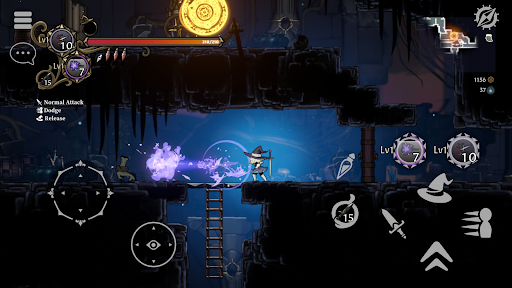
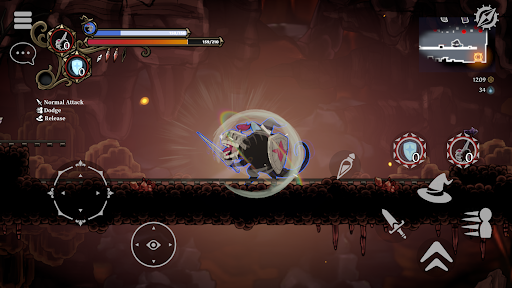
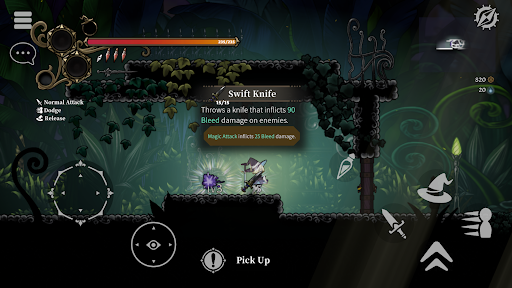
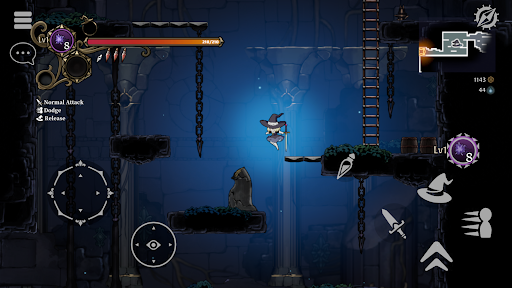
เกมแนว Metroidvania ผสม Roguelite ที่คุณออกเดินทางไปกับหมวกต้องคำสาป ใช้เวทมนตร์หลากหลายรูปแบบหรือครอบงำศัตรูเพื่อไปให้ถึงชั้นล่างสุด! เก็บไอเทม สร้างหมู่บ้าน หาเลี้ยงชีพ และเสริมความแข็งแกร่งเพื่อการต่อสู้ครั้งต่อไป! รองรับผู้เล่นสูงสุด 4 คน
เกมแอ็กชั่น 2 มิติสุดสมจริง
- Never Grave คือเกมแอ็กชั่น 2 มิติ ที่คุณออกเดินทางไปกับหมวกต้องคำสาป ผจญภัยในดันเจี้ยน ต่อสู้ด้วยเวทมนตร์ และบางครั้งก็ใช้ภูมิประเทศเพื่อเอาชนะ! ดันเจี้ยนต่างๆ เช่น ซากปรักหักพังและสวนพฤกษศาสตร์ จะถูกสร้างขึ้นโดยอัตโนมัติและเปลี่ยนแปลงทุกครั้งที่คุณเล่น อุปสรรคและปริศนารอขวางทางคุณในดันเจี้ยน ดังนั้นระวังทุกย่างก้าว!
ระบบการครอบงำ
- ครอบงำศัตรูโดยใช้หมวกต้องคำสาป ใช้ความสามารถพิเศษจากศัตรูที่คุณครอบงำเพื่อเพิ่มความได้เปรียบในการต่อสู้!
สร้างหมู่บ้านที่พังทลายขึ้นใหม่
-ใช้สิ่งของที่เก็บรวบรวมได้จากดันเจี้ยนเพื่อเคลียร์ซากปรักหักพังของหมู่บ้านที่พังทลาย สร้างสิ่งอำนวยความสะดวกใหม่ และปลูกพืชในทุ่งนา ผลิตอาหารและยาในหมู่บ้านเพื่อเตรียมพร้อมสำหรับการต่อสู้ครั้งต่อไป!
โหมดผู้เล่นหลายคน
-รองรับผู้เล่นหลายคนได้สูงสุดถึงสี่คน ชวนเพื่อนของคุณจากโลกอื่นมาร่วมพิชิตดันเจี้ยนด้วยกัน!
คุณสมบัติของเกม
-เกมแนว Metroidvania ผสมผสานกับ Roguelite โดยเน้นการสำรวจ
-ระบบควบคุมตัวละครที่ซับซ้อนและออกแบบมาอย่างดี
-ควบคุมศัตรูและใช้ความสามารถพิเศษของพวกมันด้วยระบบ Possession ที่เป็นเอกลักษณ์
-ใช้แอนิเมชั่น 2 มิติแบบวาดด้วยมือแบบญี่ปุ่นดั้งเดิม
-ฉากหลังวาดด้วยมือที่มีมิติราวกับว่าคุณกำลังเดินทางผ่านโลกของหนังสือภาพและภาพตัดปะ
-เรียนรู้ความสามารถใหม่ๆ เช่น การกระโดดสองครั้งจากสิ่งประดิษฐ์เพื่อสำรวจพื้นที่ใหม่ๆ
-รูปแบบการเล่นที่เปลี่ยนแปลงอยู่ตลอดเวลา ขึ้นอยู่กับความลงตัวของ "คุณสมบัติ" ที่เกี่ยวข้องกับเวทมนตร์และไอเท็ม
-การต่อสู้สุดเข้มข้นกับบอสสุดโหด การจะเอาชนะบอสโดยไม่ได้รับความเสียหายนั้นต้องอาศัยมากกว่าแค่การจดจำรูปแบบการโจมตี...
-สร้างหมู่บ้านของคุณขึ้นใหม่ เสริมสร้างความแข็งแกร่งให้กับตัวเองด้วยการสร้างและการผลิตเพื่อเตรียมพร้อมสำหรับการผจญภัยครั้งต่อไป
-สำรวจภูมิประเทศที่แตกต่างกันในแต่ละครั้งที่คุณเล่นผ่านดันเจี้ยนที่สร้างขึ้นแบบสุ่ม
-โหมดผู้เล่นหลายคนแบบร่วมมือกันออนไลน์ ผู้เล่นสูงสุดสี่คนสามารถผจญภัยในดันเจี้ยนด้วยกันได้!
-รองรับคอนโทรลเลอร์ / เกมแพด
แสดงเพิ่มเติม

1. ดาวน์โหลดตัวติดตั้ง MEmu และสิ้นสุดการติดตั้ง

2. เริ่ม MEmu จากนั้นเปิด Google Play บนหน้าแรก

3. ค้นหา Never Grave ใน Google Play
Install
4. ดาวน์โหลดและติดตั้ง Never Grave
5. เมื่อติดตั้งเสร็จให้คลิกที่ไอคอนเพื่อเริ่มใช้งาน

6. สนุกกับการเล่น Never Grave บนพีซีด้วย MEmu
MEmu App Player เป็นอีมูเลเตอร์ Android ที่ดีที่สุดและผู้คนกว่า 50 ล้านคนเพลิดเพลินไปกับประสบการณ์การเล่นเกม Android ที่ยอดเยี่ยม เทคโนโลยีการจำลองเสมือนของ MEmu ช่วยให้คุณเล่นเกม Android หลายพันเกมได้อย่างราบรื่นบนพีซีของคุณแม้แต่เกมที่ต้องใช้กราฟิกมากที่สุด
จอใหญ่และกราฟฟิกสวยกว่า; เล่นได้นาน, ไม่ต้องใช้แบตเตอรี่โทรศัพท์หรือเน็ตโทรศัพท์.
ระบบปรับแต่งปุ่มคีย์บอร์ดและเม้าส์ตามที่คุณเลือก
เล่นมากกว่าหนึ่งเกมบน PC ในเวลาเดียวกันด้วยระบบหลายจอหรือ Multi-Instance manager.
Play Never Grave on PC by following steps: