Never Grave
Actualizada
Versión actual
1.4.0
Ofrecida por

Con toda tu pasión para jugar Never Grave, no se supone que tus manos estén limitadas en una pequeña pantalla de tu teléfono. Juega como un profesional y obtén el control total de tu juego con el teclado y el mouse. MEmu le ofrece todas las cosas que espera. Descargar y jugar Never Grave en PC. Juega todo el tiempo que quieras, sin más limitaciones de batería, datos móviles y llamadas molestas. El nuevo MEmu 9 es la mejor opción para jugar Never Grave en PC. Preparado con nuestra experiencia, el exquisito sistema de keymapping preestablecido convierte a Never Grave en un verdadero juego de PC. Codificado con nuestra absorción, el administrador de instancias múltiples hace posible jugar 2 o más cuentas en el mismo dispositivo. Y lo más importante, nuestro exclusivo motor de emulación puede liberar todo el potencial de su PC, hacer que todo sea más fluido. Nos importa no solo cómo juegas, sino también todo el proceso de disfrutar de la felicidad de los juegos.
Más detalles
Descargar Never Grave en PC con MEmu Android Emulador. Disfruta jugando en la pentalla grande. Un juego de estilo Metroidvania y Roguelite donde te aventuras con la ayuda de un sombrero maldito.
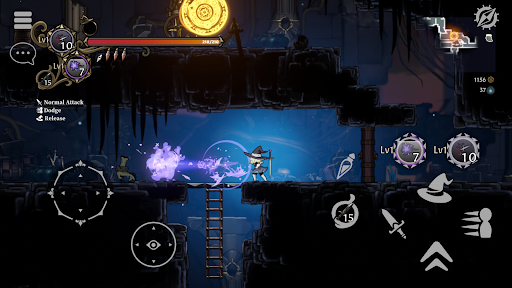
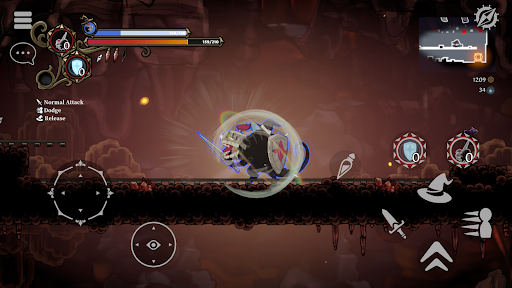
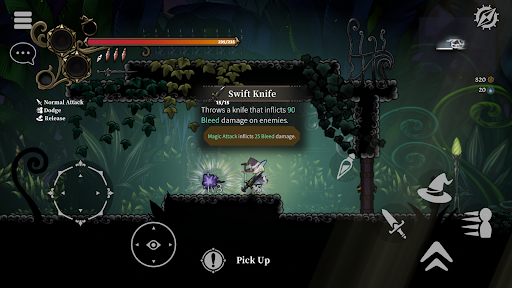
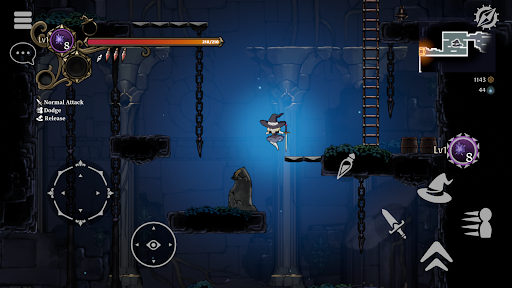
Un juego de estilo Metroidvania y Roguelite donde te aventuras con la ayuda de un sombrero maldito. ¡Usa una variedad de magia o posee a tus enemigos para alcanzar los niveles más bajos! ¡Consigue botín, desarrolla tu aldea, gana dinero y prepárate para la próxima batalla! Compatible con multijugador de hasta 4 jugadores.
Auténtica acción 2D
- Never Grave es un juego de acción 2D donde te aventuras con la ayuda de un sombrero maldito. ¡Explora mazmorras, lucha con magia e incluso usa el terreno para ganar! Las mazmorras, como ruinas y jardines botánicos, se generan automáticamente y cambian cada vez que juegas. Obstáculos y puzles te esperan en las mazmorras, ¡así que ten cuidado por dónde pisas!
Sistema de posesión
- Posee a tus enemigos usando un sombrero maldito. ¡Usa las habilidades únicas de tus enemigos poseídos para obtener ventaja en la batalla!
Reconstruye una aldea en ruinas
- Usa los materiales recolectados en las mazmorras para despejar los escombros de las aldeas destruidas, construir nuevas instalaciones y cultivar en los campos. ¡Produce comida y pociones en la aldea para prepararte para la próxima batalla!
Multijugador
- Compatible con multijugador de hasta cuatro jugadores. ¡Llama a tus amigos de otros mundos y conquisten mazmorras juntos!
Características del juego
- Estilo Metroidvania y Roguelite con énfasis en la exploración.
- Controles de personaje sofisticados y con un diseño táctil.
- Posee enemigos y usa sus habilidades únicas con el sistema de Posesión.
- Animación 2D tradicional japonesa dibujada a mano.
- Fondos pintados a mano con profundidad, como si estuvieras viajando por un mundo de cuentos ilustrados y dibujos recortados.
- Aprende nuevas habilidades, como el doble salto, con artefactos para explorar nuevas áreas. - Estilo de juego que cambia constantemente según la sinergia de los rasgos asociados a la magia y los objetos.
- Batallas intensas contra jefes formidables. Para derrotarlos sin recibir daño, necesitarás algo más que memorizar sus patrones...
- Reconstruye tu aldea. Fortalécete construyendo y produciendo para prepararte para la próxima aventura.
- Explora terrenos diferentes en cada partida a través de mazmorras generadas proceduralmente.
- Multijugador cooperativo en línea. ¡Hasta cuatro jugadores pueden aventurarse juntos en la mazmorra!
- Compatible con mando/gamepad.
Más detalles

1. Descargar el instalador de MEmu y finalice la instalación

2. Iniciar MEmu y abrir Google Play en la página de inicio

3. Buscar Never Grave en Google Play
Install
4. Descargar y instalar Never Grave
5. Hacer click al icono para iniciar

6. Disfruta jugando Never Grave en PC con MEmu
MEmu App Player es el mejor emulador de Android gratuito y 50 millones de personas ya están disfrutando su magnífica experiencia jugando en Android. La tecnología de virtualización de MEmu te permite jugar a miles de juegos Android suavemente en tu PC, incluso los más intensivos gráficamente.
Pantalla más grande con mejores gráficos; Larga duración, sin limitación de batería o datos móviles.
Soporte completo de keymapping para un control preciso del teclado y el mouse o gamepad.
Múltiples cuentas de juegos o tareas en una sola PC a la vez con el administrador de instancias múltiples.
Play Never Grave on PC by following steps: