Neverwinter Nights: Enhanced
Updated
Current Version
8193A00013
Offered By

With your passion for Neverwinter Nights: Enhanced, you shouldn’t have to limit yourself to the small screen of a phone. Play like a pro and take full control of the game using a keyboard and mouse. MEmu gives you everything you’re looking for. Download and play Neverwinter Nights: Enhanced on PC. Play as long as you want — no more worries about battery life, mobile data, or unexpected calls. The all-new MEmu 9 is the best way to play Neverwinter Nights: Enhanced on PC. With our expertly designed keymapping system, Neverwinter Nights: Enhanced feels just like a real PC game. The MEmu multi-instance manager lets you run two or more accounts on the same device at the same time. Most importantly, our exclusive emulation engine unlocks your PC’s full potential, delivering smooth and seamless performance.
Show more
Download Neverwinter Nights: Enhanced on PC with MEmu Android Emulator. Enjoy playing on big screen. Neverwinter Nights is a classic Dungeons & Dragons RPG— enhanced for Android!
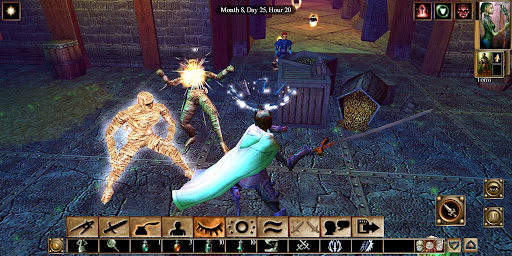
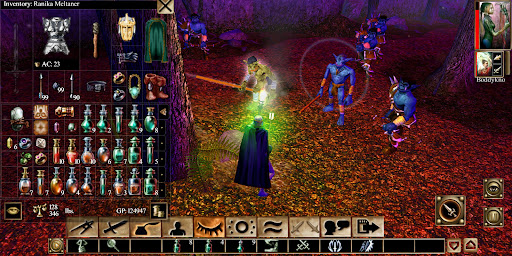
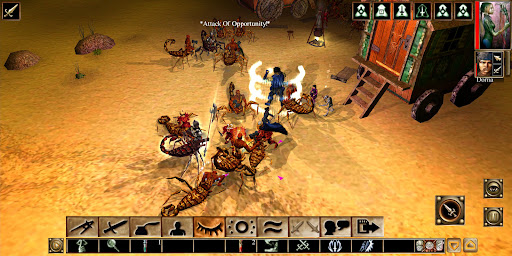
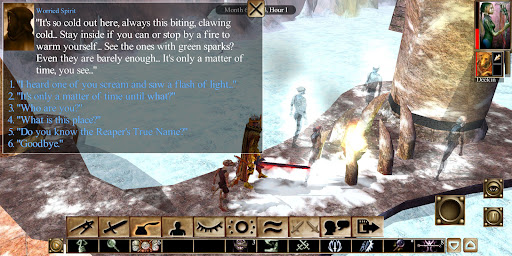
Neverwinter Nights is a classic Dungeons & Dragons RPG— enhanced for Android! Explore 100+ hours of gameplay including the original campaign, plus six free DLC adventures. Play solo or team up with friends for a grand adventure across the Forgotten Realms.
Check out details on the latest update here:
https://www.beamdog.com/news/android-patch-nwnee-google-play/
DEVICE RECOMMENDATION
Optimized for Tablets
Recommended for phones with screen sizes of 7 inches or larger
CONTENT
Neverwinter Nights (Classic Campaign)
Shadows of Undrentide (Free DLC)
Hordes of the Underdark (Free DLC)
Kingmaker (Free DLC)
ShadowGuard (Free DLC)
Witch’s Wake (Free DLC)
Adventure Pack (Free DLC)
FEATURES
Re-engineered UI
Virtual joystick and context sensitive button makes gameplay easy
UI Scales automatically or can be set to your liking
Cross-Platform Multiplayer
Adventure with friends!
Cross-play support includes compatibility with mobile, tablets, computers and consoles
Join persistent worlds, with community-run campaigns and up to 250 players
Improved Graphics
Pixel shaders and post-processing effects make for cleaner graphics and visuals
Adjustable contrast, vibrance, and depth of field options
STORY CONTENT:
Neverwinter Nights (Original Campaign)
You find yourself at the center of intrigue, betrayal, and dark magic in Neverwinter Nights. Journey through dangerous cities, monster filled dungeons and deep into uncharted wilderness in search of the cure for a cursed plague ravaging the city of Neverwinter.
Shadows of Undrentide (Free DLC Expansion)
Another adventure begins in the updated expansion, Shadows of Undrentide! Charged by your master to recover four ancient artifacts, travel from the Silver Marches to unravel mysteries of a long-dead magical civilization.
Hordes of the Underdark (Free DLC Expansion)
This expansion continues the adventure started in Shadows of Undrentide. Journey into the ever-more bizarre and hostile depths of Undermountain to challenge a gathering evil.
Three Premium Modules (Free DLC)
Discover over 40 hours of new Dungeons & Dragons adventures across the Forgotten Realms in these premium modules for Neverwinter Nights:
- Kingmaker
- ShadowGuard
- Witch’s Wake
- Adventure Pack
LANGUAGES
English
Show more

1. Download MEmu installer and finish the setup

2. Start MEmu then open Google Play on the desktop

3. Search Neverwinter Nights: Enhanced in Google Play
Install
4. Download and Install Neverwinter Nights: Enhanced
5. On install completion click the icon to start

6. Enjoy playing Neverwinter Nights: Enhanced on PC with MEmu
MEmu Play is the best Android emulator and 100 million people already enjoy its superb Android gaming experience. The MEmu virtualization technology empowers you to play thousands of Android games smoothly on your PC, even the most graphic-intensive ones.
Bigger screen with better graphics; Long duration, without limitation of battery or mobile data.
Full Keymapping support for precise control of keyboard and mouse or gamepad.
Multiple game accounts or tasks on single PC at one time with Multi-Instance manager.
Play Neverwinter Nights: Enhanced on PC by following steps: